
1. Product Overview
The Panasonic BL-C131A is a wireless network camera designed for remote monitoring. It supports both MPEG-4 and JPEG formats, features a built-in microphone, and offers remote pan/tilt control. The camera connects wirelessly via 802.11 b/g standards and includes a human detection sensor for enhanced monitoring capabilities.
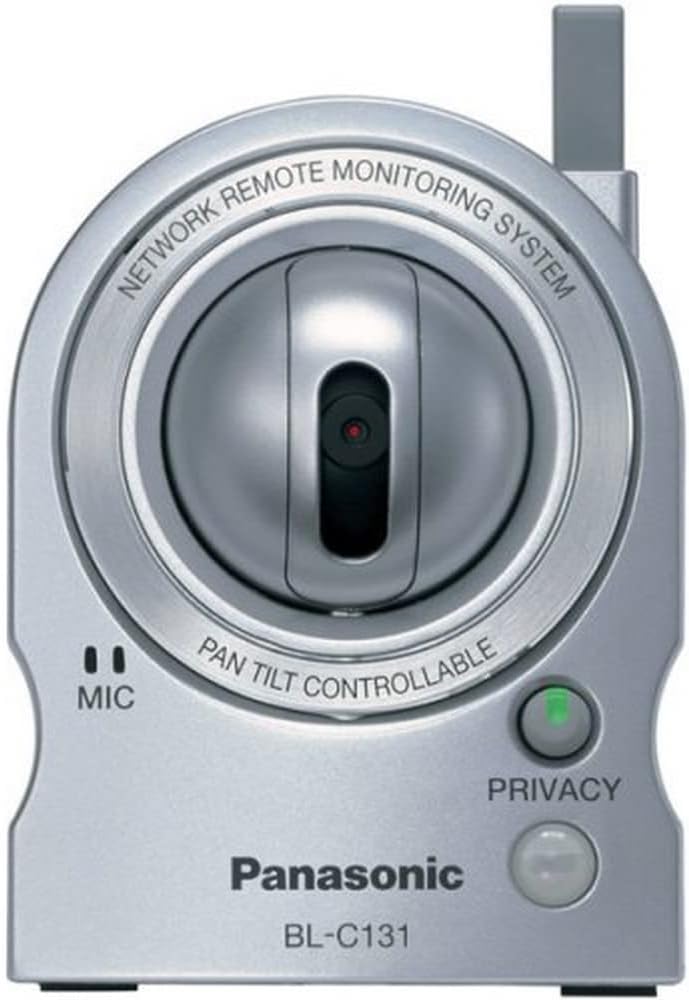
This image displays the front of the Panasonic BL-C131A Network Camera. The camera features a silver finish with a central, adjustable lens. Below the lens, a microphone icon indicates audio input capability. To the right, a green LED next to a 'PRIVACY' button signifies the camera's privacy mode status.
2. Setup Instructions
- Power Connection: Connect the included AC adapter to the camera and a power outlet. The camera will power on automatically.
- Network Connection:
- Wired (Ethernet): For initial setup or if wireless is not desired, connect an Ethernet cable from the camera's network port to your router.
- Wireless (802.11 b/g): The camera supports wireless connectivity. Ensure your wireless router is active and within range.
- Initial Access: The camera has a built-in web server. Access it via a web browser on a computer connected to the same network. Refer to the separate 'Network Setup Guide' for detailed instructions on finding the camera's IP address and configuring wireless settings.
- Security Configuration: Set up a user ID and password for secure access to the camera's interface. This is crucial for protecting your privacy and preventing unauthorized access.
3. Operating the Camera
3.1 Remote Viewing and Control
- Web Browser: View and control the camera from any standard web browser by entering its IP address or registered web address.
- Mobile Devices: Compatible cell phones or PDAs can also be used for remote monitoring without additional software.
- Pan/Tilt/Digital Zoom: Use the on-screen controls in the web interface to remotely adjust the camera's pan (left & right) and tilt (up & down) movements. The camera also features a 10X digital zoom.
- Preset Positions: Register up to eight shooting positions for quick navigation. You can also click on a specific part of the image to automatically center the camera on that area.
3.2 Recording and Alerts
- Video Formats: The camera supports simultaneous MPEG-4 and JPEG video streams.
- Image Quality: Select from three image quality modes (640x480, 320x240, 192x144) with a maximum of 30 frames per second.
- Motion Detection: Utilize the motion detection function to trigger recording or email notifications when movement is detected.
- Human Detection Sensor: The built-in heat sensor can be configured to record and/or send email alerts when a person enters the room. It can also automatically move the camera to a preset location upon activation.
- Scheduled Recording: Set the camera to automatically record video at specific times and speeds.
3.3 Audio and Privacy
- Built-in Microphone: The camera includes a built-in microphone for one-way voice direction (from camera to PC).
- Privacy Mode: Activate the privacy mode by pressing the dedicated button on the camera. An indicator light will turn red, signifying that the camera is only accessible by you. The camera can also be set to show a green light when it is being accessed.
4. Maintenance
To ensure optimal performance and longevity of your Panasonic BL-C131A Network Camera, follow these general maintenance guidelines:
- Cleaning: Gently wipe the camera lens and exterior with a soft, dry cloth. Avoid using harsh chemicals or abrasive materials.
- Firmware Updates: Periodically check the Panasonic support website for any available firmware updates. Keeping the firmware updated can improve performance, add new features, and address security vulnerabilities.
- Environmental Conditions: Ensure the camera is used indoors and within its specified operating temperature and humidity ranges. Avoid direct exposure to sunlight or extreme temperatures.
5. Troubleshooting
If you encounter issues with your Panasonic BL-C131A Network Camera, refer to the following common troubleshooting steps:
- No Image/Connection:
- Verify the power adapter is securely connected and the camera is powered on.
- Check network cable connections for wired setups.
- For wireless connections, ensure the camera is within range of your Wi-Fi router and the Wi-Fi settings (SSID, password) are correctly configured.
- Confirm there are no IP address conflicts on your network. You may need to assign a static IP address to the camera or configure your router's DHCP settings.
- Poor Image Quality/Lag:
- Ensure your network has sufficient bandwidth.
- Reduce the video resolution or frame rate in the camera settings.
- Check for wireless interference from other devices.
- Remote Access Issues:
- Ensure port forwarding is correctly configured on your router for the camera's specific port.
- Verify your dynamic DNS service (e.g., Viewnetcam) is active and correctly linked to your camera's IP address.
- Check firewall settings on your router and computer that might be blocking access.
- Privacy Mode Indicator: If the privacy indicator light is red, the camera's video feed is restricted. Press the privacy button to toggle the mode.
- Factory Reset: If issues persist, a factory reset may resolve them. Refer to the full user manual for instructions on performing a factory reset. Note that this will erase all custom settings.
6. Specifications
| Feature | Description |
|---|---|
| Model Number | BL-C131A |
| Connectivity Protocol | Wi-Fi |
| Wireless Communication Technology | Wi-Fi (802.11b/g) |
| Video Capture Resolution | 640 x 480, 320 x 240, 192 x 144 |
| Frame Rate | Up to 30 fps |
| Zoom Type | Digital Zoom (10x) |
| Audio | Built-in Microphone (one-way voice from camera to PC) |
| Alert Type | Motion Only (Motion Detection, Sensor Alert) |
| Low Light Technology | Night Color (1 Lux) |
| Mounting Type | Wall Mount |
| Power Source | AC/DC Adapter |
| Product Dimensions | 2.94 x 2.88 x 3.88 inches |
| Item Weight | 7.4 ounces (210 Grams) |
| Indoor/Outdoor Usage | Indoor |
| Color | Silver |
| UPC | 037988845156 |
7. Warranty Information
The Panasonic BL-C131A Network Camera comes with a 1 Year Manufacturer's Warranty. Please retain your proof of purchase for warranty claims. For specific terms and conditions, refer to the warranty card included with your product or visit the official Panasonic support website.
8. Support
For further assistance, technical support, or to download the latest drivers and firmware, please visit the official Panasonic support website or contact Panasonic customer service. Contact information can typically be found on the Panasonic website or in the product packaging.