Sony Cyber-shot DSC-S700 Digital Camera User Manual
Model: DSC-S700
Introduction
This manual provides detailed instructions for the proper use and care of your Sony Cyber-shot DSC-S700 digital camera. The DSC-S700 is a 7.2-megapixel camera featuring a 3x optical zoom lens, a 2.4-inch LCD screen, and 24MB of internal memory, designed for ease of use and high-quality imaging.

Figure 1: Front view of the DSC-S700 camera.
Setup
1. Battery Installation
The DSC-S700 operates on AA batteries. For optimal performance and extended shooting time, it is recommended to use Sony NiMH rechargeable batteries. The camera can capture up to 460 shots with optional NiMH batteries or approximately 100 shots with supplied AA alkaline batteries.
- Open the battery compartment cover located on the side or bottom of the camera.
- Insert the AA batteries, ensuring correct polarity (+/-) as indicated inside the compartment.
- Close the battery compartment cover securely.
2. Memory Stick Duo Media
The camera has 24 MB of internal memory for immediate use. For expanded storage, insert an optional Memory Stick Duo or Memory Stick PRO Duo media card into the designated slot. Ensure the card is inserted correctly until it clicks into place.

Figure 2: Side view showing the A/V OUT port and memory card slot area.
Operating the Camera
1. Powering On/Off
Press the POWER button located on the top of the camera to turn it on or off.
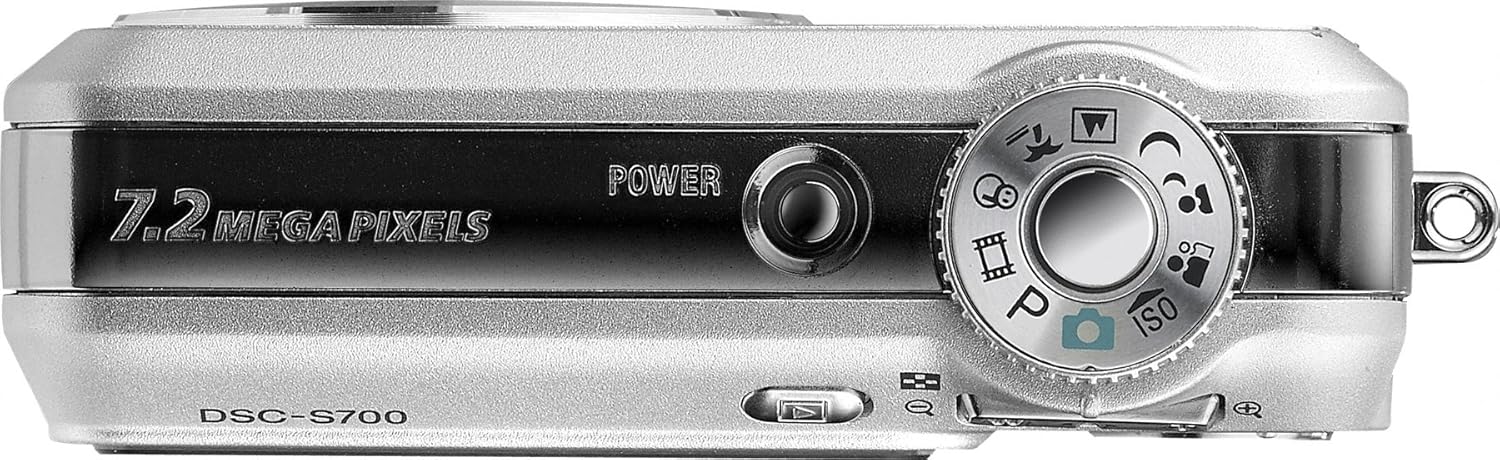
Figure 3: Top view with Power button and Mode Dial.
2. Taking Photos
To capture a still image:
- Turn the mode dial to the desired shooting mode (e.g., Auto, P-Auto, or a Scene Selection).
- Frame your shot using the 2.4-inch LCD screen.
- Press the shutter button halfway down to focus. The camera will confirm focus.
- Press the shutter button fully to take the picture.
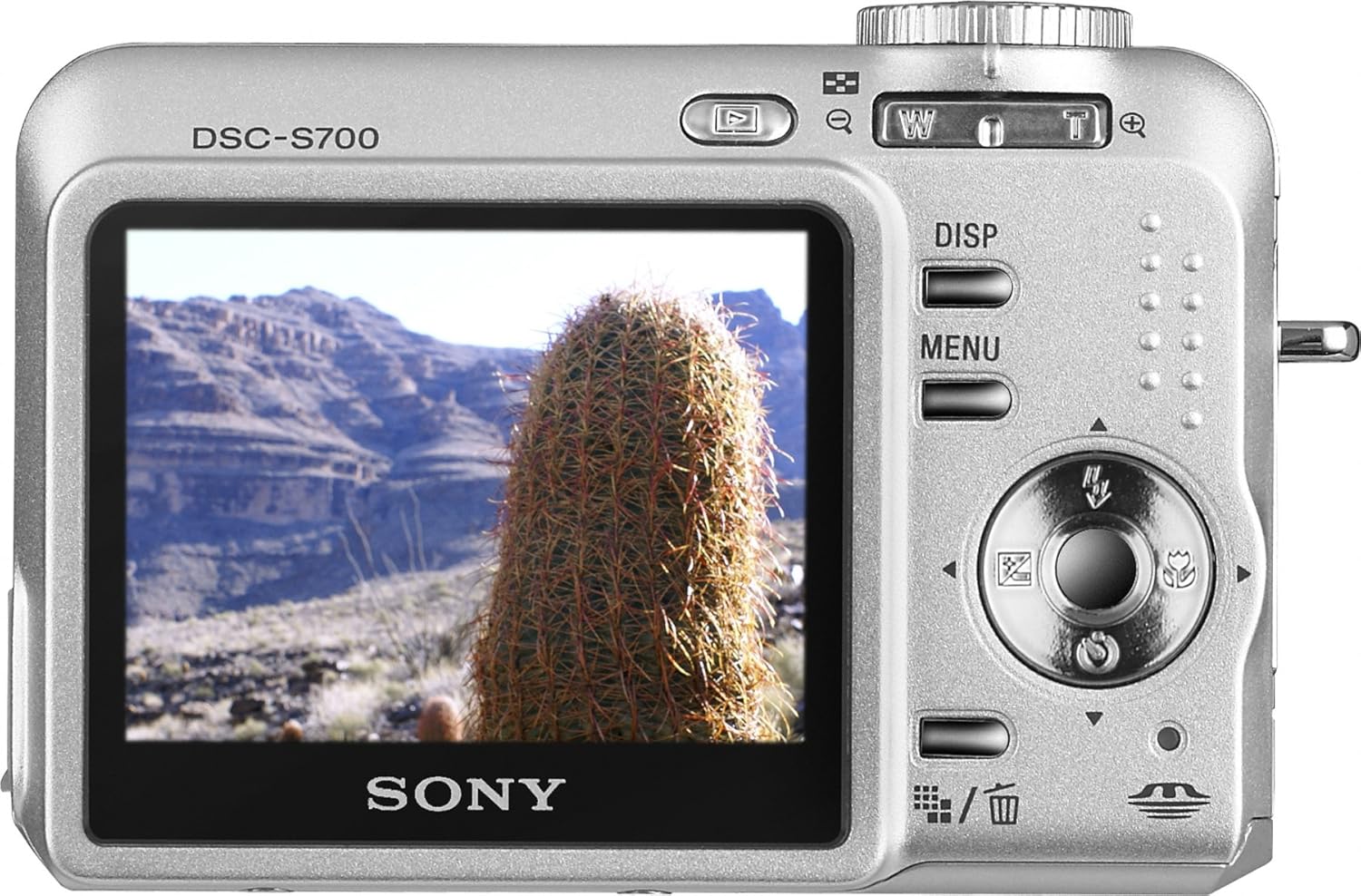
Figure 4: Rear view with LCD and control buttons.
3. Shooting Modes
The DSC-S700 offers various shooting modes to optimize your photos for different conditions:
- Auto: Standard point-and-shoot mode for general photography.
- P-Auto: Program Auto mode, allowing some manual adjustments while the camera sets exposure.
- Scene Selections: Pre-set modes for specific scenarios, including:
- Twilight: For shooting in low light without flash.
- Twilight Portrait: Optimizes for portraits in low light.
- Landscape: For wide scenic shots.
- Soft Snap: Creates softer, more flattering portraits.
- Snow: Adjusts exposure for bright, snowy scenes.
- High Sensitivity: Increases ISO to 1000 for better low-light performance without flash.
- Beach: Prevents overexposure in bright, sandy or watery environments.
4. Zoom Function
Use the zoom lever (often integrated with the shutter button or a separate rocker) to adjust the 3x optical zoom. This allows you to bring distant subjects closer or frame your shots for better composition.
5. QVGA Movie Mode
The DSC-S700 can record video clips with audio. To record a movie:
- Set the mode dial to the movie camera icon.
- Press the shutter button to start recording.
- Press the shutter button again to stop recording.
Videos are recorded at 320 x 240 resolution at up to 30 frames per second. Recording length is limited only by the capacity of your Memory Stick Duo media.
6. Burst Mode
Capture a sequence of rapid shots by activating Burst Mode. This mode allows you to take three shots automatically at 1-second intervals (VGA standard mode) or 2-second intervals (7.2 MP mode), ideal for capturing fast-moving subjects or a series of expressions.
7. Image Management and Transfer
After capturing images, you can review them on the 2.4-inch LCD screen. To transfer photos to a computer or print them:
- Connect the camera to your computer using a USB cable (not included). The Cyber-shot viewer software should automatically launch, facilitating easy upload and organization.
- Alternatively, remove the Memory Stick Duo media and insert it into a compatible card reader connected to your computer.
- For direct printing, connect the camera to an optional Sony Picture Station digital printer.
Maintenance
Proper maintenance ensures the longevity and optimal performance of your DSC-S700 camera.
- Cleaning the Lens and LCD: Use a soft, lint-free cloth specifically designed for optical surfaces. Avoid harsh chemicals.
- Battery Care: Remove batteries if the camera will not be used for an extended period to prevent leakage. Store batteries in a cool, dry place.
- Storage: Store the camera in a dry, dust-free environment, away from extreme temperatures and direct sunlight.
- USB Port Cover: The USB protector cover is delicate. Handle it with care to prevent damage.
Troubleshooting
If you encounter issues with your DSC-S700, refer to the following common solutions:
| Problem | Possible Cause / Solution |
|---|---|
| Camera does not power on. | Check battery installation and ensure batteries are charged or replaced with fresh ones. |
| Pictures are blurry. | Ensure you press the shutter button halfway to focus before fully pressing. Hold the camera steady during shooting. The DSC-S700 does not feature advanced image stabilization, so a steady hand is crucial, especially in low light. |
| Cannot transfer photos to computer. | Verify USB cable connection. Ensure the camera is in the correct mode for PC connection. Try using a Memory Stick Duo card reader. |
| "Memory Full" message. | Transfer photos to a computer or delete unwanted images from the internal memory or Memory Stick Duo card. Insert a new, empty Memory Stick Duo card. |
| Accidental deletion of photos. | The camera requires multiple steps to delete photos (e.g., pressing DISP, then DELETE, then confirming). Be mindful of these steps to prevent accidental deletion. |
Specifications
| Feature | Detail |
|---|---|
| Model Name | Sony Cybershot DSCS700 |
| Image Sensor | 7.2-megapixel Super HAD CCD |
| Optical Zoom | 3x |
| Display | 2.4-inch LCD screen |
| Internal Memory | 24 MB |
| Compatible Media | Memory Stick Duo, Memory Stick PRO Duo |
| Power Source | AA batteries (1 required) |
| Video Recording | QVGA (320 x 240) at up to 30 fps |
| ISO Sensitivity | Up to ISO 1000 (High Sensitivity mode) |
| Dimensions (W x H x D) | 3.58 x 1.06 x 2.4 inches |
| Weight | 6.2 ounces |
| Date First Available | January 17, 2007 |
Warranty and Support
Your Sony Cyber-shot DSC-S700 camera is manufactured by Sony. For detailed warranty information, please refer to the warranty card included with your product at the time of purchase. Warranty terms and conditions may vary by region.
For technical support, service, or additional product information, please visit the official Sony support website or contact Sony customer service in your region. Keep your purchase receipt and product serial number handy when seeking support.
You can find more information and support resources at the Sony Store on Amazon.


