
Introduction
This manual provides detailed instructions for the installation, operation, and maintenance of the White-Rodgers Fan Control Center, Model 90-118E. This device is designed to manage fan operations in heating, ventilation, and air conditioning (HVAC) systems. Please read this manual thoroughly before installation and use to ensure safe and efficient operation.
Safety Information
WARNING: Risk of Electric Shock. Disconnect power before installation or servicing.
- Installation must be performed by a qualified technician in accordance with all local and national electrical codes.
- Ensure the power supply to the HVAC system is completely disconnected before beginning any work.
- Verify all wiring connections are secure and correct to prevent damage to the unit or system.
- Do not operate the unit if any part is damaged.
Product Overview
The White-Rodgers Fan Control Center 90-118E is a robust component designed for reliable fan control. Key features include:
- Plug-in style relay: Facilitates easy field replacement.
- Pre-stripped, color-coded leads: Simplifies wiring connections.
- Five combination screw/solder terminals: For low voltage wiring.
- Standard double-throw relays: Capable of handling both one and two-speed motors.
- Mounting design: Suitable for a 4-inch electrical box.
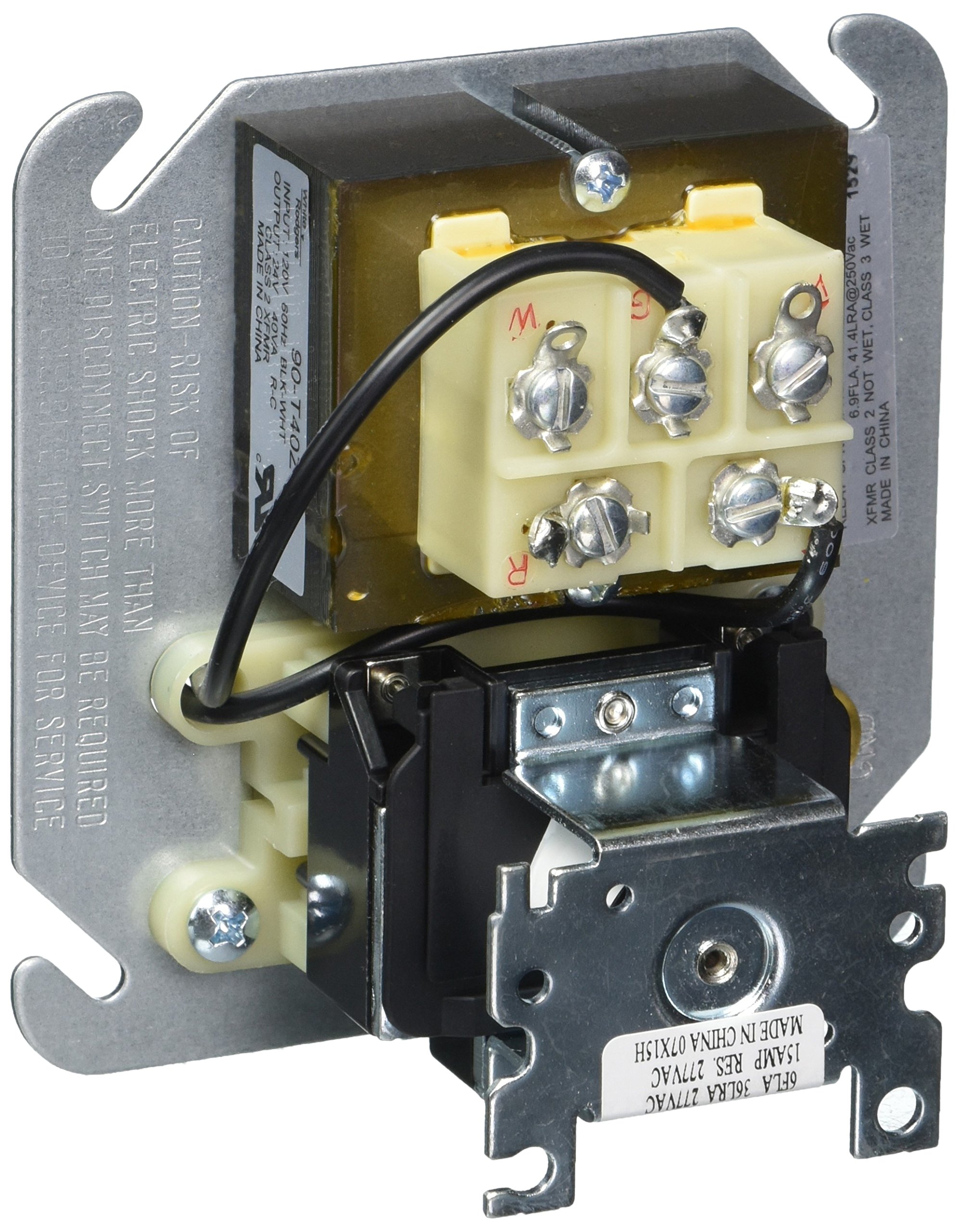
Figure 1: White-Rodgers Fan Control Center 90-118E. This image shows the control center from an angled perspective, highlighting the metal mounting plate, the central transformer component, and the pre-stripped, color-coded wires neatly bundled and connected to the terminal block.
Installation
Tools Required:
- Screwdriver (Phillips and/or flathead)
- Wire strippers/cutters
- Multimeter (for verification)
Installation Steps:
- Disconnect Power: Turn off the main power supply to the HVAC system at the circuit breaker. Verify power is off using a multimeter.
- Remove Existing Unit (if applicable): Carefully disconnect and remove the old fan control center, noting all wiring connections.
- Mount the New Unit: The 90-118E is designed for mounting in a standard 4-inch electrical box. Secure the unit using appropriate screws.
- Wire Connections: Connect the pre-stripped, color-coded leads to the corresponding terminals in your HVAC system. Refer to your specific HVAC system's wiring diagram for accurate connections. The unit features five combination screw/solder terminals for low voltage wiring.
- Relay Installation: The plug-in style relay should be securely seated in its receptacle.
- Verify Connections: Double-check all wiring connections for tightness and correctness.
- Restore Power: Once all connections are verified, restore power to the HVAC system.
Operation
The White-Rodgers Fan Control Center 90-118E operates automatically as an integral part of your HVAC system. It receives signals from the thermostat or other control devices to activate and deactivate the fan motor. Its primary function is to provide reliable switching for fan operations, supporting both single and two-speed motors.
- Upon receiving a call for fan operation (e.g., from a thermostat), the internal relay will energize, closing the appropriate contacts to power the fan motor.
- When the call for fan operation ceases, the relay de-energizes, opening the contacts and turning off the fan motor.
- The double-throw relay design allows for flexible control of different fan motor types and speeds, depending on the system's configuration.
Maintenance
The White-Rodgers Fan Control Center 90-118E is designed for minimal maintenance. Regular inspection by a qualified technician is recommended as part of routine HVAC system checks.
- Annual Inspection: During annual HVAC system servicing, have a technician inspect the control center for any signs of wear, corrosion, or loose connections.
- Cleaning: Ensure the unit is free from dust and debris. Use a soft, dry brush or compressed air for cleaning. Do not use liquid cleaners.
- Relay Replacement: The plug-in style relay is designed for easy replacement if it fails. Ensure power is disconnected before attempting to replace the relay.
Troubleshooting
If you experience issues with your fan control center, refer to the following common troubleshooting steps. For complex issues, contact a qualified HVAC technician.
- Fan Not Turning On:
- Check if the main power supply to the HVAC system is on.
- Verify the thermostat is calling for fan operation.
- Inspect wiring connections for looseness or damage.
- Test the relay for continuity (requires a multimeter and electrical knowledge).
- Fan Running Continuously:
- Check if the thermostat is stuck in the "Fan ON" position.
- The relay contacts may be fused closed. The relay may need replacement.
- Intermittent Fan Operation:
- Loose wiring connections.
- Faulty relay or control board in the HVAC system.
- No Low Voltage (24V) Output:
- Check the primary 120V input to the control center.
- The internal transformer may be faulty.
Specifications
| Feature | Specification |
|---|---|
| Model Number | 90-118E |
| Primary VAC | 120V |
| Secondary VAC | 24V |
| Connector Type | Plug-In |
| Contact Type | Normally Open (SPNO/SPNC) |
| Mounting Type | Plug In Mount (for 4-inch box) |
| Operation Mode | Automatic |
| Coil Voltage | 24 Volts |
| Maximum Switching Voltage | 24 Volts |
| Product Dimensions | 1 x 1 x 1 inches (approximate) |
| Item Weight | 1.98 pounds (approximate) |
| Manufacturer | White Rodgers |
| Country of Manufacture | United States |
Warranty and Support
For warranty information and technical support, please refer to the official White-Rodgers website or contact their customer service. Keep your purchase receipt for warranty claims.
White-Rodgers Customer Service: Visit Emerson.com/contact-us (White-Rodgers is an Emerson brand)


