
1. Introduction
The Extech 407860 is a robust Heavy Duty Vibration Meter designed for precise measurement of vibration in various industrial and scientific applications. This device accurately measures velocity, acceleration, and displacement, providing essential data for machinery maintenance and analysis. Its features include a remote vibration sensor, multiple measurement modes, and data storage capabilities.
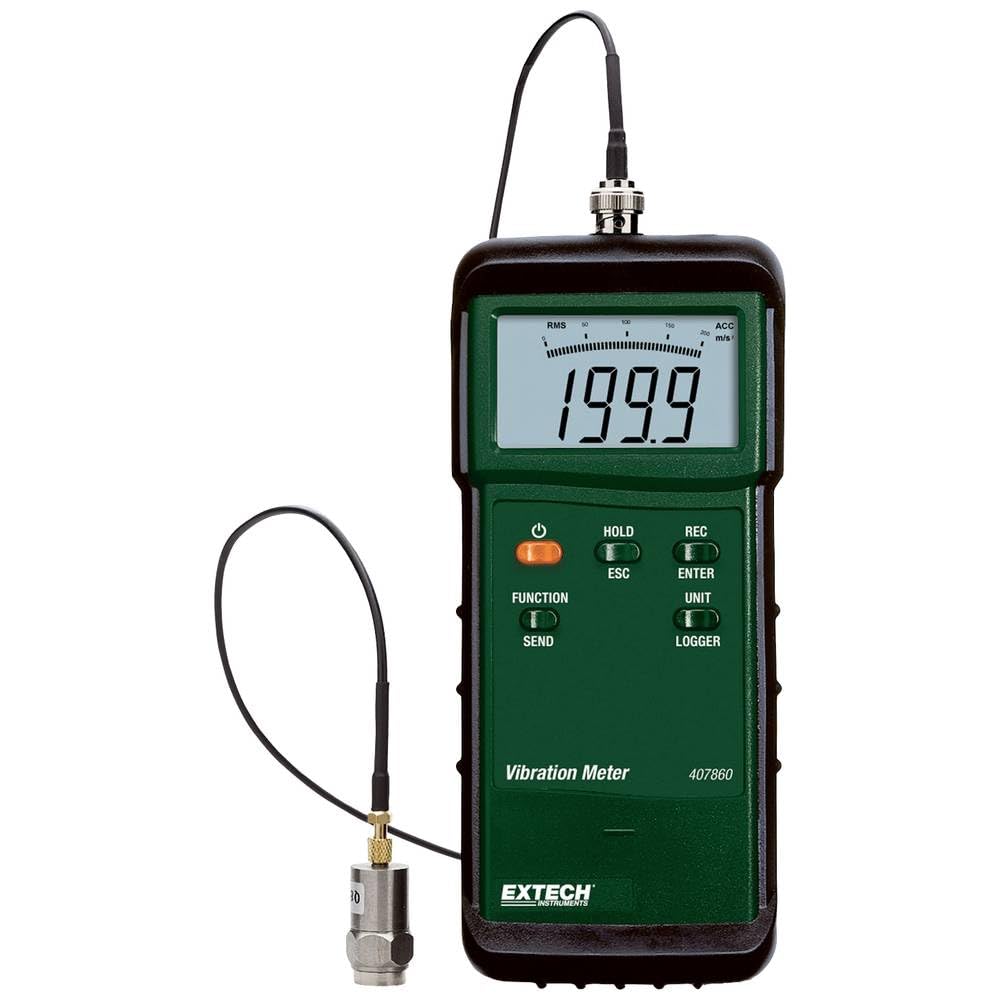
Figure 1: Extech 407860 Heavy Duty Vibration Meter with remote sensor.
1.1 Package Contents
Verify that all items are present and in good condition:
- Extech 407860 Vibration Meter
- Remote Vibration Sensor with 39-inch (1-meter) cable
- Magnetic Mount for sensor
- 9V Battery
- Holster with Stand
- Carrying Case
2. Safety Information
Please read and understand all safety instructions before operating the meter. Failure to follow these instructions may result in injury or damage to the device.
- Do not operate the meter if it appears damaged or if the remote sensor cable is frayed.
- Ensure the battery compartment is securely closed before use.
- Avoid exposing the meter to extreme temperatures, humidity, or direct sunlight.
- Do not attempt to open or modify the meter's casing. Refer servicing to qualified personnel.
- Dispose of batteries according to local regulations.
3. Setup
3.1 Battery Installation
- Locate the battery compartment cover on the back of the meter.
- Slide or unclip the cover to open.
- Insert the supplied 9V battery, observing the correct polarity (+/-).
- Replace the battery compartment cover and ensure it is securely latched.
3.2 Connecting the Remote Sensor
- Connect the remote vibration sensor cable to the designated input port on the meter.
- Ensure the connection is firm.
- Attach the magnetic mount to the sensor for easy placement on ferrous surfaces, or use stud mounting for permanent installations.
4. Operating Instructions
4.1 Powering On/Off
Press the POWER button to turn the meter on or off.
4.2 Selecting Measurement Units
The meter allows selection of units for velocity, acceleration, and displacement:
- Velocity: in/s or mm/s
- Acceleration: ft/s² or m/s²
- Displacement: in or mm
Refer to the meter's display and control buttons for specific unit selection procedures, typically involving a UNIT or MODE button.
4.3 Measurement Modes (RMS/Peak)
The 407860 supports both RMS (Root Mean Square) and Peak value measurement modes. Use the appropriate button (e.g., RMS/PEAK) to toggle between these modes based on your measurement requirements.
4.4 Taking Measurements
- Securely attach the remote sensor to the surface of the object to be measured.
- Power on the meter.
- Select the desired measurement parameter (velocity, acceleration, or displacement) and units.
- Select the desired measurement mode (RMS or Peak).
- The current vibration reading will be displayed on the screen.
4.5 Data Storage and Recall
The meter can store and recall up to 500 readings. Use the STORE button to save a reading and the RECALL button to view stored data. Consult the meter's interface for specific navigation through stored data.
Optional Windows compatible data logging software is available for downloading captured readings to a PC for further analysis. This software is sold separately.
5. Maintenance
5.1 Cleaning
Wipe the meter and sensor with a soft, dry cloth. Do not use abrasive cleaners or solvents. Ensure no moisture enters the device.
5.2 Battery Replacement
When the low battery indicator appears on the display, replace the 9V battery as described in Section 3.1. Remove the battery if the meter will not be used for an extended period to prevent leakage.
5.3 Storage
Store the meter in its carrying case in a cool, dry, and dust-free environment when not in use.
6. Troubleshooting
- Meter does not power on: Check battery installation and ensure the battery has sufficient charge. Replace if necessary.
- Inaccurate readings: Ensure the sensor is securely attached to the measurement surface. Verify correct unit and mode settings.
- No display: Check battery. If the issue persists, contact customer support.
- Sensor not detected: Ensure the sensor cable is fully and correctly plugged into the meter. Inspect the cable for damage.
7. Specifications
| Parameter | Specification |
|---|---|
| Velocity Range | 7.87 in/s (200 mm/s) |
| Acceleration Range | 656 ft/s² (200 m/s²) |
| Displacement Range | 0.078 in (2 mm) |
| Basic Accuracy | ±5% |
| Frequency Range | 10 Hz to 1 kHz |
| Measurement Modes | RMS or Peak Value |
| Data Storage | Up to 500 readings (auto/manual store and recall) |
| Sensor Type | Remote vibration sensor (magnetic or stud mounted) |
| Sensor Cable Length | 39 inches (1 meter) |
| Power Supply | 9V Battery |
| Product Dimensions | 2.8 x 1.3 x 7.1 inches |
| Item Weight | 14.1 ounces |
8. Warranty and Support
Extech Instruments provides a warranty for this product against defects in materials and workmanship. For specific warranty terms, registration, or technical support, please refer to the official Extech website or contact their customer service department. Keep your purchase receipt as proof of purchase.
Manufacturer: Extech Instruments
For further assistance, visit the Extech Store on Amazon.


