
1. Introduction
This manual provides detailed instructions for the installation, operation, and maintenance of your Prime-Line H 3966 Spline Socket Crank Handle. This handle is designed for smooth 360-degree operation, allowing for easy opening and closing of windows. It features durable diecast construction with a stone finish and is specifically designed for 3/8 inch spindles, commonly found on older Anderson casement operators.
Please read this manual thoroughly before installation and use to ensure proper function and longevity of the product.
2. Safety Information
- Always wear appropriate personal protective equipment, such as safety glasses, during installation.
- Ensure the work area is well-lit and clear of obstructions.
- Keep small parts away from children to prevent choking hazards.
- Use only the tools specified in the installation instructions.
- Do not force the handle onto the spindle if it does not fit easily. Verify spindle size before proceeding.
3. Package Contents
Verify that all components are present before beginning installation:
- 1 x Prime-Line H 3966 Spline Socket Crank Handle (Stone finish)
- 1 x Set Screw
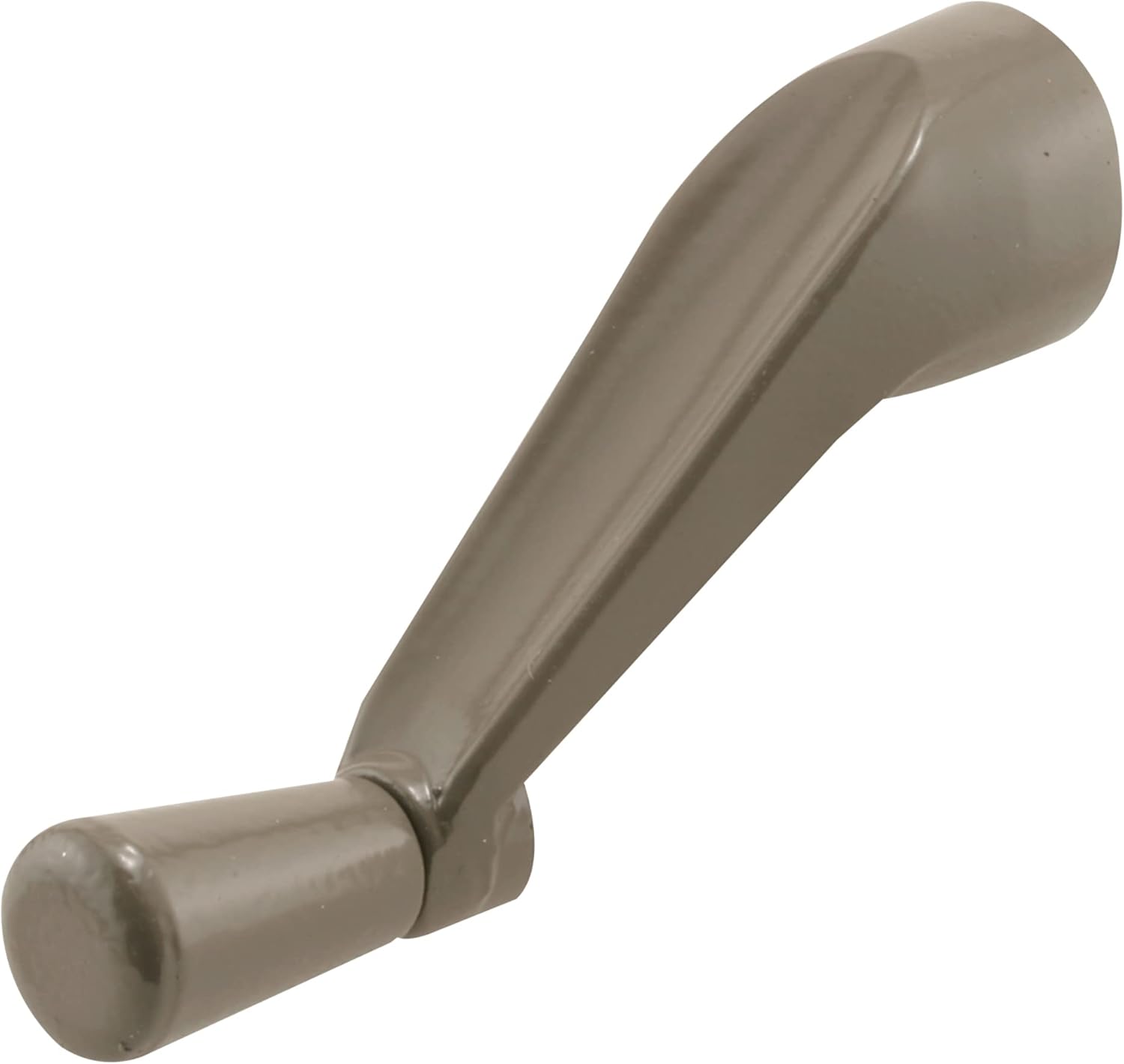
Figure 3.1: Prime-Line H 3966 Spline Socket Crank Handle.
4. Installation Instructions
The installation of the Prime-Line H 3966 Casement Window Crank Handle is straightforward and requires minimal tools.
Tools Required:
- Phillips Head Screwdriver
Installation Steps:
- Verify Spindle Compatibility: Ensure your window operator has a 3/8 inch spindle. This handle is designed specifically for 3/8 inch spindles and will not fit other sizes.
- Locate Set Screw: Identify the set screw on the side of the crank handle's bore.
- Loosen Set Screw: Using a Phillips head screwdriver, slightly loosen the set screw. Do not remove it completely. This will allow the handle to slip onto the spindle.
- Position Handle: Align the internal splines of the crank handle with the splines on the window operator's spindle.
- Slide On Handle: Carefully slide the crank handle onto the spindle. It should fit snugly. If it feels too tight, ensure the set screw is sufficiently loosened and that the splines are correctly aligned.
- Secure Handle: Once the handle is fully seated on the spindle, tighten the set screw firmly with the Phillips head screwdriver. This will hold the handle securely in place.

Figure 4.1: Confirming 3/8 inch spindle size for compatibility.

Figure 4.2: Location of the set screw and internal splines.
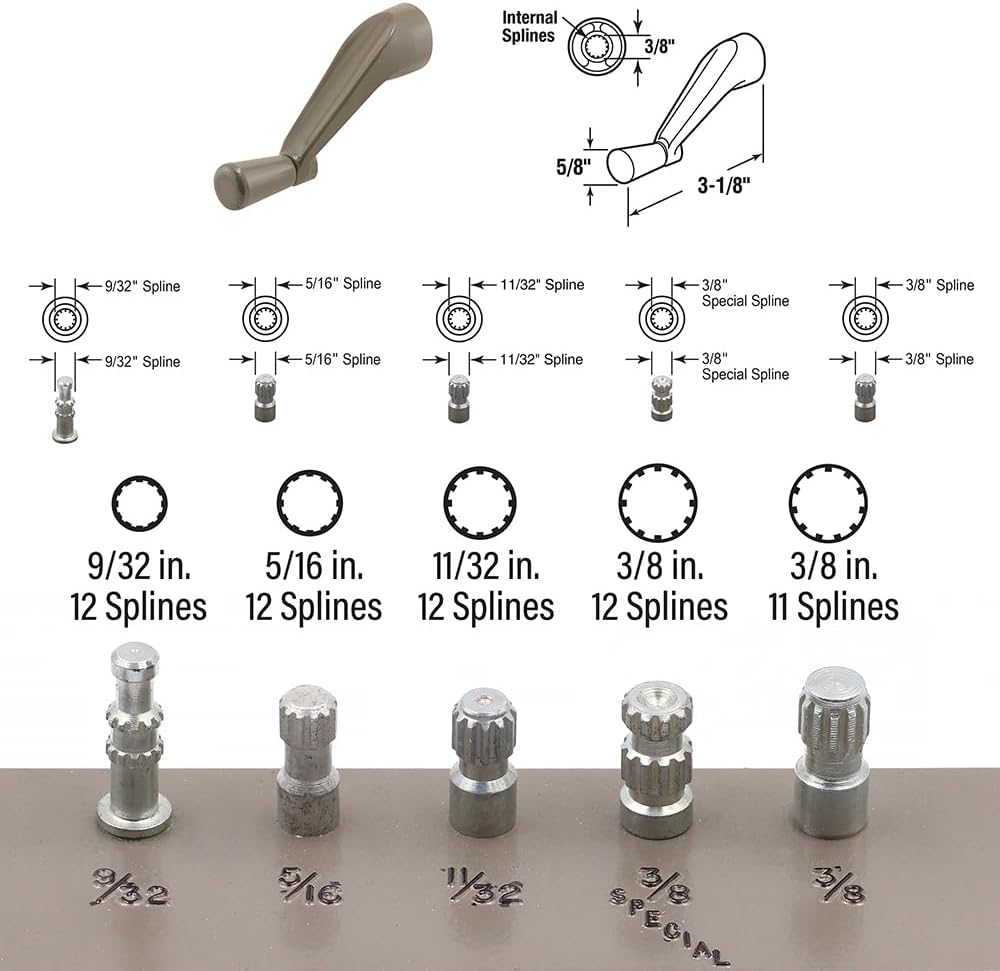
Figure 4.3: Handle dimensions and various spline types for reference. Ensure your spindle matches the 3/8 inch spline.
5. Operating Instructions
The Prime-Line H 3966 Casement Window Crank Handle provides smooth 360-degree rotation for effortless window operation.
- To open the window, rotate the crank handle clockwise.
- To close the window, rotate the crank handle counter-clockwise.
- Apply gentle, consistent pressure when turning the handle. Avoid excessive force, which could damage the window operator or the handle.
6. Maintenance
Regular maintenance will help ensure the longevity and smooth operation of your crank handle.
- Cleaning: Wipe the handle periodically with a soft, damp cloth to remove dust and grime. Avoid abrasive cleaners or solvents that could damage the finish.
- Lubrication: If the window operator mechanism becomes stiff, a small amount of silicone-based lubricant can be applied to the moving parts of the operator (not the handle itself).
- Check Set Screw: Periodically check the set screw for tightness. If the handle feels loose, re-tighten the set screw with a Phillips head screwdriver.
7. Troubleshooting
| Problem | Possible Cause | Solution |
|---|---|---|
| Handle is loose on spindle. | Set screw is not tightened or has come loose. | Tighten the set screw firmly with a Phillips head screwdriver. |
| Handle does not fit onto spindle. | Incorrect spindle size; set screw not loosened enough; splines misaligned. | Verify your window operator has a 3/8 inch spindle. Ensure the set screw is loosened. Realign the handle's internal splines with the spindle's splines. Do not force. |
| Window is difficult to open/close. | Window operator mechanism is stiff or worn. | Apply silicone-based lubricant to the window operator's moving parts. If the issue persists, the window operator itself may need replacement. |
8. Specifications
| Model Number: | H 3966 |
| Brand: | PRIME-LINE |
| Material: | Zinc (Diecast Construction) |
| Color: | Stone |
| Product Dimensions: | 3.12"L x 0.62"W |
| Spindle Compatibility: | 3/8 inch |
| Item Weight: | 1.6 ounces |
| Included Components: | 1 crank handle, 1 set screw |
9. Warranty & Support
Warranty Information:
This Prime-Line H 3966 Spline Socket Crank Handle comes with a 1-year limited warranty from the manufacturer. This warranty covers defects in material and workmanship under normal use. Please retain your proof of purchase for warranty claims.
Customer Support:
For technical assistance, troubleshooting not covered in this manual, or warranty inquiries, please contact Prime-Line customer support. You can find more information and contact details on the official Prime-Line website:
Visit the PRIME-LINE Store on Amazon
Additionally, a User Guide PDF is available for download: