
1. Introduction
This manual provides essential instructions for the safe installation, operation, and maintenance of your Master Flow WHFS24M 24-inch 4500 CFM Whole House Fan. Please read all instructions carefully before beginning installation or operation to ensure proper function and to prevent potential hazards. Retain this manual for future reference.
2. Safety Information
WARNING: To reduce the risk of fire, electric shock, or injury to persons, observe the following:
- Installation work and electrical wiring must be done by qualified person(s) in accordance with all applicable codes and standards, including fire-rated construction codes and standards.
- Always disconnect power at the service panel before servicing or cleaning the unit. Lock the service panel to prevent power from being turned on accidentally.
- Do not use this fan with any solid-state speed control device.
- This unit is for general ventilating use only. Do not use to exhaust hazardous or explosive materials and vapors.
- Ensure adequate combustion air for fuel-burning equipment in the attic to prevent back-drafting.
- The fan blades are sharp. Exercise caution during installation and maintenance.
- This product is UL and UL Canada listed for safety.
3. Product Overview
The Master Flow WHFS24M is a 24-inch direct drive whole house fan designed to provide efficient ventilation and cooling for homes. It features a powerful 1/4 HP permanent split-capacitor motor and a 2-speed pull-chain control for flexible operation. The unit includes an automatic ceiling shutter that seals off the attic when the fan is not in use, enhancing energy efficiency.
Key Features:
- Efficient Airflow: Moves air at up to 4500 CFM.
- Powerful Motor: 1/4 HP permanent split-capacitor motor.
- Low-Vibration Design: Direct drive motor for quieter operation.
- 2-Speed Control: Convenient pull chain switch.
- Automatic Ceiling Shutter: White aluminum shutter for energy efficiency.
- Simple Installation: Designed for installation without joist cutting.
- Certified Safety: UL and UL Canada listed.
Components:
- Fan Unit (Motor and Blades)
- Galvanized Steel Shroud
- Automatic Ceiling Shutter
- Pull Chain Switch
- Installation Hardware
- Plenum Boards
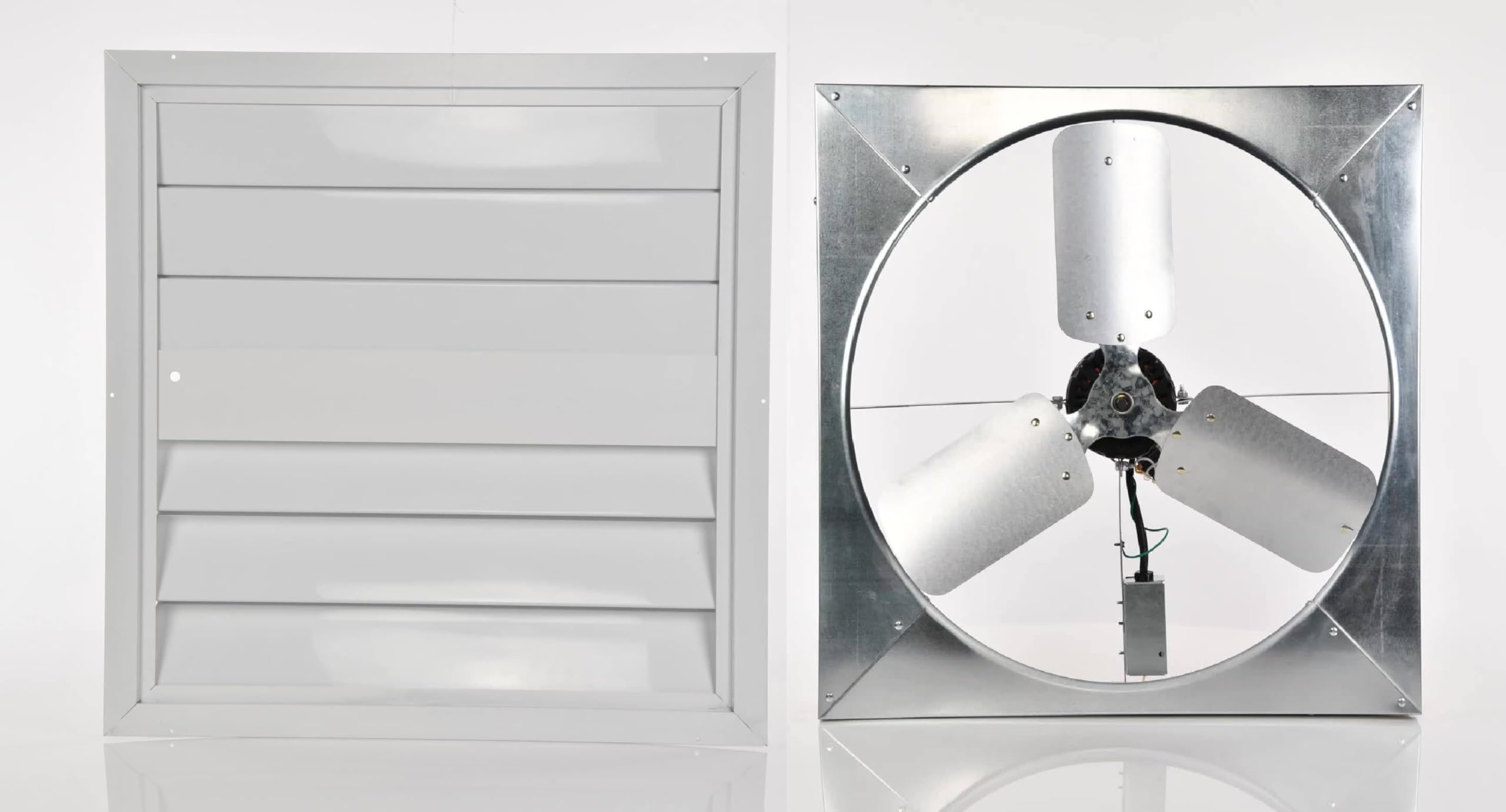
Figure 1: Master Flow WHFS24M Whole House Fan unit, showing the motor, three blades, and galvanized steel frame.

Figure 2: The white automatic ceiling shutter, designed to close when the fan is not in operation.
4. Setup & Installation
The Master Flow WHFS24M fan is designed for installation in the ceiling between the attic and the living space. It comes pre-assembled for ease of installation. Refer to the included DIYer instructions for detailed steps.
Pre-Installation Checklist:
- Verify that the installation location can support the fan's weight (approximately 36 lbs).
- Ensure proper attic ventilation exists (e.g., soffit and ridge vents) to allow hot air to escape.
- Confirm electrical supply (120V) is available at the installation site.
- Gather necessary tools: measuring tape, saw, screwdriver, wire strippers, safety glasses, gloves.
Installation Steps (Summary):
- Prepare Opening: Create a rough opening in the ceiling between joists. The fan's overall dimensions are approximately 27.38"D x 27"W x 5"H. The design allows for installation without cutting joists in many cases.
- Mount Fan Unit: Secure the fan unit to the attic joists using the provided installation hardware and plenum boards. Ensure the fan is level and securely fastened.
- Install Shutter: Attach the automatic ceiling shutter to the ceiling opening from below, ensuring it operates freely.
- Electrical Wiring: Connect the fan to a 120V power supply. The fan features an easy-to-wire 2-speed pull-chain switch. Follow all local electrical codes.
- Test Operation: Once installed and wired, test the fan's operation at both speeds using the pull chain.

Figure 3: The fan unit shown with a wooden frame, illustrating how it integrates with attic joists during installation.

Figure 4: View of the white automatic ceiling shutter installed in a ceiling, showing the louvers in an open position.
5. Operating Instructions
The Master Flow WHFS24M Whole House Fan is controlled by a simple pull-chain switch, offering two speed settings.
Using the Pull Chain:
- First Pull: Activates the fan at the LOW speed setting.
- Second Pull: Switches the fan to the HIGH speed setting.
- Third Pull: Turns the fan OFF.
- Fourth Pull: Returns the fan to the LOW speed setting, completing the cycle.
When the fan is turned off, the automatic ceiling shutter will close, sealing the opening to the attic and preventing air exchange.
Optimal Use:
For effective cooling, open several windows or doors in your home to allow cooler outside air to be drawn in by the fan. The fan will exhaust warmer air from your living space into the attic, and then out through attic vents. This process creates a comfortable airflow throughout your home.
6. Maintenance
Regular maintenance ensures optimal performance and longevity of your whole house fan.
General Maintenance Tips:
- Power Disconnection: Always disconnect power to the fan at the circuit breaker before performing any maintenance or cleaning.
- Cleaning Blades: Periodically inspect and clean the fan blades to remove dust and debris. Use a soft cloth and mild detergent if necessary. Ensure blades are dry before restoring power.
- Motor Inspection: Annually inspect the motor for any signs of wear, loose connections, or unusual noises. The motor is a permanent split-capacitor type and typically does not require lubrication.
- Shutter Inspection: Check the automatic ceiling shutter for smooth operation. Ensure the louvers open and close freely without obstruction. Clean any dust accumulation on the louvers.
- Fastener Check: Periodically check all mounting fasteners to ensure they are tight and secure.

Figure 5: Close-up view of the fan's motor and blade assembly, highlighting areas for inspection and cleaning.
7. Troubleshooting
Refer to the table below for common issues and their potential solutions.
| Problem | Possible Cause | Solution |
|---|---|---|
| Fan does not turn on. | No power supply. Faulty pull chain switch. Motor malfunction. | Check circuit breaker. Ensure pull chain is fully engaged. Consult a qualified electrician or contact customer support. |
| Fan runs, but airflow is weak. | Insufficient open windows/doors. Blocked attic vents. Dirty fan blades. | Open more windows/doors. Ensure attic vents are clear. Clean fan blades (see Maintenance). |
| Fan is excessively noisy or vibrates. | Loose mounting. Unbalanced blades. Motor issue. | Check and tighten mounting hardware. Inspect blades for damage or debris; clean if necessary. If noise persists, contact customer support. |
| Ceiling shutter does not open/close properly. | Obstruction. Dust accumulation. Damaged mechanism. | Remove any obstructions. Clean louvers and hinges. Inspect for damage; replace shutter if necessary. |
8. Specifications
| Feature | Detail |
|---|---|
| Model Name | WHFS24M |
| Brand | Master Flow |
| Air Flow Capacity | 4500 Cubic Feet Per Minute (CFM) |
| Motor Power | 1/4 HP Permanent Split-Capacitor |
| Voltage | 120 Volts |
| Number of Speeds | 2 |
| Control Type | Pull Chain |
| Number of Blades | 3 |
| Blade Material | Plastic (Alloy Steel frame) |
| Product Dimensions (D x W x H) | 27.38" x 27" x 5" |
| Item Weight | 36 Pounds |
| Mounting Type | Ceiling Mount |
| Certification | UL, UL Canada listed |
| UPC | 050206023853 |
9. Warranty Information
Master Flow products are manufactured to high-quality standards. This product typically comes with a limited warranty covering defects in materials and workmanship. For specific warranty terms, duration, and claim procedures, please refer to the warranty card included with your product packaging or visit the official Master Flow website. Keep your proof of purchase for warranty validation.
10. Customer Support
If you have any questions, require technical assistance, or need to report an issue with your Master Flow WHFS24M Whole House Fan, please contact Master Flow customer support. Contact information can typically be found on the product packaging, the manufacturer's official website, or within the warranty documentation.
Manufacturer: LL BUILDING PRODUCTS