
1. Product Overview
The ACDelco 10449235 GM Audio Amplifier is an integral component of your vehicle's audio system, designed as a GM-recommended replacement for the original factory unit. Its primary function is to increase the power of an audio signal, ensuring clear and robust sound output to your vehicle's speakers.
This amplifier processes audio signals, which may include the full range of frequencies or specific frequency ranges, such as those for subwoofers or mid-range speakers. It amplifies these signals and directs them to the appropriate speakers. The audio output relies on a variable AC voltage centered around a DC bias voltage, which together drive the speaker cones to produce sound.
2. Key Features
- Provides a rich sound experience within your vehicle.
- GM-recommended replacement for the original factory audio amplifier.
- Delivers the quality, reliability, and durability expected from original GM parts.
- Manufactured to GM Original Equipment (OE) specifications for precise fit, form, and function.
3. Specifications
| Attribute | Detail |
|---|---|
| Model Number | 10449235 |
| Brand | ACDelco |
| Item Dimensions (L x W x H) | 32 x 30 x 10.2 centimeters |
| Item Weight | 2.49 Pounds |
| UPC / GTIN | 021625525785 |
4. Setup and Installation
Installation of the ACDelco 10449235 GM Audio Amplifier typically involves integrating it into your vehicle's existing audio wiring harness. Due to the complexity of automotive electrical systems and the importance of proper audio signal routing, professional installation by a qualified automotive technician is highly recommended.
General Installation Steps (Consult a professional):
- Safety First: Disconnect the vehicle's battery to prevent electrical shorts or damage.
- Locate Mounting Position: Identify the appropriate mounting location for the amplifier, often under a seat, in the trunk, or behind a panel. Ensure adequate ventilation.
- Mount the Amplifier: Securely fasten the amplifier using appropriate hardware. The image below shows the mounting brackets and connectors.
- Connect Wiring: Carefully connect the power, ground, remote turn-on, input signal (from head unit), and output signal (to speakers) wires. Ensure all connections are secure and correctly polarized. Refer to your vehicle's specific wiring diagrams.
- Reconnect Battery: Once all connections are verified, reconnect the vehicle's battery.
- Test System: Power on the vehicle's audio system and test all speakers for proper functionality and sound quality.
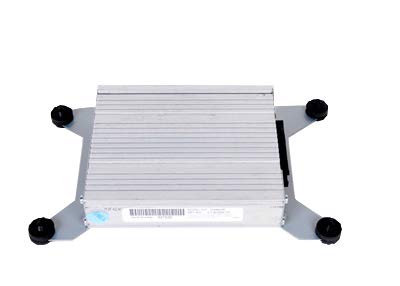
Image 1: Rear view of the ACDelco 10449235 GM Audio Amplifier, showing the main electrical connectors and mounting brackets. The heat sink fins are visible on the top surface.
5. Operating Instructions
The ACDelco 10449235 GM Audio Amplifier operates automatically as part of your vehicle's audio system. Once properly installed, it receives low-level audio signals from your vehicle's head unit (radio/media player) and amplifies them before sending them to the speakers.
- Power On/Off: The amplifier will power on and off automatically with your vehicle's ignition or head unit, typically via a remote turn-on wire.
- Volume Control: Audio volume is controlled through your vehicle's head unit. The amplifier will proportionally increase the power of the signal.
- Sound Settings: Any equalization, balance, or fade adjustments are made through your head unit or vehicle's infotainment system. The amplifier processes the signal as it receives it.
No direct user interaction with the amplifier itself is typically required during normal operation.
6. Maintenance
The ACDelco 10449235 GM Audio Amplifier is designed for long-term reliability and typically requires minimal maintenance. However, following these general guidelines can help ensure its longevity:
- Keep Clean: Ensure the amplifier's exterior, especially the heat sink fins, remains free of dust and debris to allow for proper heat dissipation. Use a soft, dry cloth for cleaning.
- Check Connections: Periodically inspect wiring connections for tightness and corrosion. Loose or corroded connections can lead to poor performance or damage.
- Avoid Moisture: Protect the amplifier from direct exposure to water or excessive moisture.
- Ensure Ventilation: Do not obstruct the amplifier's ventilation areas. Proper airflow is crucial to prevent overheating.
For any internal issues or complex maintenance, consult a qualified automotive electronics technician.
7. Troubleshooting
If you experience issues with your vehicle's audio system after installing or using the ACDelco 10449235 GM Audio Amplifier, consider the following troubleshooting steps:
- No Sound:
- Check all power and ground connections to the amplifier.
- Verify the remote turn-on wire is receiving a signal from the head unit.
- Ensure input and output audio cables are securely connected.
- Check vehicle fuses related to the audio system.
- Distorted Sound:
- Ensure the head unit's volume is not excessively high, causing clipping before the signal reaches the amplifier.
- Check speaker wiring for shorts or loose connections.
- Verify speaker impedance matches amplifier specifications (if applicable).
- Intermittent Sound:
- Inspect all wiring for loose connections or frayed insulation.
- Check for overheating; ensure proper ventilation around the amplifier.
If these steps do not resolve the issue, it is recommended to consult a professional automotive audio technician or contact ACDelco customer support.
8. Warranty and Support
As a GM-recommended replacement part, the ACDelco 10449235 GM Audio Amplifier is manufactured to meet General Motors' specifications for fit, form, and function. For specific warranty information, including coverage duration and terms, please refer to the documentation provided with your purchase or contact ACDelco customer service directly.
For technical support, installation guidance, or warranty claims, please visit the official ACDelco website or contact their customer support channels. You may also consult your authorized GM service center.