
1. Introduction
This manual provides essential information for the safe and efficient operation of your Grundig Lenaro 40 LXW 102-8620 Dolby HD Television. Please read these instructions thoroughly before using the product and retain them for future reference. This television features a 40-inch LCD screen, offering high-definition viewing and integrated Dolby audio technology.
2. Safety Information
To ensure safe operation and prevent damage, observe the following safety precautions:
- Do not expose the television to rain or moisture to prevent fire or electric shock.
- Ensure proper ventilation. Do not block ventilation openings.
- Place the television on a stable, level surface to prevent it from falling.
- Do not place heavy objects on the power cord.
- Disconnect the power plug from the wall outlet during lightning storms or when unused for long periods.
- Refer all servicing to qualified service personnel.
3. Package Contents
Verify that all items are present in the package:
- Grundig Lenaro 40 LXW 102-8620 Dolby HD Television
- Remote Control
- Power Cable
- Table Stand (components for assembly)
- User Manual (this document)
4. Setup
4.1 Unpacking
Carefully remove the television and all accessories from the packaging. Retain the packaging materials for future transport or storage.
4.2 Attaching the Table Stand
The Grundig Lenaro 40 LXW 102-8620 Dolby is designed for table mounting. Follow these steps to attach the stand:
- Place the television face down on a soft, clean cloth to prevent screen damage.
- Align the stand base with the mounting holes on the bottom of the television.
- Secure the stand using the provided screws. Ensure all screws are tightened firmly.
- Carefully lift the television and place it on a stable, level surface.
4.3 Connecting Power
Connect the power cable to the power input on the back of the television, then plug the other end into a wall outlet.
4.4 Connecting External Devices
Your television supports various connections:
- HDMI: For high-definition video and audio from devices like Blu-ray players, game consoles, or set-top boxes. Use an HDMI cable to connect the device to an HDMI port on the TV.
- Ethernet: For wired network connectivity. Connect an Ethernet cable from your router to the LAN port on the TV.
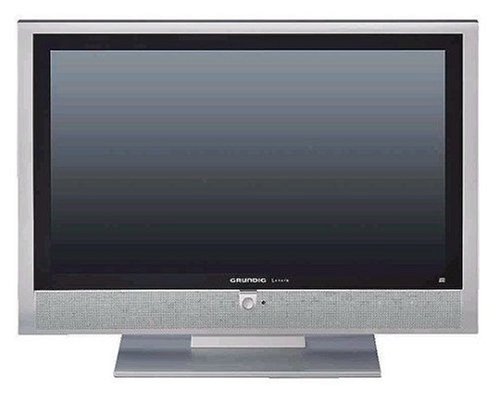
Figure 1: Front view of the Grundig Lenaro 40 LXW 102-8620 Dolby HD TV, showing the screen and bezel.
5. Operating Instructions
5.1 Powering On/Off
Press the POWER button on the remote control or on the television to turn the TV on or off.
5.2 Remote Control Functions
The remote control allows you to access all television functions. Key buttons include:
- POWER: Turns the TV on or off.
- SOURCE/INPUT: Selects the input source (HDMI, TV, etc.).
- VOL +/-: Adjusts the volume level.
- CH +/-: Changes channels.
- MENU: Accesses the main menu for settings adjustments.
- NAVIGATION BUTTONS (Up/Down/Left/Right): Navigates through menus.
- OK/ENTER: Confirms selections.
- EXIT/BACK: Returns to the previous screen or exits the menu.
5.3 Initial Setup Wizard
Upon first power-on, the television will guide you through an initial setup wizard to configure language, country, time zone, and scan for available channels.
5.4 Network Connectivity
If connected via Ethernet, the TV can access network features. Navigate to the network settings in the main menu to configure or verify the connection.
6. Maintenance
6.1 Cleaning the Screen
Gently wipe the screen with a soft, lint-free cloth. For stubborn marks, slightly dampen the cloth with water or a specialized screen cleaner. Do not spray cleaner directly onto the screen.
6.2 Cleaning the Cabinet
Wipe the television cabinet with a soft, dry cloth. Avoid using abrasive cleaners or solvents.
6.3 General Care
Ensure the television is placed in a well-ventilated area, away from direct sunlight and heat sources. Avoid placing objects on top of the television.
7. Troubleshooting
If you encounter issues with your television, refer to the following common problems and solutions:
| Problem | Possible Solution |
|---|---|
| No power | Check if the power cable is securely connected to both the TV and the wall outlet. Try a different outlet. |
| No picture, but sound is present | Ensure the correct input source is selected. Check cable connections to external devices. |
| No sound, but picture is present | Check the volume level and ensure the TV is not muted. Verify audio settings in the menu. |
| Remote control not working | Replace the batteries in the remote control. Ensure there are no obstructions between the remote and the TV's IR sensor. |
| Poor picture quality | Check antenna/cable connections. Adjust picture settings (brightness, contrast, sharpness) in the TV menu. |
8. Specifications
| Feature | Detail |
|---|---|
| Model Number | Lenaro 40 LXW 102-8620 Dolby |
| Brand | Grundig |
| Screen Size | 40 Inches |
| Display Technology | LCD |
| Special Feature | Flat Screen |
| Connectivity Technology | Ethernet |
| Hardware Interface | HDMI |
| Mounting Type | Table Stand |
| Product Weight | 68.56 Pounds (approx. 31.1 kg) |
| Model Year | 2018 |
| Wattage | 20 Watts |
| Response Time | 8 Milliseconds |
| Control Method | Remote Control |
| Package Dimensions | 108.2 x 80.7 x 34.5 cm |
9. Warranty and Support
For warranty information and technical support, please refer to the warranty card included with your product or visit the official Grundig website. You may also contact Grundig customer service for assistance with product registration, troubleshooting, or service requests.
Official Grundig Website: www.grundig.com