
Logitech X-540 (Model No. 970223-0403)
Logitech X-540 5.1 Surround Sound Speaker System User Manual
Model: X-540 (Part No. 970223-0403)
Introduction
This manual provides detailed instructions for the setup, operation, and maintenance of your Logitech X-540 5.1 Surround Sound Speaker System. This system is designed to deliver an immersive audio experience for games, movies, and music, utilizing Frequency Directed Dual Driver (FDD2) technology and a powerful down-firing subwoofer.
Package Contents
Verify that all items listed below are included in your package:
- 4 Satellite Speakers
- 1 Center Channel Speaker
- 1 Subwoofer
- 1 Control Pod
- Color-coded Audio Cables
- Game Console Adapter
- User's Manual (this document)
Setup
Speaker Placement
Optimal speaker placement is crucial for achieving the best surround sound experience. Consider the following guidelines:
- Front Left and Right Satellites: Place these speakers equidistant from your listening position, typically on either side of your monitor or TV.
- Center Channel Speaker: Position this speaker directly in front of your listening position, usually above or below your monitor. It includes an integrated clip for easy attachment to flat-panel displays.
- Rear Left and Right Satellites: Place these speakers behind your listening position, ideally at ear level or slightly above. The stands can be rotated for wall mounting.
- Subwoofer: The down-firing subwoofer can be placed on the floor, preferably in a corner or against a wall to enhance bass response. Ensure it has adequate ventilation.
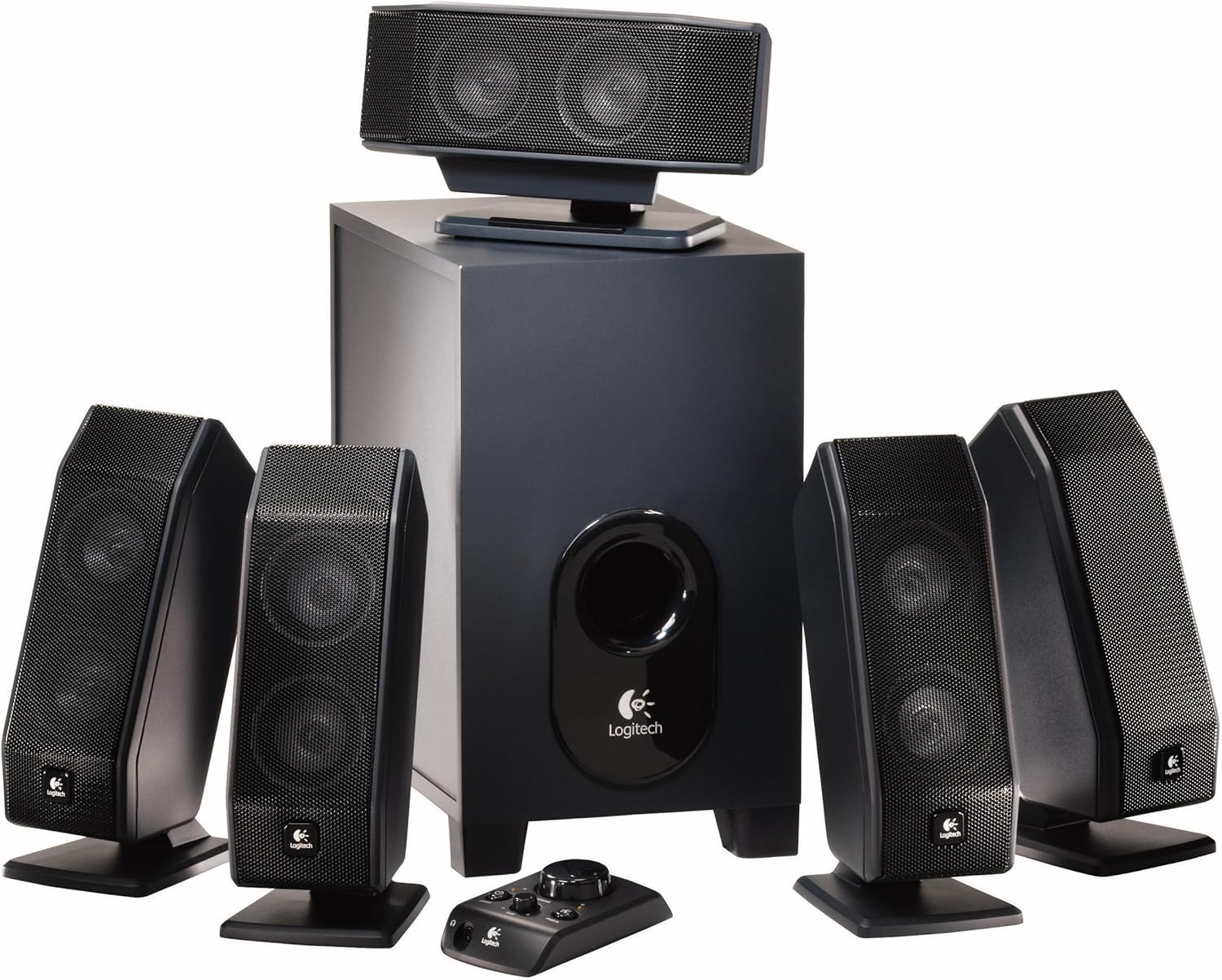
Figure 1: Complete Logitech X-540 5.1 Speaker System layout.

Figure 2: Center channel speaker mounted on a flat-panel display.

Figure 3: Satellite speaker with stand adjusted for wall mounting.
Connecting the System
- Connect Satellite Speakers: Plug the color-coded cables from the satellite speakers (front left, front right, rear left, rear right) and the center channel speaker into their corresponding color-coded ports on the back of the subwoofer.
- Connect Control Pod: Plug the control pod cable into the dedicated port on the subwoofer.
- Connect to Audio Source:
- For 5.1 surround sound, connect the color-coded audio cables from the subwoofer to the corresponding 5.1 audio output jacks on your computer's sound card or other audio device.
- For stereo sources, you can use the green audio cable to connect to a standard stereo headphone jack. The system's Matrix Mode can then convert this to simulated 5.1 surround sound.
- Use the included game console adapter if connecting to a gaming console with RCA audio outputs.
- Connect Power: Plug the subwoofer's power cord into a standard electrical outlet.
Operating Instructions
Control Pod Functions
The wired control pod provides convenient access to all essential functions:

Figure 4: Logitech X-540 Control Pod.
- Power Button: Press to turn the speaker system on or off.
- Master Volume Dial: Rotate to adjust the overall volume of the system.
- Bass Level Dial: Adjusts the intensity of the subwoofer's bass output.
- Matrix Mode Button: Activates or deactivates Matrix Mode. When active, this mode converts 2-channel stereo audio into simulated 5.1 surround sound. This is useful for older games, movies, or music that are not natively 5.1.
- Headphone Jack: Plug in headphones for private listening. When headphones are connected, the speakers will automatically mute.
Audio Technologies
- Frequency Directed Dual Driver (FDD2) Technology: This technology is integrated into the satellite speakers to produce a uniform sound field throughout your room. It helps eliminate "hot spots" and "dead zones" by ensuring a smooth and even frequency response, providing consistent surround sound regardless of your listening position.
- Ported Down-Firing Subwoofer: The subwoofer is designed to direct bass downwards, distributing it evenly across the room. This design, combined with real-time bass equalization, delivers deep, rich bass without distortion, even at high volumes.
Maintenance
To ensure the longevity and optimal performance of your Logitech X-540 speaker system, follow these maintenance guidelines:
- Cleaning: Use a soft, dry cloth to wipe down the speakers and subwoofer. Avoid using liquid cleaners or abrasive materials, as they may damage the finish or internal components.
- Ventilation: Ensure the subwoofer and satellite speakers have adequate airflow. Do not block ventilation ports.
- Environment: Keep the system away from excessive heat, direct sunlight, moisture, and dust.
- Cable Management: Avoid kinking or sharply bending audio cables. Secure them to prevent accidental disconnections or damage.
Troubleshooting
If you encounter issues with your speaker system, refer to the following common problems and solutions:
- No Sound:
- Ensure the system is powered on (power indicator light on the control pod should be lit).
- Check all cable connections to the subwoofer and audio source. Ensure they are securely plugged into the correct ports.
- Verify that the master volume on the control pod is turned up and not muted on your audio source (computer, console, etc.).
- If headphones are plugged into the control pod, unplug them to enable speaker output.
- Test with a different audio source to rule out issues with your primary device.
- Distorted Sound:
- Reduce the master volume and bass level on the control pod.
- Check the audio output settings on your computer or audio device to ensure they are not set too high or causing clipping.
- Ensure cables are not damaged or loosely connected.
- Subwoofer Not Producing Bass:
- Increase the bass level using the dial on the control pod.
- Ensure the subwoofer is properly connected to the audio source.
- Check your audio source's settings for subwoofer or bass management options.
- Only Some Speakers Working (e.g., no surround sound):
- Verify that your audio source is outputting 5.1 surround sound and that all color-coded audio cables are correctly connected to the corresponding 5.1 output jacks.
- Ensure Matrix Mode is enabled if you are trying to simulate 5.1 from a stereo source.
- Check individual speaker connections to the subwoofer.
Specifications
| Feature | Detail |
|---|---|
| Model Name | X-540 |
| Speaker Type | 5.1 Surround Sound System with Subwoofer |
| Total Peak Power | 140 Watts |
| Frequency Response | 40 Hz - 20 kHz |
| Subwoofer Diameter | 12.5 Inches |
| Controller Type | Corded Electric Control Pod |
| Connectivity Technology | Wired |
| Product Dimensions | 12.5"D x 12.5"W x 12.5"H (Subwoofer) |
| Item Weight | 18 Pounds |
| Mounting Type | Wall Mount, Tabletop Mount |
| Special Features | Bass Boost, FDD2 Technology, Matrix Mode |
| Compatible Devices | Desktop, Laptop, Smartphone, Tablet (with appropriate adapters) |
| Model Number | 970223-0403 |
| UPC | 840356579115, 097855050359, 097855040084 |
Warranty and Support
Your Logitech X-540 5.1 Surround Sound Speaker System comes with a 2-year limited hardware warranty from the date of purchase. This warranty covers defects in materials and workmanship under normal use.
For warranty claims, technical support, or further assistance, please visit the official Logitech support website or contact their customer service. Keep your proof of purchase for warranty validation.
Note: This product is sold as is. Please refer to the full warranty terms and conditions provided by Logitech.
Related documentsX-540 (Model No. 970223-0403)


Ask a question about this manual
Ask about setup, troubleshooting, compatibility, parts, safety, or missing instructions. Manuals+ will review the question and use this page’s manual context to help answer it.