
OM SYSTEM FE-170
OM SYSTEM OLYMPUS FE-170 Digital Camera Instruction Manual
Model: FE-170
Introduction
This manual provides essential instructions for the safe and effective use of your OM SYSTEM OLYMPUS FE-170 6MP Digital Camera. Please read this manual thoroughly before using the camera and keep it for future reference.

Figure 1: Front view of the OM SYSTEM OLYMPUS FE-170 Digital Camera, showing the lens, flash, and branding.
Setup
1. Battery Installation
The FE-170 camera operates on two AA-size batteries. For optimal performance, especially for extended use, rechargeable Ni-MH batteries are recommended.
- Open the battery compartment cover, typically located on the bottom or side of the camera.
- Insert two AA batteries, ensuring correct polarity (+/-) as indicated inside the compartment.
- Close the battery compartment cover securely until it clicks into place.
2. Memory Card Installation
The camera uses xD Picture Cards for image storage. A memory card is essential for saving photos and videos.
- Locate the memory card slot, often adjacent to the battery compartment.
- Insert the xD Picture Card with the correct orientation until it clicks into place. Do not force the card.
- To remove, gently push the card in until it springs out, then pull it out.

Figure 2: Back view of the camera, highlighting the 2.5-inch LCD display and control buttons.
Operating Instructions
1. Powering On/Off
Press the power button, usually located on the top panel, to turn the camera on or off. The lens will extend upon power-on.
2. Basic Photography
- Select Mode: Rotate the mode dial (refer to Figure 2) to the desired shooting mode, such as AUTO for general use.
- Frame Your Shot: Use the 2.5-inch LCD display to compose your image.
- Focus: Press the shutter button halfway down to allow the camera to focus. The focus indicator will illuminate when focus is achieved.
- Capture: Press the shutter button fully down to take the picture.
3. Shooting Modes
The camera offers 16 pre-set shooting modes, including:
- Portrait: Optimizes settings for photographing people.
- Landscape: Ideal for wide outdoor scenes.
- Sports: Captures fast-moving subjects.
- Night: For low-light conditions.
- Movie: Records video clips.
4. Zoom Function
The camera features a 3x optical zoom and a 4x digital zoom.
- Use the W (Wide) and T (Telephoto) buttons, typically located near the LCD, to adjust the zoom.
- Optical zoom provides higher quality images than digital zoom.
5. Flash Modes
The built-in flash can be adjusted for various lighting situations:
- Auto: Camera automatically determines if flash is needed.
- Fill-in (On): Flash fires with every shot.
- Off: Flash is disabled.
- Red-eye Reduction (Slow Synch): Reduces red-eye effect in portraits.
6. Video Recording
To record video:
- Set the mode dial to Movie mode.
- Press the shutter button to start recording. Press again to stop.
- Note that the camera records video at 320x240 resolution at 15 frames per second and does not include a microphone for audio recording.
7. Image Playback
To view captured images and videos:
- Press the playback button (often indicated by a play icon).
- Use the directional pad to navigate through your photos and videos.
- Press the OK button to view options or play videos.

Figure 3: Angled front view of the camera, showcasing its compact design.
Maintenance
1. Cleaning the Camera
- Use a soft, dry cloth to clean the camera body.
- For the lens and LCD screen, use a specialized lens cleaning cloth and solution. Avoid abrasive materials.
- Do not use organic solvents such as alcohol or paint thinner.
2. Battery Care
- Remove batteries if the camera will not be used for an extended period to prevent leakage.
- Store batteries in a cool, dry place.
- If using rechargeable batteries, follow the manufacturer's instructions for charging and storage.
3. Memory Card Handling
- Avoid exposing the memory card to extreme temperatures, moisture, or strong magnetic fields.
- Always format new memory cards in the camera before first use.
- Do not remove the memory card while the camera is writing data (e.g., after taking a picture or during transfer).
Troubleshooting
If you encounter issues with your camera, refer to the following common problems and solutions:
- Camera does not power on:
- Ensure batteries are correctly inserted with proper polarity.
- Replace with fresh or fully charged batteries.
- Check if the battery compartment cover is securely closed.
- Images are blurry or grainy:
- Check lighting conditions; use flash in low light.
- Ensure the lens is clean and free from smudges.
- Hold the camera steady during shooting, especially in low light or when using zoom.
- Verify that the correct shooting mode is selected for the scene.
- Camera is slow to capture photos:
- This model may have a slight delay between pressing the shutter and capturing the image. Anticipate the shot.
- Ensure sufficient light to aid autofocus.
- "Power Off" or "Format" message appears unexpectedly:
- This can indicate a memory card issue. Try reformatting the card (this will erase all data).
- If the issue persists, try a different, compatible xD Picture Card.
- Ensure the memory card is fully inserted.
- Captured images are black:
- Check if the lens cap (if any) is removed.
- Ensure the flash is not obstructed.
- Reset camera settings to factory defaults.
If problems persist, contact customer support or refer to the official OM SYSTEM website for further assistance.
Specifications
| Feature | Detail |
|---|---|
| Model Name | FE-170 |
| Image Sensor | 6.0 Megapixel CCD |
| Optical Zoom | 3x |
| Digital Zoom | 4x |
| LCD Display | 2.5-inch (154,000 dots) |
| Image Stabilization | Electronic |
| Storage Media | xD Picture Card, Internal Memory |
| Battery Type | 2x AA-size (Alkaline or Ni-MH) |
| Connectivity | USB |
| Video Resolution | 320 x 240, 15 fps (MJPEG) |
| Dimensions (D x W x H) | 1.2" x 3.6" x 2.5" |
| Weight | 6.24 ounces (without batteries/card) |
| Supported File Format | JPEG |
| Shooting Modes | 16 pre-set modes (e.g., Portrait, Landscape, Sports, Night, Movie) |
| Self Timer | 10 Seconds |
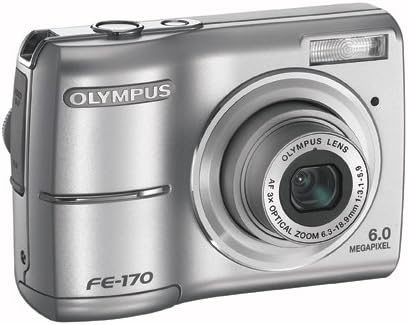
Figure 4: A different angled front view of the camera, showing the lens and flash unit.
Warranty and Support
For information regarding warranty coverage, service, or technical support for your OM SYSTEM OLYMPUS FE-170 Digital Camera, please refer to the warranty card included with your product or visit the official OM SYSTEM support website. Contact details for customer service are typically available on the manufacturer's website.
Online Resources: For the most up-to-date information, FAQs, and software downloads, please visit the official OM SYSTEM website.
Official Product Videos
No official product videos from the seller were provided for this model in the available data.
Ask a question about this manual
Ask about setup, troubleshooting, compatibility, parts, safety, or missing instructions. Manuals+ will review the question and use this page’s manual context to help answer it.