
Important Safety Instructions
Please read these instructions carefully before operating your TEAC CD-P1260 CD Player. Keep this manual for future reference.
- Power Source: Connect the unit only to an AC outlet of the voltage specified on the unit.
- Ventilation: Ensure proper ventilation. Do not block ventilation openings.
- Water and Moisture: Do not expose the unit to rain, moisture, or dripping or splashing liquids.
- Heat: Do not place the unit near heat sources such as radiators, heat registers, stoves, or other apparatus (including amplifiers) that produce heat.
- Cleaning: Clean only with a dry cloth.
- Servicing: Do not attempt to service this product yourself. Refer all servicing to qualified service personnel.
Product Overview
The TEAC CD-P1260 is a single-disc CD player designed for high-quality audio playback. It supports standard audio CDs, CD-R/RW discs, and MP3/WMA file playback from CD-R/RW discs. Featuring an 8-times oversampling digital filter and a center-mounted drive mechanism, it delivers clear and stable sound reproduction. The unit includes various playback modes and a convenient LCD with a music calendar.
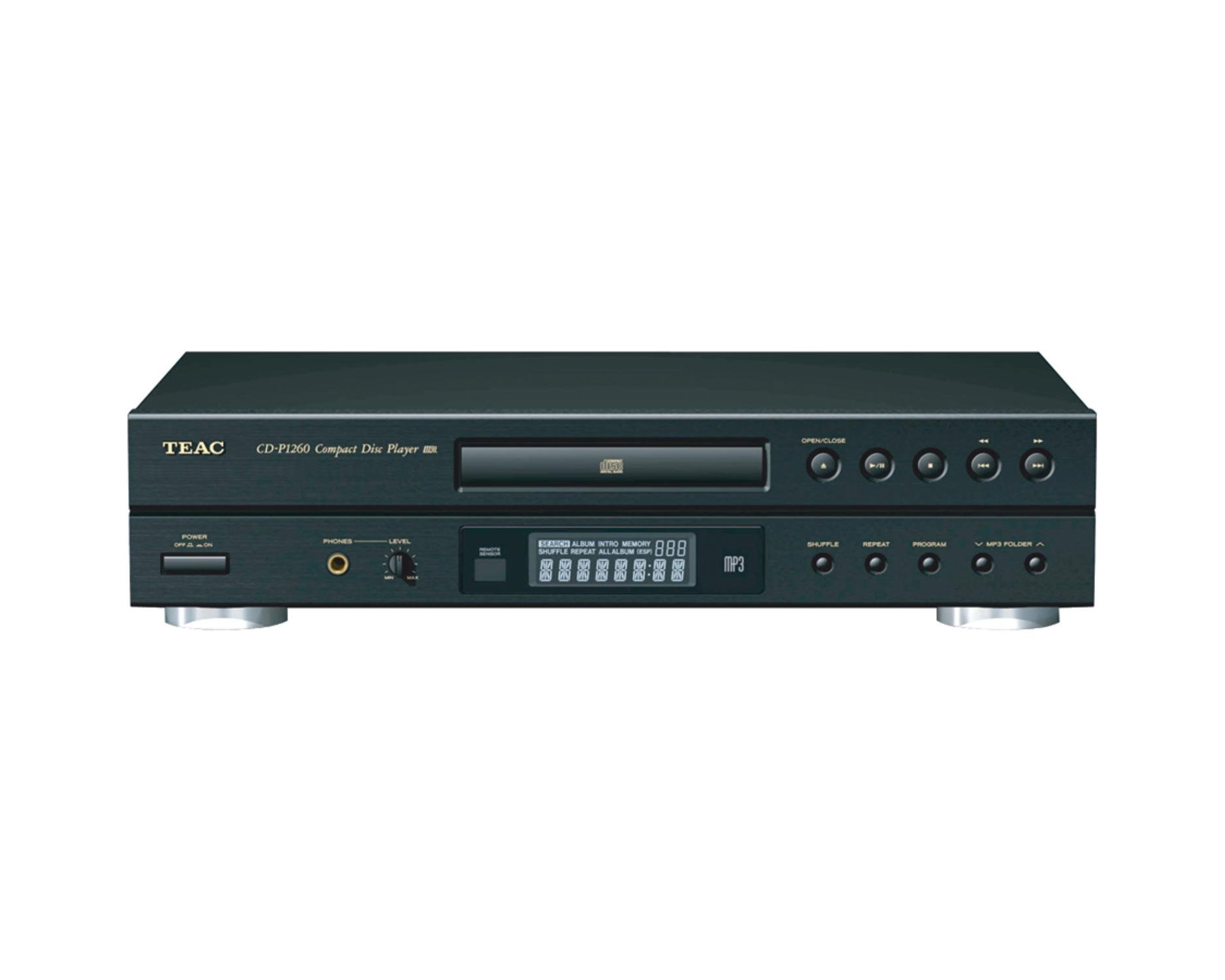
Front view of the TEAC CD-P1260 CD Player, showing the disc tray, LCD display, and control buttons.
Key Features
- Center-mounted mechanism for optimal weight distribution and stability.
- MP3/WMA file playback from CD-R/RW discs.
- 8-times oversampling digital filter for enhanced audio quality.
- Multiple playback modes: Program, Repeat, Shuffle, and Intro Play.
- Compatible with CD, CD-R, and CD-RW discs.
- LCD display with music calendar function.
- Integrated 1-bit D/A converter.
- 32-selection random memory program.
- Built-in headphone jack with volume control.
Setup
Unpacking
Carefully remove the CD player and all accessories from the packaging. Ensure all items are present:
- TEAC CD-P1260 CD Player unit
- Power cord
- RCA audio cable
- Remote control (if included)
- Instruction manual (this document)
Connections
- Placement: Place the CD player on a stable, level surface with adequate ventilation. Avoid placing it near heat sources or in direct sunlight.
- Audio Connection: Connect the RCA audio output jacks on the rear of the CD-P1260 to the corresponding audio input jacks (e.g., "CD IN" or "AUX IN") on your amplifier or receiver using the supplied RCA cable. Ensure left (white) and right (red) channels are matched correctly.
- Power Connection: Plug the power cord into the AC IN socket on the rear of the CD player, then plug the other end into a suitable AC wall outlet.
- Initial Power On: After connecting, press the POWER button on the front panel or remote control to turn on the unit. Allow a few moments for the unit to initialize.
Operating Instructions
Basic CD Playback
- Press the OPEN/CLOSE button to open the disc tray.
- Place a CD (audio CD, CD-R/RW with audio, or MP3/WMA files) onto the disc tray with the label side facing up.
- Press the OPEN/CLOSE button again to close the disc tray. The player will read the disc.
- Press the PLAY/PAUSE button to start playback.
- To pause playback, press PLAY/PAUSE again. Press it once more to resume.
- To stop playback, press the STOP button.
- Use the SKIP FORWARD (⏭) or SKIP BACKWARD (⏮) buttons to skip tracks.
MP3/WMA File Playback
The CD-P1260 can play MP3 and WMA audio files recorded on CD-R/RW discs. Ensure your files are encoded at standard bitrates for optimal compatibility. Variable bit-rate MP3 files may not play correctly.
- When an MP3/WMA disc is inserted, the player will display folder and file information on the LCD.
- Use the navigation buttons (if available on remote) or skip buttons to browse folders and tracks.
Playback Modes
- Program Play: Allows you to create a custom playlist of up to 32 tracks. Press the PROGRAM button, select tracks using the skip buttons, and confirm each selection.
- Repeat Play: Press the REPEAT button to cycle through repeat modes (e.g., repeat current track, repeat all tracks, repeat program).
- Shuffle Play: Press the SHUFFLE button to play tracks in a random order.
- Intro Play: Press the INTRO button to play the first 10 seconds of each track on the disc.
Using Headphones
The CD-P1260 features a 1/4-inch headphone jack on the front panel for private listening.
- Connect your headphones to the PHONES jack. If your headphones have a 3.5mm plug, you may need a 1/4-inch adapter.
- Adjust the headphone volume using the PHONES LEVEL control knob.
- Note that plugging in headphones will typically mute the RCA audio outputs to your amplifier/receiver.
Maintenance
Proper care will ensure the longevity and optimal performance of your CD player.
- Cleaning the Unit: Wipe the exterior of the unit with a soft, dry cloth. Do not use abrasive cleaners, waxes, or solvents.
- Cleaning Discs: Use a soft, lint-free cloth to wipe discs from the center outwards. Do not use solvents or abrasive cleaners.
- Handling Discs: Always hold discs by their edges. Avoid touching the shiny surface. Store discs in their cases to prevent scratches and dust accumulation.
- Ventilation: Ensure the ventilation openings on the unit are not blocked to prevent overheating.
Troubleshooting
If you encounter problems with your CD player, refer to the following table for possible solutions.
| Problem | Possible Cause | Solution |
|---|---|---|
| No power | Power cord not connected securely. | Check power cord connection to the unit and wall outlet. |
| "NO DISC" error | Disc inserted incorrectly or dirty/damaged. Unit micro-processors need reboot. | Insert disc correctly (label side up). Clean the disc. Unplug the player for 15 seconds, then plug it back in. |
| Disc skips or sound cuts out | Dirty, scratched, or warped disc. Unit is vibrating. | Clean the disc. Replace damaged discs. Ensure the player is on a stable surface. |
| No sound output | Audio cables not connected. Incorrect input selected on amplifier. Headphones plugged in. | Check RCA cable connections. Select correct input on your amplifier/receiver. Disconnect headphones if using speakers. |
| MP3/WMA files do not play | Disc not compatible or files are variable bit-rate. | Ensure disc is CD-R/RW. Check file encoding. Some variable bit-rate files may not be supported. |
Specifications
| Feature | Detail |
|---|---|
| Brand | Teac |
| Model Name | CD-P1260 |
| Model Number | CDP1260 |
| Color | Black |
| Connectivity Technology | Auxiliary |
| Included Components | Single CD Player (unit, power cord, RCA cable, remote control) |
| Number Of Discs | 1 |
| Supported Audio Format | CD-Audio, MP3, WMA |
| Connector Type | RCA (Audio Out), 1/4" Headphone Jack |
| Specific Uses For Product | Personal audio playback |
| Number of Channels | 2 (Stereo) |
| Media Format Type | CD, CD-R, CD-RW |
| Compatible Devices | Amplifier, Receiver, Speakers, Headphones |
| MP3 Player Functionality | Yes (from CD-R/RW) |
| Item Weight | 7.1 Pounds (approx. 3.2 kg) |
| D/A Converter | 1-bit, 8x oversampling |
| Frequency Response | 20Hz - 20kHz (within 2 dB) |
| Total Harmonic Distortion | 0.03% (typical) |
Warranty and Support
TEAC products are manufactured to high-quality standards and are backed by a limited warranty. For specific warranty terms and conditions, please refer to the warranty card included with your product or visit the official TEAC website.
For technical support, service, or inquiries, please contact TEAC customer service through their official channels. Keep your purchase receipt and product serial number handy when contacting support.
Online Support: www.teac.com/us/


