
1. Introduction
This manual provides instructions for the safe and efficient use of your Targus TG-LCS Universal Sony Rapid Li-ion Battery Charger. This device is designed to rapidly charge most Sony Li-ion batteries, offering convenience with its universal voltage compatibility and included car charging adapter.
Key features include:
- Rapidly charges most Sony batteries in a standard wall outlet or in a car within 1-2 hours.
- Universal 100-240V input for worldwide usage.
- Advanced technology prevents overcharging, protecting your batteries.
- Indicator light clearly shows charging status (red for charging, green for complete).
- Includes a 12-24V DC car charging plug for on-the-go power.
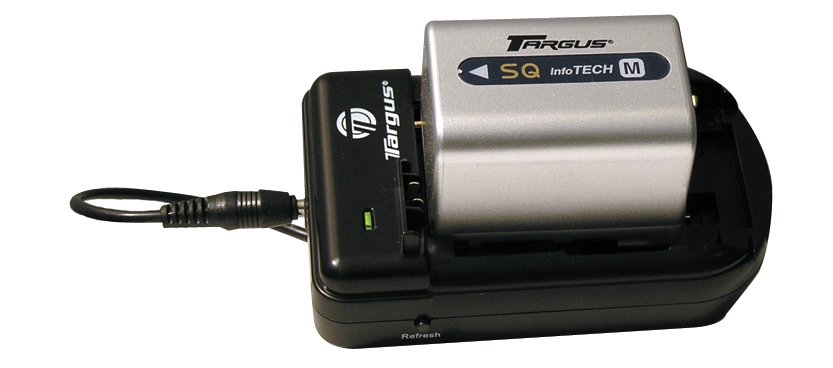
Figure 1: Targus TG-LCS Universal Sony Rapid Li-ion Battery Charger. This image shows the compact design of the charger, suitable for both home and travel use.
2. Important Safety Information
Please read all safety instructions before using this product. Failure to follow these instructions may result in electric shock, fire, or serious injury.
- Do not expose the charger to rain or moisture.
- Do not operate the charger if it has received a sharp blow, been dropped, or otherwise damaged.
- Do not disassemble the charger. Incorrect reassembly may result in electric shock or fire.
- Do not use an extension cord or attachment not recommended by the manufacturer, as this may result in a risk of fire or electric shock.
- Do not charge non-rechargeable batteries.
- Ensure the battery type is compatible with the charger before inserting.
- Unplug the charger from the power outlet when not in use.
- Keep out of reach of children.
3. Package Contents
Verify that all items are present in your package:
- Targus TG-LCS Universal Sony Rapid Li-ion Battery Charger
- AC Power Cord (for wall outlet charging)
- 12-24V DC Car Charging Plug
- User Manual (this document)
4. Setup
4.1 Connecting to Power
The charger can be powered via a standard wall outlet or a vehicle's DC power socket.
- For Wall Outlet Use: Connect the AC power cord to the charger and then plug the other end into a standard 100-240V AC wall outlet.
- For Car Use: Connect the 12-24V DC car charging plug to the charger and then plug the other end into your vehicle's DC power socket (cigarette lighter socket).
4.2 Inserting the Battery
Carefully insert your compatible Sony Li-ion battery into the designated slot on the charger. Ensure the battery is seated correctly and makes proper contact with the charging terminals.
Note: The charger is designed to accommodate various Sony Li-ion battery sizes. Ensure a secure fit for optimal charging. If the fit is loose, ensure the battery is still making proper contact with the charging pins.
5. Operation
5.1 Charging Process
Once the battery is correctly inserted and the charger is connected to a power source, the charging process will begin automatically.
5.2 Indicator Light
The charger features an indicator light to communicate the charging status:
- Red Light: Indicates that the battery is currently charging.
- Green Light: Indicates that the battery is fully charged and ready for use. The charger's advanced technology prevents overcharging, so you can leave the battery connected even after the light turns green.
Typical charging time for most Sony batteries is 1-2 hours, depending on the battery's capacity and discharge level.
6. Maintenance
To ensure the longevity and optimal performance of your charger:
- Keep the charger clean and dry. Wipe with a soft, dry cloth.
- Avoid exposing the charger to extreme temperatures or direct sunlight.
- Store the charger in a cool, dry place when not in use.
- Regularly check the power cords for any signs of damage. If damaged, discontinue use and replace.
7. Troubleshooting
If you encounter issues with your Targus TG-LCS charger, refer to the following common problems and solutions:
| Problem | Possible Cause | Solution |
|---|---|---|
| Charger indicator light does not turn on. | No power to the charger. |
|
| Battery is not charging (light remains off or flashes erratically). | Battery not properly seated or incompatible battery. |
|
| Charging takes longer than expected. | Battery capacity is very high or deeply discharged. | This is normal for high-capacity or deeply discharged batteries. Allow more time. Ensure the charger is in a well-ventilated area. |
8. Specifications
| Model Number | TG-LCS |
| Brand | Targus |
| Input Voltage | 100-240V AC (Wall Outlet), 12-24V DC (Car) |
| Compatible Battery Type | Sony Li-ion batteries |
| Charging Time | Approximately 1-2 hours (depending on battery capacity) |
| Product Dimensions | 2 x 2 x 5 inches |
| Item Weight | 5.6 ounces |
| Manufacturer | Targus |
| UPC | 871436005453 |
9. Customer Support and Warranty
For technical assistance, warranty information, or to inquire about replacement parts, please contact Targus customer support.
Please visit the official Targus website for the most up-to-date contact information and warranty details: www.targus.com/us/support
Keep your purchase receipt as proof of purchase for warranty claims.