
Snap Circuits SC-300R
Snap Circuits SC-300 Student Electronics Training Program
Model: SC-300R | Brand: Snap Circuits
Introduction
The Snap Circuits SC-300 Student Electronics Training Program is designed for an in-depth exploration of electronic components and principles. This comprehensive kit allows users to build over 300 exciting projects, fostering an understanding of electronics through hands-on experimentation.
Ideal for ages 8 and up, this program is suitable for home schooling, middle schools, and high schools, providing a foundational grasp of basic electronics.
Product Components
The SC-300 kit includes over 60 snap-together parts, designed for easy assembly without the need for tools. All components are housed in a lightweight, durable plastic case with custom foam inserts for organized storage and easy identification of parts.

Image: The Snap Circuits SC-300 kit with its case open, displaying the various snap-together electronic components and wires arranged in custom foam inserts.

Image: The durable black carrying case for the Snap Circuits SC-300 kit, shown closed for storage and transport.
Included Parts:
- Over 60 unique snap-together electronic parts.
- Project books and a student guide for detailed instructions.
- Custom storage case with foam inserts.
Note: 4 AA batteries are required for operation and are not included with the kit.
Setup and Assembly
- Unpack Components: Carefully remove all snap-together parts from the custom foam inserts in the storage case.
- Install Batteries: Locate the battery holder component. Insert 4 AA batteries (not included) into the designated slots, ensuring correct polarity.
- Consult Project Guides: Refer to the included project books and student guide for step-by-step instructions on assembling specific circuits. These guides provide clear, illustrated diagrams.
- Snap Together Parts: Components are designed to snap securely onto the base grid. Align the metal snaps and press firmly until they click into place. No tools are required for assembly.
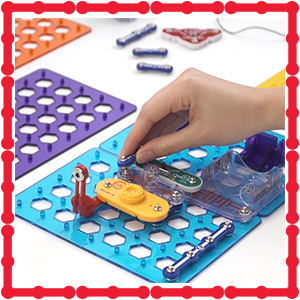
Image: A close-up of a hand snapping an electronic component onto the Snap Circuits base grid, demonstrating the ease of assembly.
Operating Instructions
The Snap Circuits SC-300 allows for the creation of over 300 diverse electronic projects. Each project is detailed in the provided manuals, guiding users through the process of building and understanding various circuits.
Project Examples:
- Build a functional radio.
- Construct a doorbell circuit.
- Design a burglar alarm.
- Create light and sound-based projects, including a voice changer and fiber optic light show.
Key Electronic Concepts Covered:
| Concept | Description |
|---|---|
| Resistors | Components that limit current flow in a circuit. |
| Switches | Devices used to open or close a circuit. |
| Capacitors | Components that store electrical energy. |
| Series Circuits | Circuits where components are connected end-to-end, forming a single path for current. |
| Transistors | Semiconductor devices used to amplify or switch electronic signals. |
| Parallel Circuits | Circuits where components are connected across the same two points, providing multiple paths for current. |
| Integrated Circuits | Miniaturized electronic circuits manufactured on a semiconductor material. |
| Batteries | Provide the electrical power for the circuits. |
| Motors | Convert electrical energy into mechanical energy. |

Image: Two children collaborating on a Snap Circuits project, demonstrating interactive learning.

Image: A child observing a fan component in action, powered by a Snap Circuits assembly.

Image: A child engaging with a Snap Circuits project that incorporates structural elements, showcasing advanced building possibilities.

Image: A stack of project manual pages, illustrating the detailed circuit diagrams and instructions provided with the kit.
Maintenance
- Storage: Always store all components in the provided custom storage case. The foam inserts are designed to keep parts organized and prevent loss.
- Cleaning: Use a soft, dry cloth to gently wipe components if they become dusty. Avoid using liquids or abrasive cleaners.
- Battery Care: Remove batteries from the battery holder if the kit will not be used for an extended period to prevent leakage and corrosion.
- Component Inspection: Periodically inspect all snap connections and wires for any signs of wear or damage. Replace any damaged parts to ensure safe and proper operation.
Troubleshooting
If you encounter issues while building or operating your Snap Circuits projects, consider the following common troubleshooting steps:
- No Power:
- Ensure batteries are correctly installed with the proper polarity.
- Check if the batteries are fresh and have sufficient charge.
- Verify that the power switch (if applicable) is in the "ON" position.
- Circuit Not Working:
- Double-check all connections against the project diagram in the manual. Ensure all components are snapped firmly into place.
- Verify that you are using the correct components for each step as specified in the instructions.
- Look for any loose wires or bent metal snaps that might be preventing a proper connection.
- Intermittent Operation:
- This often indicates a loose connection. Gently press down on all components to ensure they are fully seated.
- Check for any debris or foreign objects on the metal snaps that might interfere with conductivity.
- Component Malfunction:
- If a specific component consistently fails to work across multiple projects, it may be faulty. Contact customer support for assistance.
For further assistance, refer to the detailed project guides or contact Elenco Electronics LLC customer support.
Specifications
| Attribute | Detail |
|---|---|
| Product Model Number | SC-300R |
| Product Dimensions | 16.5 x 12 x 6.25 inches |
| Item Weight | 4 ounces |
| Manufacturer Recommended Age | 8 - 15 years |
| Batteries Required | 4 AA batteries (not included) |
| Number of Projects | Over 300 |
| Number of Parts | Over 60 |
| Manufacturer | Elenco Electronics LLC |
Warranty and Support
For information regarding product warranty, returns, or technical support, please contact the manufacturer directly:
Manufacturer: Elenco Electronics LLC
Please refer to the product packaging or the official Elenco Electronics website for the most current warranty terms and contact information.
Additional resources, including detailed project guides and potential FAQs, may be available on the Snap Circuits Store Page.
Related documentsSC-300R


Ask a question about this manual
Ask about setup, troubleshooting, compatibility, parts, safety, or missing instructions. Manuals+ will review the question and use this page’s manual context to help answer it.