
1. Introduction
Thank you for purchasing the Timex Nature Sounds CD Clock Radio T621T. This unit combines a digital alarm clock with an AM/FM radio and a front-loading CD player, offering multiple wake-up options including nature sounds. This manual provides detailed instructions for setup, operation, and maintenance to ensure optimal performance and longevity of your device.
2. Safety Information
- Read all instructions before operating the unit.
- Keep this manual for future reference.
- Do not expose the unit to rain or moisture.
- Do not block any ventilation openings.
- Use only attachments/accessories specified by the manufacturer.
- Unplug this unit during lightning storms or when unused for long periods.
- Refer all servicing to qualified service personnel.
3. Package Contents
Please check that the following items are included in your package:
- Timex Nature Sounds CD Clock Radio T621T unit
- AC Power Adapter
- 3 AA Batteries (for Sure Alarm Battery Backup)
- User Manual (this document)
4. Product Overview
The Timex T621T features a large Amber-Glo display with brightness control, a front-loading CD player, and an AM/FM stereo radio. It includes a Triple Alarm System with 7-5-2 programming and four soothing nature sounds. The unit is equipped with Auto-Set time and a Sure Alarm Battery Backup system.
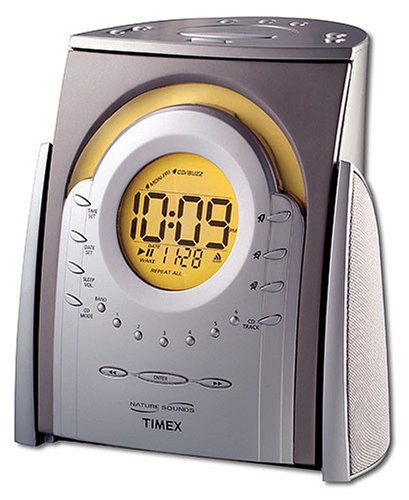
Figure 1: Front view of the Timex Nature Sounds CD Clock Radio T621T, showing the display, CD slot, and control buttons.
5. Setup
5.1 Power Connection
- Plug the AC power adapter into the DC input jack located on the back of the unit.
- Plug the other end of the adapter into a standard wall outlet.
5.2 Battery Backup Installation
The Sure Alarm Battery Backup system maintains time and alarm settings during a power outage. It requires 3 AA batteries (included).
- Open the battery compartment cover on the bottom of the unit.
- Insert 3 AA batteries, observing the polarity markings (+ and -).
- Close the battery compartment cover securely.
5.3 Auto-Set Time
Upon initial power connection, the unit's Auto-Set feature will automatically set the correct time and date. It also adjusts for Daylight Saving Time automatically.
5.4 Setting Radio Presets
The unit allows for 18 preset radio stations (12 FM and 6 AM).
- Tune to your desired AM or FM station using the tuning controls.
- Press and hold the Preset button until the preset number flashes on the display.
- Use the Tune buttons to select the desired preset number (1-18).
- Press the Preset button again to confirm and save the station.
6. Operating Instructions
6.1 CD Player Operation
The unit features a front-loading CD player.
- Insert a CD into the front-loading slot with the label side facing up.
- Press the CD button to switch to CD mode.
- Use the Play/Pause, Skip, and Stop buttons to control playback.
6.2 Setting Alarms (Triple Alarm System)
The T621T features three independent alarms with 7-5-2 programming (Daily, Weekdays, or Weekend).
- Press and hold the Alarm 1, Alarm 2, or Alarm 3 button to enter alarm setting mode.
- Use the Time Set buttons to adjust the wake time.
- Press the Alarm button again to select the wake source: CD, Radio, Nature Sounds (Brook, Ocean, Wind Chimes, Song Bird), or Buzzer.
- Press the Alarm button a third time to select the alarm schedule: 7-Day, 5-Day (weekdays), or 2-Day (weekend).
- Press the Alarm button once more to confirm and exit.
6.3 Nature Sounds
The unit offers four soothing nature sounds: Brook, Ocean, Wind Chimes, and Song Bird. These can be used for waking up or for the sleep timer function.
- Press the Nature Sound button to cycle through the available sounds.
- Press the Volume buttons to adjust the sound level.
6.4 Sleep Timer
You can fall asleep to the CD player, radio, or nature sounds with a programmable sleep timer.
- While playing CD, radio, or nature sounds, press the Sleep button.
- Repeatedly press the Sleep button to cycle through available sleep times (e.g., 90, 60, 30, 15 minutes).
- The unit will automatically turn off after the selected time.
6.5 Display Brightness Control
Adjust the brightness of the Amber-Glo display to your preference.
- Press the Dimmer button to cycle through different brightness levels.
6.6 Headphone Jack
A stereo headphone jack is provided for private listening. Plug standard 3.5mm headphones into the jack located on the unit.
7. Maintenance
7.1 Cleaning the Unit
- Wipe the exterior of the unit with a soft, dry cloth.
- Do not use abrasive cleaners or solvents.
- For the CD lens, use a specialized CD lens cleaner disc.
7.2 Battery Replacement
Replace the 3 AA backup batteries annually or when the battery low indicator appears on the display to ensure continuous alarm functionality during power outages.
8. Troubleshooting
- No Power: Ensure the AC adapter is securely plugged into both the unit and a working wall outlet. Check household circuit breaker.
- Alarm Not Sounding: Verify that the alarm is activated and set to the correct time and day schedule. Check the alarm volume. Ensure backup batteries are fresh if power was interrupted.
- Poor Radio Reception: Extend and adjust the FM wire antenna for better reception. For AM, rotate the unit slightly to improve signal.
- CD Not Playing: Ensure the CD is inserted correctly with the label side up. Check if the CD is scratched or dirty; clean if necessary. Try a different CD.
- Display Not Visible/Dim: Adjust the display brightness using the Dimmer button.
9. Specifications
- Model: T621T
- Brand: Timex
- Display Type: Digital, Amber-Glo
- Power Source: AC Powered, 3 AA batteries for backup (included)
- Radio: AM/FM Stereo, 18 Presets (12 FM/6 AM)
- CD Player: Front-loading
- Alarm System: Triple Alarm, 7-5-2 Programming
- Wake Options: CD, Radio, Nature Sounds, Buzzer
- Nature Sounds: Brook, Ocean, Wind Chimes, Song Bird
- Special Features: Auto-Set Time, Adjustable Brightness, Large Display, Stereo Headphone Jack
- Manufacturer: SDI Technologies, Inc.
- UPC: 758859203782
10. Warranty Information
This product is covered by a limited warranty from the manufacturer. Please refer to the warranty card included with your purchase for specific terms and conditions, including coverage period and service procedures. Keep your proof of purchase for warranty claims.
11. Customer Support
For further assistance, technical support, or warranty inquiries, please contact Timex customer service. Contact information can typically be found on the manufacturer's website or on the warranty card provided with your product.


