
1. Product Overview
The Grundig Eton Sound 50 Speaker System is designed to provide high-fidelity audio playback from your iPod. It features an integrated docking station that also charges your iPod during use. The system includes dual full-range drivers and micro tweeters for balanced sound, and can be controlled via an included remote.
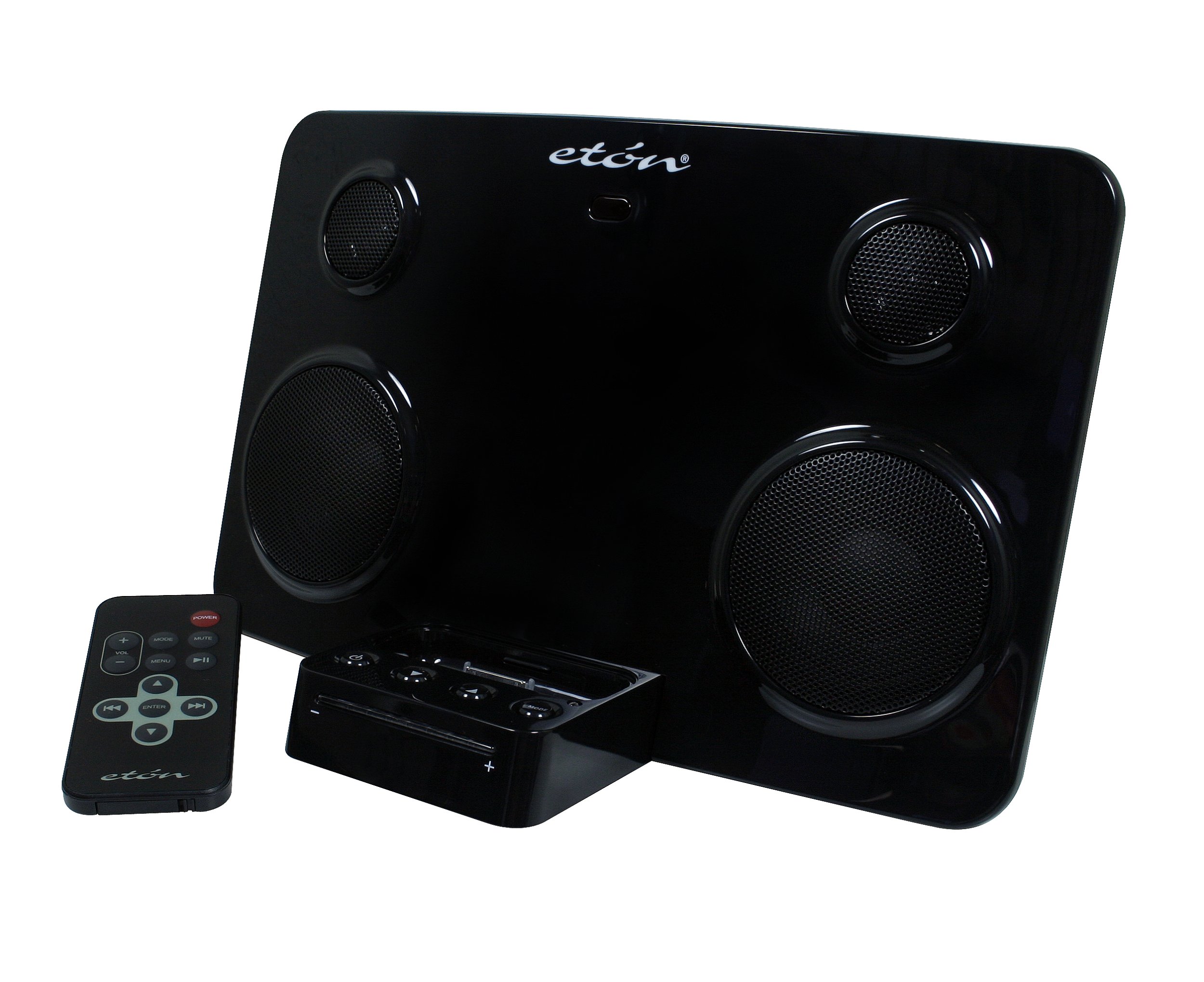
Image: Front view of the Eton Sound 50 Speaker System with an iPod docked, showcasing its speakers and controls.
2. Package Contents
Verify that all items are present in the package:
- Eton Sound 50 Speaker System
- Remote control
- iPod trays (to fit various iPod models)
- AC Adapter
- 3.5 mm male-to-male audio cord
3. Setup
3.1 Power Connection
- Connect the AC adapter to the power input port on the back of the Sound 50 Speaker System.
- Plug the AC adapter into a standard electrical outlet. The integrated LED power indicator will illuminate.
3.2 iPod Docking
- Select the appropriate iPod tray for your specific iPod model. The system includes various trays to ensure a secure fit.
- Insert the selected iPod tray into the docking slot on the Sound 50.
- Carefully place your iPod into the docking slot. Ensure it is seated correctly to establish a connection for audio playback and charging.
4. Operating Instructions
4.1 Basic Playback
- Ensure your iPod is properly docked and the speaker system is powered on.
- Use the controls on your iPod or the included remote control to select and play music.
- Adjust the volume using the volume controls on the speaker system or the remote. The integrated LED volume indicators will show the current level.
4.2 Remote Control Usage
The remote control provides full functionality for your docked iPod from a distance.
- Power Button: Turns the speaker system on or off.
- Volume Up/Down: Adjusts the audio output level.
- Play/Pause: Starts or pauses playback.
- Next/Previous Track: Skips to the next or previous song.
- Menu Navigation: Allows navigation through your iPod's menu (specific functionality may vary by iPod model).
4.3 Charging Your iPod
When your iPod is docked, it will automatically charge, regardless of whether music is playing. This ensures your iPod is ready for portable use when removed from the dock.
5. Maintenance
5.1 Cleaning
- Disconnect the power adapter before cleaning.
- Use a soft, dry cloth to wipe the exterior surfaces of the speaker system.
- Do not use liquid cleaners, aerosols, or abrasive materials, as these may damage the finish.
5.2 Storage
When not in use for extended periods, store the speaker system in a cool, dry place away from direct sunlight and extreme temperatures.
6. Troubleshooting
| Problem | Possible Cause | Solution |
|---|---|---|
| No power | AC adapter not connected or power outlet not active. | Ensure AC adapter is securely connected to both the speaker system and a working power outlet. |
| No sound from speakers | iPod not docked correctly; volume too low; iPod in pause mode. | Re-dock the iPod, ensuring a firm connection. Increase volume. Check iPod playback status. |
| iPod not charging | iPod not docked correctly. | Ensure the iPod is fully seated in the docking connector. Try removing and re-inserting the iPod. Verify the correct iPod tray is used. |
| Remote control not working | Remote batteries depleted; obstruction between remote and system; remote out of range. | Replace remote batteries. Ensure a clear line of sight to the speaker system. Operate within effective range. |
| iPod not recognized by system | Incorrect iPod tray or connection issue. | Ensure the correct iPod tray is used. If issues persist, try removing any extra cradle or adapter that might be preventing a direct connection between the iPod and the dock connector. |
7. Specifications
- Color: Black
- Dimensions (W x H x D): 10" x 6" x 5.75"
- Weight: 2.30 lbs.
- Power Source: AC (AC Adapter included)
- Amplifier Output Power: 7 x 2 Watts (L: 7 Watts, R: 7 Watts)
- Compatibility: iPod Shuffle (1st, 2nd Gen), iPod Nano (1st, 2nd Gen Aluminum), iPod (3rd, 4th, 5th Gen Video, Color Display), iPod Mini (1st Gen). Note: Compatibility with newer iPod models not guaranteed.
- UPC: 750254801471, 750254802584
- ASIN: B000FGI7QI
8. Warranty and Support
8.1 Warranty Information
This product comes with a One Year Warranty from the date of purchase. Please retain your proof of purchase for warranty claims. The warranty covers manufacturing defects under normal use.
8.2 Customer Support
For technical assistance or warranty inquiries, please refer to the contact information provided with your product packaging or visit the official Grundig / Eton support website.