1. Product Overview
The BLACK+DECKER BDS200 is a reliable and essential tool designed to detect metal pipes and live electrical cables hidden within walls. It provides clear visual and audible alerts, enhancing safety and preventing damage during drilling, cutting, or renovation tasks.
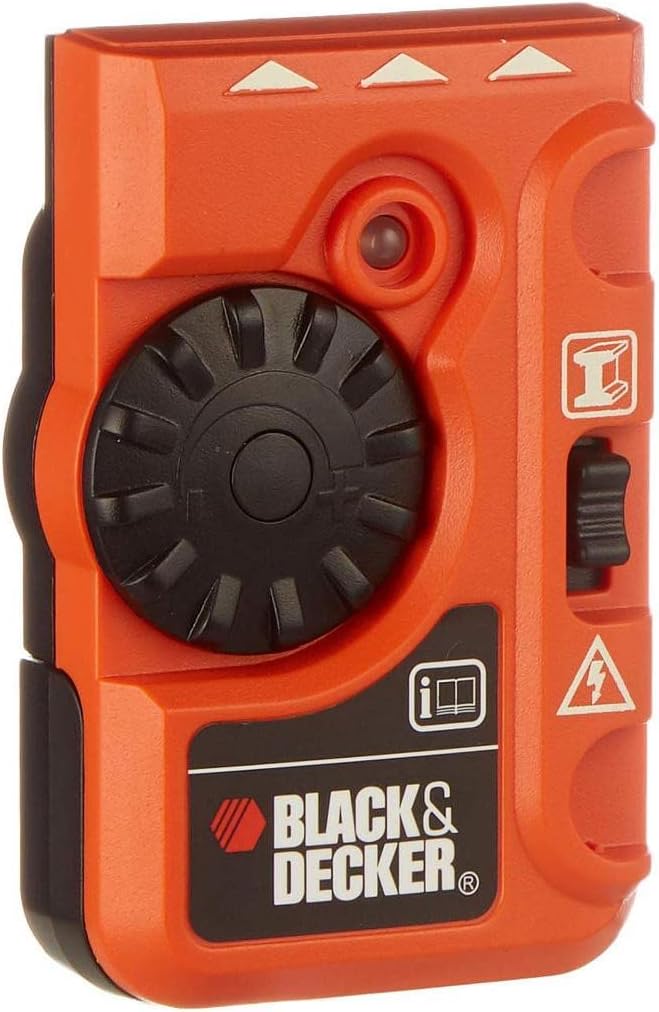
Figure 1: Front view of the BDS200 Detector. This image displays the device's main controls and indicators.
Key Features:
- Dual Detection: Accurately locates both metal pipes and live electrical cables within walls.
- Enhanced Safety: Provides critical information to help users avoid hazards before drilling or cutting.
- Clear Alerts: Features distinct visual and audible indicators for detected objects.
- Compact Design: Lightweight and easy to handle for extended use.

Figure 2: The BDS200 Detector held in hand, demonstrating its practical size for operation.
2. Important Safety Information
Always adhere to the following safety guidelines to prevent injury or damage to property.
- Read Instructions: Fully read and understand this instruction manual before operating the device.
- Personal Protective Equipment: Always wear appropriate safety gear, such as safety glasses, when working with tools or drilling into walls.
- Exercise Caution: Do not rely solely on the detector. Always proceed with caution, especially when drilling or cutting into unknown areas. Consult building plans if available.
- Environmental Protection: Protect the device from low-pressure water jets and dust. The device has an IP65 rating, indicating protection against dust ingress and low-pressure water jets from any direction.
- Live Wires: When detecting live electrical cables, always assume wires are live and take appropriate precautions. Disconnect power if possible before any work.
- Battery Safety: Use only the specified battery type (9V Alkaline). Ensure correct polarity during installation. Remove batteries if the device is not used for extended periods.
3. Getting Started
3.1. Battery Installation
The BDS200 requires one 9V (Alkaline) battery for operation. The battery is not included with the device.
- Locate the battery compartment cover on the back of the device.
- Slide or unclip the cover to open the compartment.
- Insert a new 9V battery, ensuring that the positive (+) and negative (-) terminals align correctly with the markings inside the compartment.
- Close the battery compartment cover securely until it clicks into place.

Figure 3: Back view of the BDS200, illustrating the battery compartment.
4. Operating Instructions
The BDS200 features a simple interface for detecting both metal and live electrical cables.
4.1. General Operation
- Hold the detector flat against the wall surface. Ensure your hand does not cover the detection area or touch the wall directly.
- Move the device slowly and consistently across the surface in a sweeping motion.
- The device will provide visual (LED indicators) and audible (beeping) indications when it detects an object.
4.2. Detecting Metal
- Switch the device to the metal detection mode (refer to the device's markings for the correct switch position).
- Place the detector flat against the wall and move it slowly.
- A continuous audible tone and illuminated indicator lights typically signify the presence of metal objects such as pipes, studs, or conduit.
- Mark the edges of the detected area to determine the object's width and path.
4.3. Detecting Live Electrical Cables
- Switch the device to the electrical cable detection mode (refer to the device's markings for the correct switch position).
- Ensure the electrical circuit you are scanning is active (e.g., lights are on, appliances are plugged in and turned on) for optimal detection.
- Place the detector flat against the wall and move it slowly.
- Intermittent or continuous audible tones and flashing indicator lights usually indicate the presence of live electrical cables.
- Extreme Caution: Always assume detected electrical cables are live. Disconnect power to the area before performing any work.
4.4. Tips for Accurate Detection
- Slow Movement: Always move the detector slowly and consistently across the surface. Rapid movement can lead to missed detections.
- Multiple Scans: Perform several scans over the same area from different directions (horizontal, vertical, diagonal) to confirm detections and pinpoint locations.
- Surface Condition: Ensure the wall surface is dry and clean. Moisture or debris can interfere with readings.
- Interference: Keep other electronic devices, such as mobile phones, away from the detection area to minimize interference.
- Foil-Backed Materials: Be aware that foil-backed insulation or certain wall materials can cause false metal readings.
5. Care and Maintenance
Proper care will extend the life of your BLACK+DECKER BDS200 detector.
- Cleaning: Clean the exterior of the device with a soft, dry cloth. Do not use abrasive cleaners, solvents, or immerse the device in water.
- Storage: Store the detector in a dry, dust-free environment, away from direct sunlight and extreme temperatures.
- Battery Removal: If the device will not be used for an extended period, remove the 9V battery to prevent potential leakage and damage.
- Inspection: Periodically inspect the device for any signs of damage or wear. Do not use if damaged.
6. Troubleshooting
If you encounter issues with your BDS200 detector, refer to the following table for common problems and solutions.
| Problem | Possible Cause | Solution |
|---|---|---|
| No detection or weak signal | Low battery; device moved too quickly; incorrect mode selected; object too deep. | Replace battery; move device slower; ensure correct detection mode; perform multiple scans. |
| Inconsistent readings | External interference; uneven surface; hand touching wall. | Move away from other electronics; ensure flat contact; avoid touching wall with free hand. |
| False metal detection | Foil-backed insulation; metal studs; dense wall materials. | Confirm with other methods if possible; understand wall construction. |
| No detection of live electrical cables | Circuit is not active; cables are shielded or too deep. | Ensure power is on to the circuit; try scanning from different angles. |
7. Technical Specifications
| Brand | BLACK+DECKER |
| Model | BDS200 |
| Dimensions (L x W x H) | 5 x 10.5 x 21 cm |
| Weight | 80 grams |
| Power Source | Battery-powered |
| Battery Type | 9 Volts (Alkaline recommended) |
| Batteries Included | No |
| Material | Plastic |
| Color | Red |
| IP Rating | IP65 (Protection against dust and low-pressure water jets) |
| Recommended Use | Detection of metal pipes and electrical cables |
8. Warranty and Support Information
BLACK+DECKER products are manufactured to high-quality standards and are guaranteed for professional use. For detailed warranty information, including terms and conditions, please refer to the official BLACK+DECKER website or the warranty card included with your purchase.
For technical support, service, or to inquire about spare parts, please contact BLACK+DECKER customer service. Keep your purchase receipt as proof of purchase for any warranty claims.
You can typically find contact information and support resources on the official BLACK+DECKER website: www.blackanddecker.com