1. Introduction
This manual provides essential instructions for the safe and efficient operation of your KB Electronics 8811007 Solid State Variable Speed AC Electric Motor Control. This control is designed to provide infinite variable speed for shaded pole and Permanent Split Capacitor (PSC) motors. Please read this manual thoroughly before installation and operation.
2. Important Safety Information
- Motor Amperage: The rated motor nameplate amperage must not exceed the control's maximum rating (6.0 Amps) to prevent damage to both the control and the motor.
- Motor Stalling: Motors must be run with sufficient torque to prevent stalling. A stalled motor that is still receiving power will overheat and burn out.
- Motor Cooling: For proper cooling, the motor must have a fan blade installed on its shaft (direct drive).
- Incompatible Motors: This control is not to be used with gear motors, capacitor start motors, or capacitor run motors.
- Professional Installation: Installation should be performed by a qualified electrician in accordance with all local and national electrical codes.
- Non-Returnable: Controls that have been installed are generally not returnable.
3. Product Overview
The KB Electronics 8811007 is a solid-state variable speed control designed for precise regulation of AC electric motors. It features a durable metal construction and is suitable for various applications including fans, blowers, fireplace blowers, attic fans, humidifiers, and ventilators.
Components:
- Control Knob: For adjusting motor speed from OFF to HIGH.
- Faceplate: Standard 2" x 4" electrical wall box design.
- Wiring Terminals: Screw terminals for secure electrical connections.

Figure 1: Front view of the KB Electronics 8811007 control, showing the Vari-Speed label, control knob, and Solid State designation.

Figure 2: Rear view of the control, illustrating the wiring connections and compact housing designed for a standard electrical wall box.
4. Specifications
| Feature | Detail |
|---|---|
| Model Number | 8811007 (K177-1006) |
| Brand | KB ELECTRONICS |
| Maximum Current Rating | 6.0 Amps |
| Operating Voltage | 115 Volts (AC) |
| Operation Mode | ON-NONE-ON |
| Contact Type | Normally Open |
| Connector Type | Screw Terminal |
| Switch Type | Push Button (for ON/OFF, rotary for speed) |
| Material | Metal |
| Product Dimensions (L x W x H) | 5 x 3.1 x 2 inches |
| Weight | 4.8 ounces |
| Certifications | UL & CSA Approved |
| Mounting | Designed for Standard 2" x 4" Electrical Wall Box |
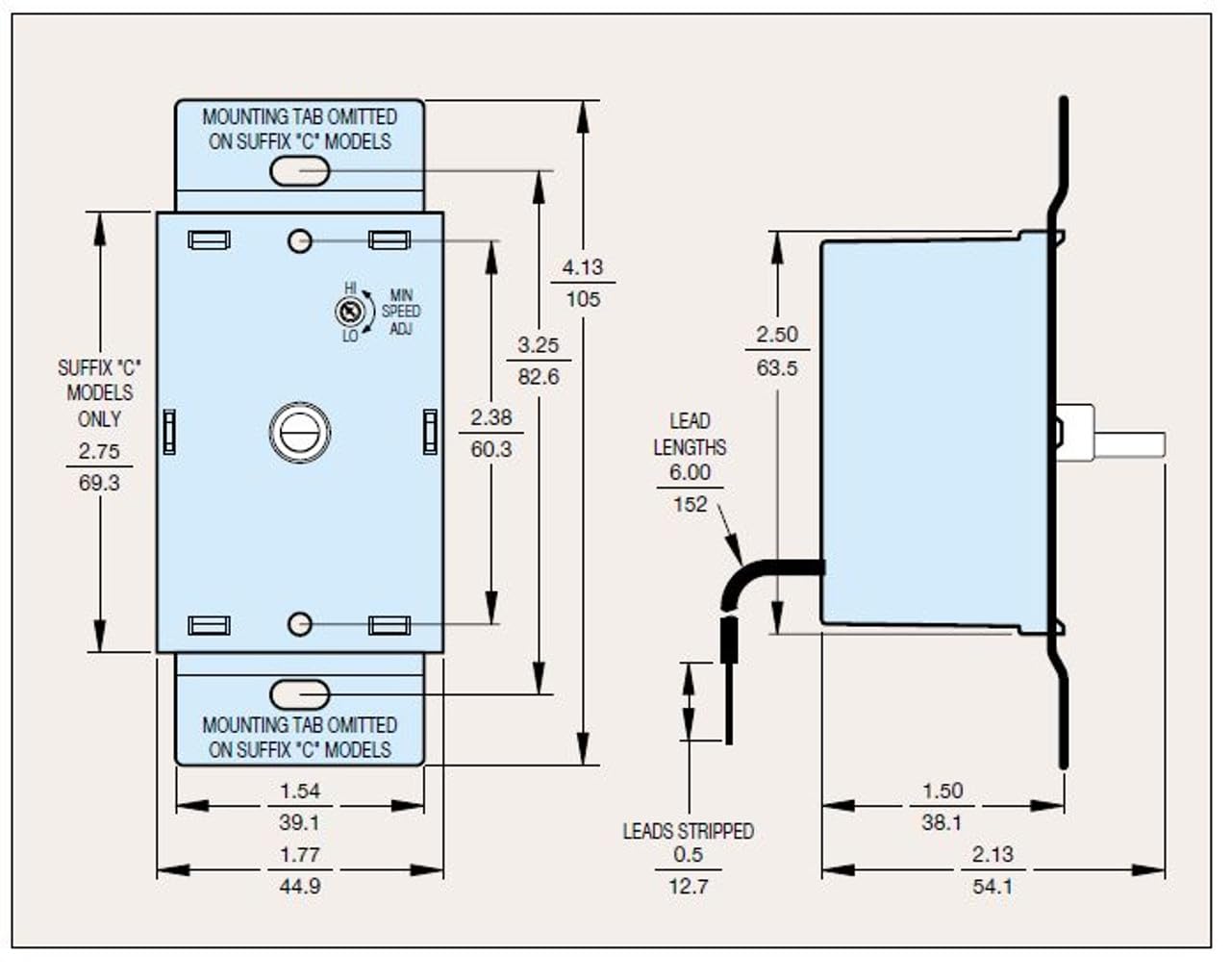
Figure 3: Technical drawing illustrating the dimensions and internal layout of the KB Electronics 8811007 control.
5. Setup & Installation
WARNING: To avoid electric shock, always disconnect power at the circuit breaker before installing or servicing this control. Installation should only be performed by a qualified electrician in compliance with all applicable electrical codes.
General Installation Steps:
- Ensure power to the circuit is OFF at the main breaker.
- Remove the existing switch or cover plate from the electrical wall box.
- Connect the control's wires to the appropriate circuit wires using screw terminals. Typically, this involves connecting the control in series with the hot wire leading to the motor. Refer to the wiring diagram provided with the product packaging for specific connections.
- Securely mount the control into a standard 2" x 4" electrical wall box.
- Install the faceplate and control knob.
- Restore power and test the control.
Note: The control may generate some heat during operation. Ensure adequate ventilation within the wall box and do not exceed the maximum current rating.
6. Operating Instructions
The KB Electronics 8811007 control offers simple and intuitive operation for adjusting motor speed.
- Turning On/Off: Rotate the control knob clockwise from the "OFF" position to turn the motor on. Continue rotating clockwise to increase speed. Rotate counter-clockwise to decrease speed and eventually turn the motor off.
- Adjusting Speed: The control knob allows for infinite variable speed adjustment between the minimum and maximum settings. Turn the knob clockwise to increase motor speed and counter-clockwise to decrease it.
- Minimum Speed Adjustment: Some models may feature a small internal or external trim pot for setting a minimum speed to prevent motor stalling at very low settings. Consult the specific product documentation for details on adjusting this if available.
Always ensure the motor is operating smoothly and not exhibiting signs of stalling (e.g., humming without rotation) at any speed setting.
7. Maintenance
- Cleaning: Ensure the control's faceplate is kept clean. Use a soft, dry cloth. Do not use abrasive cleaners or solvents.
- Inspection: Periodically inspect the control and its connections for any signs of wear, damage, or loose wiring. If any issues are found, disconnect power and have a qualified electrician inspect and repair as necessary.
- Ventilation: Ensure the area around the control and the motor has adequate airflow to prevent overheating.
8. Troubleshooting
| Problem | Possible Cause | Solution |
|---|---|---|
| Motor does not turn on. | No power to the circuit; loose wiring; faulty motor; control knob in "OFF" position. | Check circuit breaker; verify wiring connections (power off); test motor independently; rotate knob clockwise. |
| Motor hums but does not rotate (stalling). | Speed set too low; motor overloaded; incompatible motor type. | Increase speed setting; reduce motor load; ensure motor is shaded pole or PSC type. |
| Motor speed is inconsistent or erratic. | Loose wiring; internal control issue; motor compatibility. | Check all wiring connections (power off); consult a qualified electrician. |
| Control feels excessively hot. | Overloaded circuit; motor current exceeds control rating; poor ventilation. | Verify motor amperage is within control limits; ensure adequate ventilation; reduce load if possible. Disconnect power if overheating persists. |
For issues not listed here or if troubleshooting steps do not resolve the problem, contact a qualified electrician or KB Electronics customer support.
9. Warranty & Support
For specific warranty information and customer support, please refer to the documentation included with your product packaging or visit the official KB Electronics website. Keep your purchase receipt for warranty claims.
Contact Information:
- Brand: KB ELECTRONICS
- Manufacturer: KB Electronics
- For the most current support details, please visit the manufacturer's website.