
Conair SU1W
Conair Sound Therapy Sound Machine - Instruction Manual
Product Overview
Model: SU1W
Brand: Conair
The Conair Sound Therapy Sound Machine is designed to create a relaxing environment through a variety of soothing sounds. It features multiple sound options and a convenient auto-off timer, ideal for promoting relaxation or aiding sleep.

Figure 1: Top view of the Conair Sound Therapy Sound Machine, highlighting the sound selection buttons and volume control.
Features
- Plastic Construction: Durable and lightweight design.
- Elemental Therapy: Soothes the mind through sounds, rhythm, and nature.
- 10 Soothing Sounds: Includes Tropical Forest, Thunderstorm, Summer Night, Ocean Waves, White Noise, Heartbeat, Songbirds, Waterfall, Running Stream, and Rain.
- 60-Minute Auto-Off Timer: Automatically turns off the unit after one hour for convenience.
- Volume Control: Easy-to-use dial for adjusting sound intensity.
- Dual Power Options: Can be operated with batteries or a DC adapter.
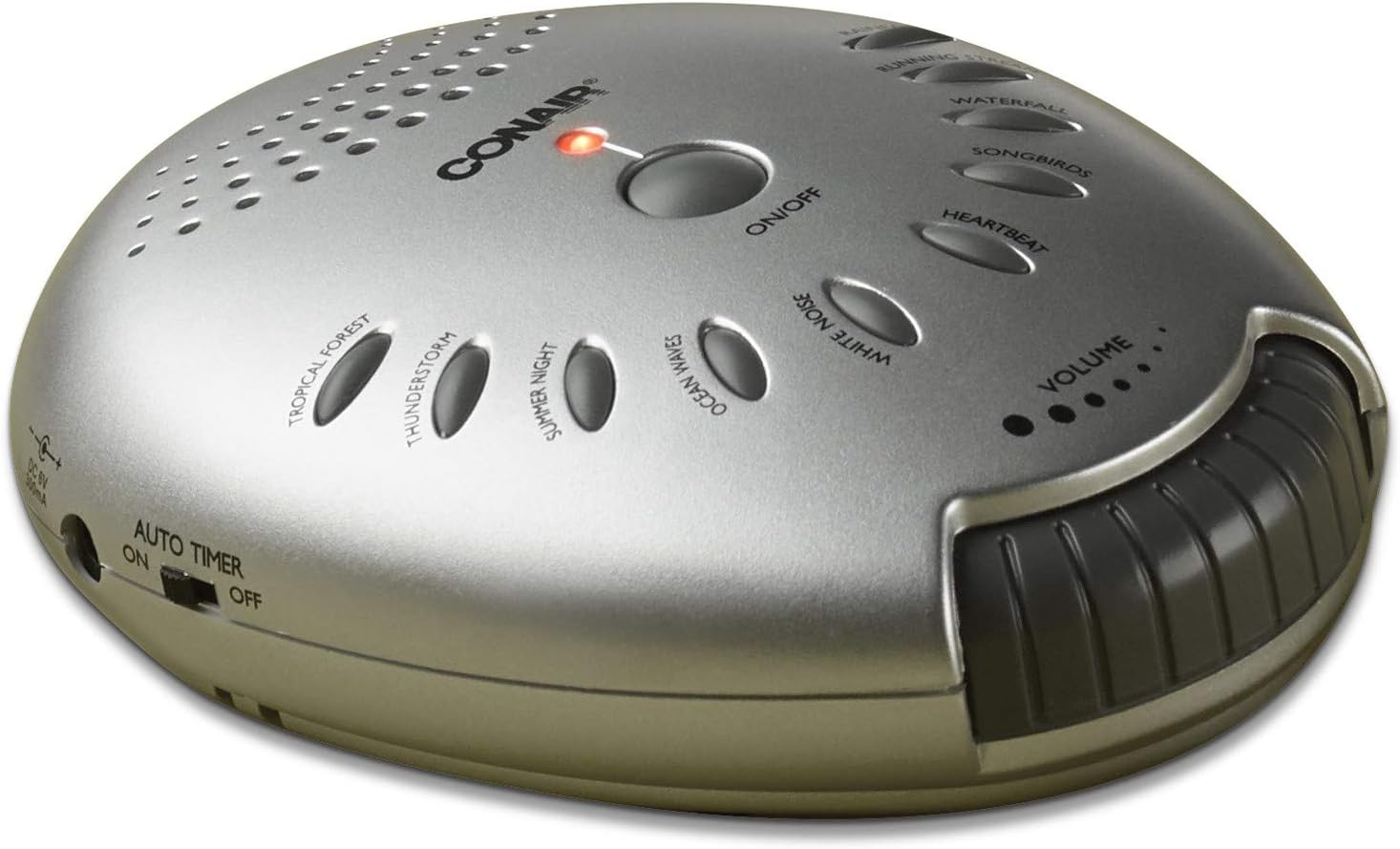
Figure 2: Side view of the sound machine, illustrating the auto-off timer switch.
Setup
The Conair Sound Therapy Sound Machine offers flexible power options for your convenience. Ensure the unit is placed on a stable, flat surface before use.
Powering the Unit:
- Battery Operation: Locate the battery compartment on the underside of the unit. Insert the required batteries (e.g., 4 x AA, type not specified in product details) into the compartment, ensuring correct polarity (+/-). Close the battery compartment cover securely.
- DC Adapter Operation: Connect the DC adapter (if included or purchased separately) to the unit's power input jack, typically located on the side or back. Plug the other end of the adapter into a standard electrical wall outlet.
Operation
Operating your Conair Sound Therapy Sound Machine is straightforward. Follow these steps to enjoy its soothing sounds:
- Power On/Off: Press the large central ON/OFF button to turn the unit on or off. A red indicator light will illuminate when the unit is active.
- Selecting Sounds: Choose your desired sound by pressing one of the ten oval-shaped buttons located around the central ON/OFF button. Available sounds include Tropical Forest, Thunderstorm, Summer Night, Ocean Waves, White Noise, Heartbeat, Songbirds, Waterfall, Running Stream, and Rain.
- Adjusting Volume: Use the VOLUME dial located on the side of the unit to increase or decrease the sound level. The small dots above the volume dial indicate the current volume setting.
- Using the Auto-Off Timer: To activate the 60-minute auto-off timer, slide the AUTO TIMER switch (located on the side) to the ON position. The unit will automatically power off after approximately 60 minutes. To disable the timer and allow continuous play, slide the switch to the OFF position.

Figure 3: The sound machine in a typical bedroom setting, demonstrating its compact size.
Maintenance
Proper care and maintenance will help extend the life of your sound machine.
- Cleaning: To clean the exterior of the unit, use a soft, dry cloth. Do not use liquid cleaners, aerosols, or harsh chemicals, as these may damage the finish or internal components.
- Storage: When not in use for extended periods, store the sound machine in a cool, dry place, away from direct sunlight and extreme temperatures. If operating on batteries, remove them before storing the unit to prevent potential battery leakage and damage.
- Environmental Conditions: Avoid exposing the unit to excessive moisture, dust, or vibrations.
Troubleshooting
If you experience issues with your Conair Sound Therapy Sound Machine, consult the table below for common problems and solutions.
| Problem | Possible Cause | Solution |
|---|---|---|
| Unit does not turn on. | No power supply or depleted batteries. | Ensure the DC adapter is securely connected and plugged into a working electrical outlet. If using batteries, check that they are inserted correctly with proper polarity and replace them if depleted. |
| No sound output. | Volume is set too low or muted. | Increase the volume using the volume control dial. |
| Sound is distorted or unclear. | Low battery power. | Replace the batteries with fresh ones or use the DC adapter for continuous power. |
| Auto-off timer not functioning. | Timer switch is in the 'OFF' position. | Ensure the 'Auto Timer' switch on the side of the unit is set to the 'ON' position. |
Specifications
| Feature | Detail |
|---|---|
| Model Number | SU1W |
| Brand | Conair |
| Material | Plastic |
| Color | Silver |
| Product Dimensions (L x W x H) | 2.5 x 5.7 x 8.8 inches |
| Weight | 15.87 ounces |
| Power Source | Battery Powered or DC Adapter |
| Sound Options | 10 soothing sounds |
| Timer Function | 60-Minute auto-off timer |
| Date First Available | June 20, 2006 |
Important Notices
Legal Disclaimer: Item is sold as is, no refunds. Shipping is an additional cost.
Warranty and Support
For detailed warranty information, product registration, or technical support, please refer to the documentation provided with your original purchase. You may also visit the official Conair website for further assistance. Please retain your purchase receipt as proof of purchase for any warranty claims.