
Introduction
This manual provides detailed instructions for the setup, operation, and maintenance of your Teac SR-L200i-W Hi-Fi Table Radio with iPod Dock. Please read this manual thoroughly before using the product to ensure proper and safe operation. Keep this manual for future reference.
Safety Information
- Do not expose this appliance to rain or moisture to reduce the risk of fire or electric shock.
- Do not block any ventilation openings. Install in accordance with the manufacturer's instructions.
- Do not install near any heat sources such as radiators, heat registers, stoves, or other apparatus (including amplifiers) that produce heat.
- Protect the power cord from being walked on or pinched, particularly at plugs, convenience receptacles, and the point where they exit from the appliance.
- Only use attachments/accessories specified by the manufacturer.
- Unplug this appliance during lightning storms or when unused for long periods of time.
Package Contents
Verify that all items listed below are included in your package:
- Teac SR-L200i-W Hi-Fi Table Radio with iPod Dock
- Remote Control
- Multiple iPod Dock Adapters
- Dock Cover
- User's Manual (this document)
Product Overview
The Teac SR-L200i-W is a versatile Hi-Fi table radio featuring an integrated iPod dock, AM/FM tuner, and auxiliary input. It is designed to provide clear audio performance in a compact form factor.
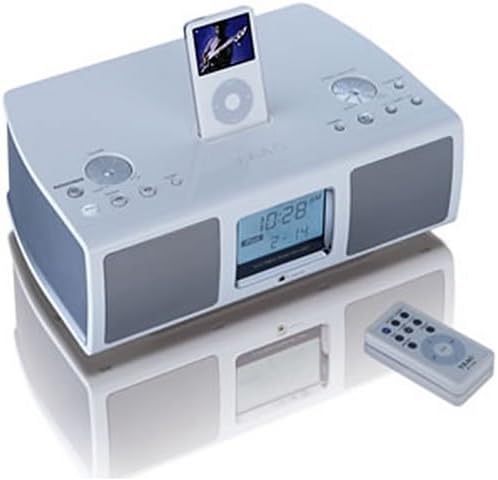
Image: The Teac SR-L200i-W Hi-Fi Table Radio in white, featuring a docked iPod, front-facing speakers, an LCD display showing time and date, and various control buttons on the top panel. A matching remote control is positioned to the right of the unit.
Key Components:
- iPod Dock: Located on the top panel for connecting and charging compatible iPod models.
- LCD Display: Shows time, radio frequency, and iPod information. Features a dimmer function.
- Control Buttons: Various buttons on the top panel for power, volume, mode selection, tuning, and alarm settings.
- Speakers: Two 2.5-inch full-range speakers for audio output.
- Remote Control Sensor: Receives signals from the included remote control.
- Headphone Jack: For private listening.
- Auxiliary Input: For connecting external audio devices.
Setup
1. Unpacking and Placement:
Carefully remove the unit from its packaging. Place the radio on a stable, flat surface away from direct sunlight, heat sources, and moisture. Ensure adequate ventilation around the unit.
2. Power Connection:
Connect the AC power cord to the power input on the back of the unit, then plug the other end into a standard wall outlet.
3. Antenna Connection:
For optimal AM/FM reception, connect the supplied AM loop antenna and FM wire antenna to their respective jacks on the rear of the unit. Adjust their position for the best signal.
4. iPod Docking:
Select the appropriate iPod dock adapter for your specific iPod model from the included accessories. Insert the adapter into the dock on the top of the unit, then carefully place your iPod into the dock. The iPod will begin charging automatically when docked.
5. Auxiliary Input:
To connect an external audio device (e.g., MP3 player, personal CD player), use a 3.5mm audio cable (not included) to connect the device's headphone or line-out jack to the AUX IN jack on the front of the SR-L200i-W.
Operating Instructions
1. Power On/Off:
Press the POWER button on the unit or the remote control to turn the unit on or off.
2. Volume Control:
Rotate the VOLUME knob on the unit or use the VOL + / - buttons on the remote control to adjust the sound level.
3. Mode Selection:
Press the MODE button on the unit or remote to cycle through available sources: iPod, FM Radio, AM Radio, and AUX.
4. iPod Playback:
- Ensure your iPod is properly docked.
- Select iPod mode using the MODE button.
- Use the iPod's controls or the remote control's iPod-specific buttons (Play/Pause, Skip, etc.) to manage playback.
5. Radio Operation (AM/FM):
- Select AM or FM mode using the MODE button.
- Manual Tuning: Use the TUNE + / - buttons on the unit or remote to manually adjust the frequency.
- Auto Scan: Press and hold the TUNE + / - buttons to automatically scan for the next available station.
- Presets: The unit supports 10 AM and 10 FM station presets. To store a station, tune to the desired frequency, then press and hold a PRESET number button until the display confirms storage. To recall a preset, press the corresponding PRESET number button.
6. Clock and Alarm Functions:
- Setting the Clock: Refer to the detailed instructions in the full user manual for setting the current time.
- Setting the Alarm: The SR-L200i-W allows you to set an alarm to wake to either the AM/FM tuner or your docked iPod. Consult the full user manual for specific alarm setting procedures.
- Sleep Timer: Activate the sleep timer function to automatically turn off the unit after a set period (e.g., 90, 60, 30 minutes).
7. LCD Display and Dimmer:
The large LCD display shows relevant information. Use the DIMMER button on the unit or remote to adjust the brightness of the display for comfortable viewing, especially in low-light conditions.
8. Remote Control:
The included remote control provides convenient access to most functions, including power, volume, mode selection, tuning, iPod playback controls, and alarm settings. Ensure the remote is pointed towards the unit's sensor during use.
Maintenance
Cleaning:
Wipe the exterior of the unit with a soft, dry cloth. Do not use abrasive cleaners, waxes, or solvents. Ensure the unit is unplugged before cleaning.
iPod Dock:
Keep the iPod dock connector free of dust and debris to ensure proper connection and charging.
Troubleshooting
| Problem | Possible Cause | Solution |
|---|---|---|
| No power | Power cord not connected; power outlet not active | Ensure power cord is securely plugged in; test outlet with another device. |
| No sound | Volume too low; incorrect mode selected; headphones connected | Increase volume; select correct source mode (iPod, AM, FM, AUX); disconnect headphones. |
| iPod not playing/charging | iPod not properly docked; incorrect adapter; iPod issue | Re-dock iPod; ensure correct adapter is used; check iPod functionality independently. |
| Poor radio reception | Antenna not connected/positioned correctly; interference | Connect and adjust AM/FM antennas; move unit away from other electronic devices. |
| Remote control not working | Batteries depleted; obstruction; not pointing at sensor | Replace remote batteries; remove obstructions; point remote directly at the unit's sensor. |
Specifications
- Model: SR-L200i-W
- Product Dimensions (W x H x D): 13.5 x 4.38 x 9.12 inches (34.3 x 11.1 x 23.2 cm)
- Item Weight: Approximately 8 pounds (3.6 kg)
- Speakers: Two 2.5-inch, full-range dynamic speakers
- Tuner: Digital AM/FM tuner with 10 AM and 10 FM presets
- Connectivity: iPod Dock, Auxiliary Input (3.5mm), Headphone Jack
- Display: Large LCD with dimmer function
- Power Source: AC power
- Color: White
Warranty Information
The Teac SR-L200i-W Hi-Fi Table Radio with iPod Dock comes with a one-year limited warranty from the date of purchase. This warranty covers manufacturing defects under normal use. Please retain your proof of purchase for warranty claims. For specific terms and conditions, refer to the warranty card included with your product or contact Teac customer support.
Customer Support
If you encounter any issues not covered in the troubleshooting section or require further assistance, please contact Teac customer support. Visit the official Teac website for contact information, FAQs, and additional resources.