
Introduction
This manual provides detailed instructions for the operation and maintenance of your Bulova Men's 98C59 Dial Watch. Please read this manual thoroughly to ensure proper use and to maximize the lifespan of your timepiece.
The Bulova 98C59 is a sport chronograph watch featuring a solid black steel case, a coordinating steel bracelet, and a grey dial with luminous hands and markers. It includes two digital display windows for various functions such as alarm, 12/24 hour time, countdown timer, and digital display of day, date, and time. A unidirectional rotating bezel is included for elapsed time measurement. This watch is powered by Japanese quartz movement and is water resistant to 100 meters.
Package Contents
Upon opening your Bulova watch package, please verify that all items are present and in good condition.
- Bulova Men's 98C59 Dial Watch
- Instruction Manual (this document)
- Warranty Information Card

Image: The Bulova 98C59 watch presented in its original packaging, showcasing the watch and box.
Watch Components
Familiarize yourself with the key components of your Bulova 98C59 watch. Refer to the image below for visual identification.
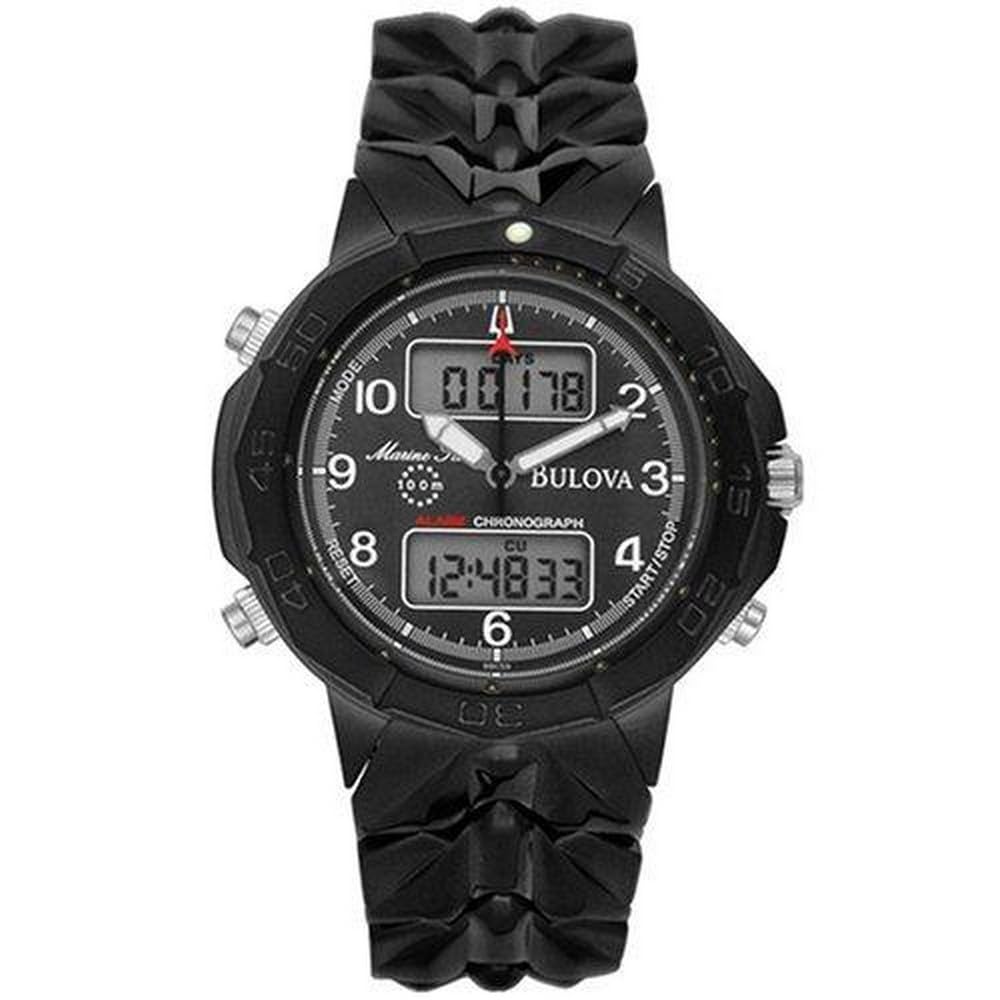
Image: A clear front view of the Bulova 98C59 watch, displaying the analog dial, digital windows, crown, and pushers.
- Crown: Located on the right side of the watch case, used for setting analog time.
- Pushers (A, B, C): Buttons typically located on the sides of the watch case, used for operating digital functions such as alarm, chronograph, and date.
- Unidirectional Rotating Bezel: The outer ring of the watch face, designed to rotate in one direction for measuring elapsed time.
- Analog Dial: The main watch face displaying hours, minutes, and seconds with luminous hands and markers.
- Digital Display Windows: Two small screens on the dial that show digital time, date, alarm, and timer functions.
- Bracelet: The stainless steel band that secures the watch to your wrist, featuring a foldover buckle with a safety clasp.
Setup and Initial Operation
Setting Analog Time
- Pull the crown out to the first click position.
- Rotate the crown to set the hour and minute hands to the desired time.
- Push the crown back in to the normal position to start the watch.
Setting Digital Time and Date
The digital display offers 12/24 hour format, date, day, and time. Specific button functions may vary slightly; refer to the detailed instructions below for common operations.
- Mode Selection: Press the top-left pusher (Button A) repeatedly to cycle through modes: Time, Date, Alarm, Chronograph, Countdown Timer.
- Setting Time/Date: When in Time/Date mode, press and hold the bottom-left pusher (Button B) to enter setting mode. The digits will flash.
- Adjusting Values: Use the top-right pusher (Button C) to increase the flashing value (hours, minutes, year, month, day).
- Moving to Next Setting: Use the top-left pusher (Button A) to move to the next setting field.
- Exiting Setting Mode: Press the bottom-left pusher (Button B) again to exit setting mode.
Using the Chronograph (Stopwatch)
- Enter Chronograph mode by pressing Button A until "CHRONO" or similar appears on the digital display.
- Press Button C to start the chronograph.
- Press Button C again to stop the chronograph.
- Press Button B to reset the chronograph to zero.
Setting and Using the Alarm
- Enter Alarm mode by pressing Button A until "ALARM" appears.
- Press and hold Button B to enter alarm setting mode. The hour digits will flash.
- Use Button C to adjust the hour. Press Button A to move to minutes.
- Use Button C to adjust the minutes.
- Press Button B to confirm and exit setting mode.
- To activate/deactivate the alarm, press Button C while in Alarm mode (a bell icon usually indicates activation).
Using the Unidirectional Rotating Bezel
The bezel rotates in one direction only to prevent accidental changes that would indicate a shorter elapsed time. It is useful for timing events up to 60 minutes.
- Align the triangle marker on the bezel with the minute hand at the start of the event you wish to time.
- As time passes, the minute hand will move past the bezel markers. The number on the bezel that the minute hand points to indicates the elapsed time in minutes.
Maintenance and Care
- Cleaning: Wipe the watch case and bracelet regularly with a soft, dry cloth. For stainless steel, a slightly damp cloth can be used, followed by immediate drying. Avoid harsh chemicals or abrasive materials.
- Water Resistance: Your Bulova 98C59 watch is water resistant to 100 meters (330 feet). This means it is suitable for swimming and snorkeling, but not for scuba diving. Do not operate the crown or pushers while the watch is wet or submerged. Ensure the crown is fully pushed in before exposing the watch to water.
- Temperature: Avoid exposing your watch to extreme temperatures (above 60°C / 140°F or below 0°C / 32°F) or sudden temperature changes.
- Shocks: While durable, avoid strong impacts or shocks to the watch.
- Chemicals: Keep the watch away from solvents, detergents, perfumes, and cosmetics, as these can damage the case, bracelet, or gaskets.
- Battery Replacement: When the digital display dims or the watch stops, the battery may need replacement. This should be performed by a qualified watch technician to ensure water resistance is maintained.
Troubleshooting
| Problem | Possible Cause | Solution |
|---|---|---|
| Analog hands not moving | Depleted battery; Crown not pushed in | Replace battery (professional service recommended); Push crown fully in. |
| Digital display is blank or dim | Depleted battery | Replace battery (professional service recommended). |
| Water inside the watch | Crown/pushers operated underwater; Gasket damage | Immediately take to a professional watch repair service. Do not attempt to dry it yourself. |
| Incorrect time/date displayed | Not set correctly; Accidental adjustment | Refer to "Setup and Initial Operation" section to reset time and date. |
Specifications
| Feature | Detail |
|---|---|
| Model Number | 98C59 |
| Movement | Japanese Quartz |
| Display Type | Analog and Digital |
| Case Material | Stainless Steel |
| Band Material | Stainless Steel |
| Dial Color | Grey |
| Band Color | Black |
| Water Resistance Depth | 100 Meters (330 Feet) |
| Clasp Type | Fold-over-clasp-with-safety |
| Case Diameter | 45 Millimeters |
| Band Width | 25 Millimeters |
| Additional Features | Chronograph, Alarm, 12/24 Hour Time, Countdown Timer, Unidirectional Rotating Bezel |

Image: A visual guide illustrating various watch case sizes in millimeters, providing a reference for the 45mm diameter of the Bulova 98C59.
Warranty Information
Your Bulova 98C59 Dial Watch is covered by a manufacturer's warranty. The specific terms and duration of the warranty are provided with your purchase on the included warranty card. Please retain your proof of purchase for warranty claims.
For detailed warranty information and to register your product, please visit the official Bulova website or contact Bulova customer service.
Customer Support
Should you require further assistance, have questions about your watch, or need service, please contact Bulova customer support.
- Official Bulova Website: www.bulova.com
- Bulova Store on Amazon: Visit the Bulova Store
- Refer to your warranty card for specific contact details in your region.

