
Introduction
The Tripp Lite SU6000RT4U is a 6000VA/4200W Smart Online Rackmount Uninterruptible Power Supply (UPS) system designed to provide the highest level of power protection for mission-critical equipment. This UPS features true on-line operation with pure sine wave output, ensuring zero transfer time to battery power during outages. It isolates connected components from power outages, voltage fluctuations, and transient surges by converting incoming AC power to DC and then back to filtered AC output. The unit's detachable PDU and hot-swappable power and battery modules allow for maintenance and replacement without system downtime.
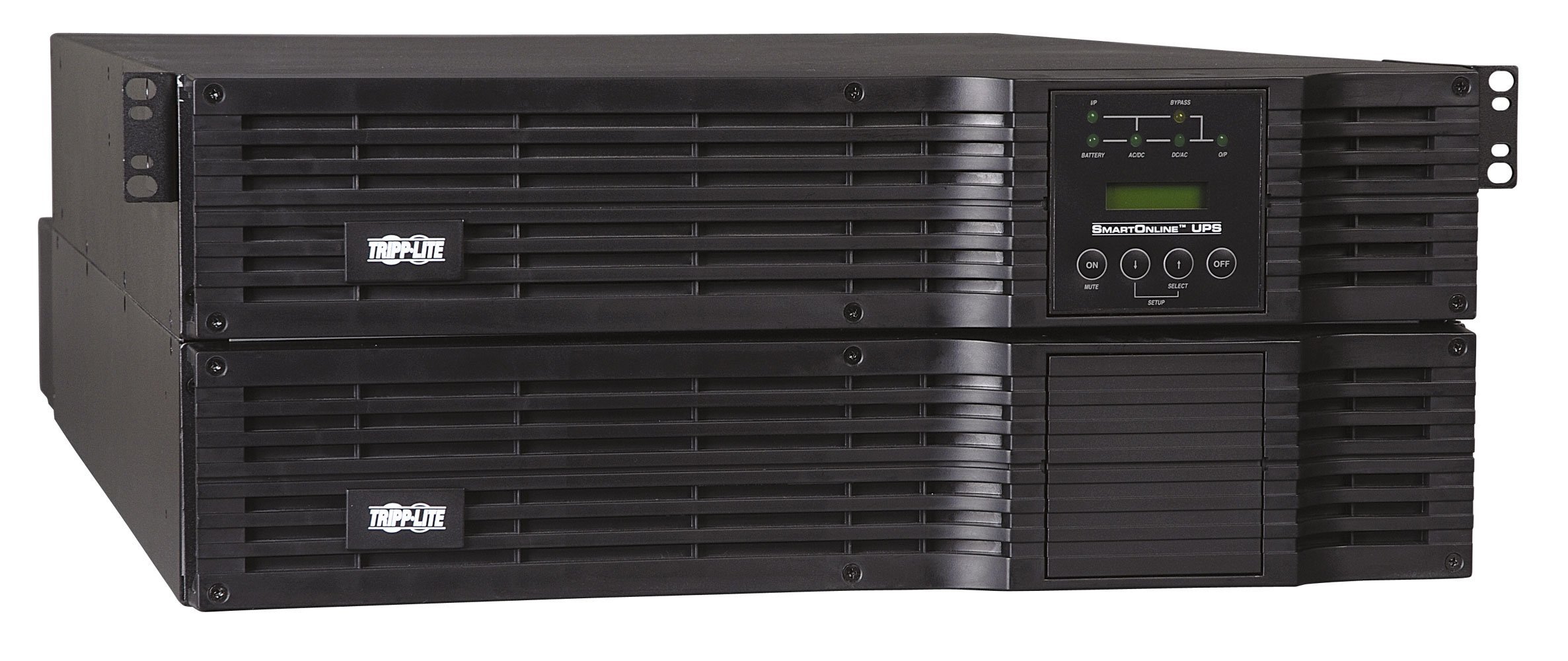
Figure 1: Front view of the Tripp Lite SU6000RT4U UPS.
Package Contents
- SU6000RT4U UPS System (with SUPDMB56 detachable PDU module)
- USB, DB9, and EPO cabling
- Rackmount installation kit for 4-post rack enclosures
- Owner's manual and warranty information
Key Features
- True online, double-conversion UPS provides pure, full-time sine wave AC output free of surges, voltage fluctuations, and line noise.
- 6000VA/4200 watt output power capacity with dual voltage output of 208/120V or 240/120V.
- 4U all-in-one high power density housing supports rackmount installation in only 4 rack spaces.
- Dual conversion UPS actively converts raw input from AC to DC, then back to perfect sine wave AC output with enhanced protection from harmonic distortion, fast electrical impulses, and other power problems.
- Input cord and outlets are mounted on a detachable backplate with a manual bypass switch to enable hot-swappable UPS replacement without powering off connected equipment.
- Highly efficient (94%) economy mode setting reduces energy costs by minimizing heat output and cooling requirements.
- LCD display with LED indicators for monitoring operating modes and conditions.
- USB and DB9 ports for comprehensive network power monitoring and control with Tripp Lite's PowerAlert software.
- Optional network accessory card for network managed device operation.
Setup & Installation
The SU6000RT4U is designed for flexible installation in various environments. It requires 4U of rack space in a standard rack enclosure. An included rackmount installation kit facilitates mounting in 4-post rack enclosures. For 2-post rack installations, the optional 2POSTRMKITHD accessory is required. The unit can also be configured in a tower setup using the optional 2-9USTAND accessory.
Rackmount Installation
- Ensure the rack is stable and capable of supporting the UPS weight (189.2 lbs).
- Attach the included rackmount rails to the rack posts according to the instructions provided with the rackmount kit.
- Carefully slide the UPS unit onto the installed rails and secure it with the provided screws.
- Connect the input power cord to a compatible NEMA L14-30P 4-wire split-phase input.
- Connect your equipment to the appropriate AC outlets (8 5-15/20R; 2 L6-20R; 2 L6-30R).

Figure 2: Tripp Lite SU6000RT4U UPS installed in a rack.
Rear Panel Connections
The rear panel of the UPS features various input and output connections, including the NEMA L14-30P input, 5-15/20R, L6-20R, and L6-30R outlets, as well as USB and DB9 communication ports. A manual bypass switch is also located on the detachable PDU module.

Figure 3: Rear panel connections of the SU6000RT4U UPS.
Operation
True Online Double-Conversion
The SU6000RT4U operates in true online, double-conversion mode, providing continuous, regulated AC power to your connected equipment. This means the UPS constantly converts incoming AC to DC, then back to AC, effectively isolating your devices from all power disturbances, including blackouts, brownouts, surges, and line noise. This process ensures a pure sine wave output with precisely regulated voltage, crucial for sensitive electronics.
Economy Mode
For enhanced energy efficiency, the UPS features an economy mode setting. When enabled, this mode optimizes power consumption, reducing heat output and cooling requirements, which can lead to significant savings in operating costs. The UPS automatically switches to online mode if power quality degrades.
Dual Voltage Output
The unit supports both high-voltage (208V/240V) and low-voltage (120V) output, making it versatile for various equipment requirements. Ensure your devices are connected to the appropriate outlets.
Hot-Swap Capability
The SU6000RT4U features a detachable PDU and hot-swappable power and battery modules. This design allows for maintenance, repair, or replacement of these modules without powering down connected equipment, ensuring continuous operation and eliminating downtime.

Figure 4: Illustration of the hot-swap capability, showing power flow in normal and bypass modes.
Monitoring and Control
An integrated LCD display with LED indicators provides real-time information on operating modes and conditions. The panel can rotate for optimal viewing in both horizontal rack and vertical tower installations. For advanced monitoring and control, connect the UPS via its USB or DB9 port to a computer running Tripp Lite's PowerAlert software. An optional network accessory card can enable the UPS to function as a network-managed device.
Video 1: Overview of the Tripp Lite SU6000RT4U UPS system, highlighting its features and benefits for critical server and network equipment protection.
Maintenance
Regular maintenance ensures the longevity and optimal performance of your UPS. The hot-swappable design of the power and battery modules simplifies routine service. In bypass mode, the PDU continues to supply power to connected equipment, allowing the power and battery modules to be safely removed for inspection or replacement without interrupting your application.
Battery Replacement
The UPS utilizes lead-acid batteries. Over time, batteries will require replacement. The hot-swappable battery modules allow for replacement without powering down the UPS or connected equipment. Refer to the detailed instructions in the full owner's manual for the specific battery replacement procedure. Runtime can be extended with optional external battery packs.
Troubleshooting
If you encounter issues with your SU6000RT4U UPS, consult the following general guidelines. For detailed troubleshooting steps and error code explanations, refer to the comprehensive owner's manual or Tripp Lite's PowerAlert software documentation.
- No Power Output: Verify the input power connection, check circuit breakers, and ensure the UPS is not in a fault state.
- Audible Alarms: The UPS includes an audible alarm system. Refer to the LCD display for specific alarm codes and their meanings. Common alarms include battery low, overload, or system fault.
- Short Battery Runtime: This may indicate aging batteries. Consider replacing the battery modules or adding optional external battery packs.
- Communication Issues: Ensure USB or DB9 cables are securely connected. Verify that Tripp Lite PowerAlert software is correctly installed and configured.
If problems persist, contact Tripp Lite technical support for assistance.
Specifications
| Feature | Detail |
|---|---|
| Brand | TRIPP LITE |
| Model Number | SU6000RT4U |
| Capacity (VA/Watts) | 6000VA / 4200W |
| Input Voltage | 240 Volts (AC) |
| Output Voltage | 208V/240V/120V (AC) |
| Output Current | 17.5 Amps |
| Number of Outlets | 12 (8 x 5-15/20R; 2 x L6-20R; 2 x L6-30R) |
| Power Plug Type | Type B - 3 pin (North American & Japanese) |
| Connector Type | NEMA, USB, DB9 |
| Form Factor | Rack (4U) |
| Battery Cell Composition | Lead Acid |
| Item Weight | 189.2 Pounds |
| Item Dimensions (LxWxH) | 13.25 x 37 x 23 inches |
| Enclosure Material | Metal |
| Frequency Range | 50/60 Hz |
Warranty & Support
The Tripp Lite SU6000RT4U UPS comes with a 2-year limited warranty. Additionally, it includes $250,000 Ultimate Lifetime Insurance (U.S., Canada, and Puerto Rico only) for connected equipment, providing peace of mind for your valuable assets.
For technical assistance, warranty claims, or further information, please refer to the contact details provided in your owner's manual or visit the official Tripp Lite website.
Customer Support: For support inquiries, please visit the Tripp Lite Customer Support page.


