
Product Overview
The INNOVA 3320 is an Auto-Ranging Multimeter designed to accurately troubleshoot a variety of automotive and household electrical problems. The auto-ranging scales eliminate the need to dial in the correct range when making electronic measurements. The 10 MegOhm input is safe for automotive and household uses (i. e., household outlets, fuses, wiring, general-purpose batteries, vehicle battery and charging system, automotive circuits and more). The color-coded LEDs allow you to quickly check household batteries (green = good, yellow = weak and red = replace). Includes attachable test leads, holders and stand for hands free use and features protective rubber corner guards for drop protection. The INNOVA 3320 has a single setting resistance function for AC and DC voltage.
Setup
Battery Installation
The INNOVA 3320 Multimeter requires 2 AAA batteries (included). To install or replace batteries, locate the battery compartment on the back of the unit, open it, insert the batteries according to polarity markings, and securely close the compartment.
Connecting Test Leads
Connect the black test lead to the 'COM' (Common) input jack. Connect the red test lead to the appropriate input jack based on the measurement you intend to perform. For most voltage, resistance, and battery tests, use the 'VΩmA' input jack. For high current (10A) measurements, use the 'DC10A' input jack.
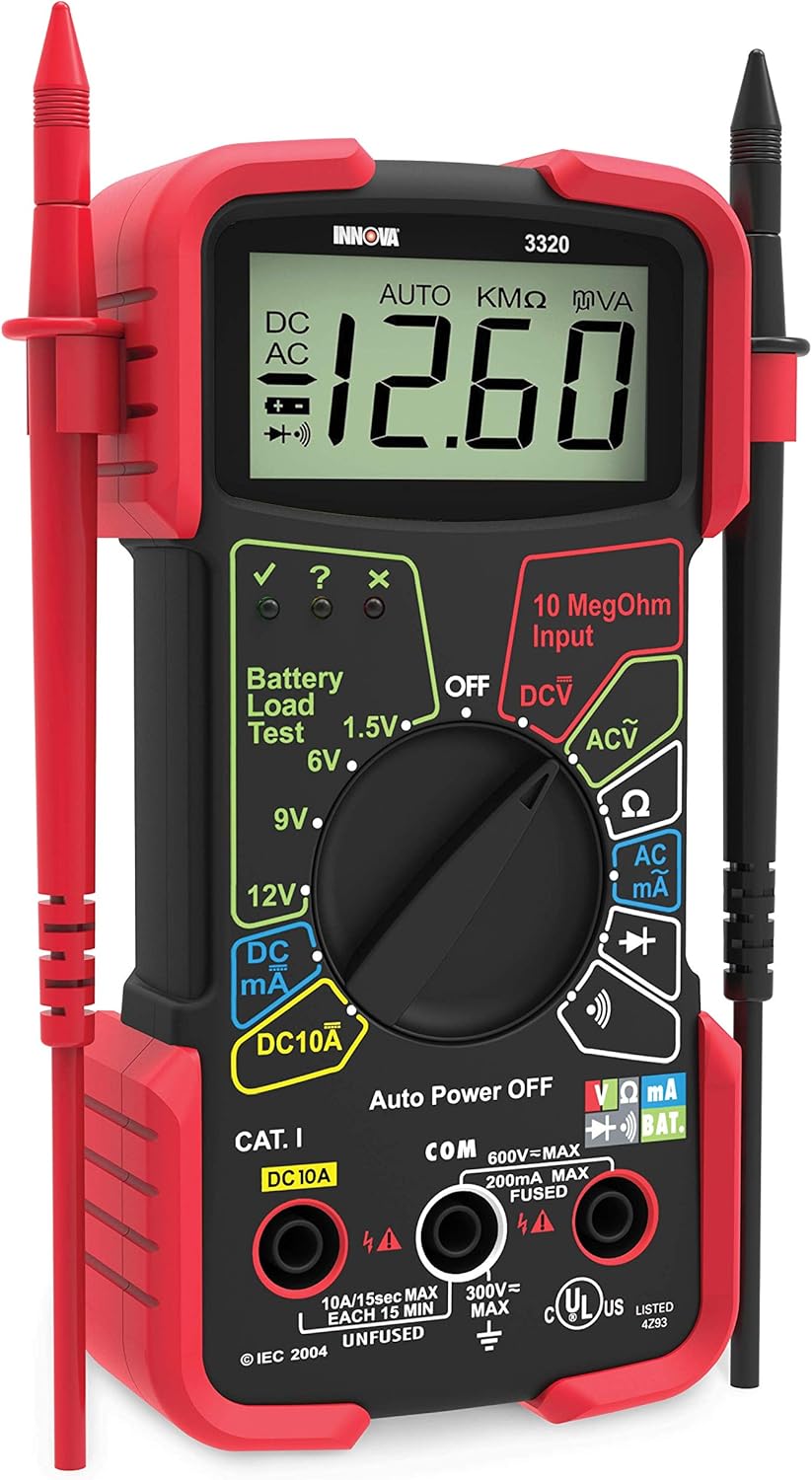
The INNOVA 3320 Multimeter with its test leads properly connected. The red lead is typically for positive connections and the black lead for common/negative connections.

The INNOVA 3320 Multimeter featuring its integrated stand and convenient test lead holders for organized and hands-free use.
Operating Instructions
Function Selection
The INNOVA 3320 features auto-ranging capabilities, simplifying measurements by automatically selecting the correct range. Use the central rotary dial to select the desired measurement function (e.g., DCV for DC Voltage, ACV for AC Voltage, Ω for Resistance, DC mA/DC 10A for Current, Battery Load Test).
Voltage Measurement (DCV/ACV)
Turn the rotary dial to 'DCV' for Direct Current voltage or 'ACV' for Alternating Current voltage. Connect the red test lead to the positive point and the black test lead to the negative/common point of the circuit or component being measured. The reading will appear on the large digital display.

The INNOVA 3320 Multimeter in use, measuring the voltage of a car battery. The auto-ranging feature simplifies the measurement process.

Measuring voltage from a household outlet using the INNOVA 3320 Multimeter, demonstrating its versatility for home electrical problems.
Resistance Measurement (Ω)
Turn the rotary dial to the 'Ω' (Resistance) setting. Ensure the circuit is de-energized before measuring resistance. Connect the test leads across the component. The display will show the resistance value in Ohms (Ω), Kilohms (KΩ), or Megohms (MΩ).

The INNOVA 3320 Multimeter being used to test components on a circuit board, ideal for electronics diagnostics.
Battery Load Test
Select the appropriate battery voltage (1.5V, 6V, 9V, or 12V) on the rotary dial. Connect the red lead to the positive terminal and the black lead to the negative terminal of the battery. The color-coded LEDs on the multimeter will indicate the battery's charge status: Green for good, Yellow for weak, and Red for replace.

The INNOVA 3320 Multimeter being used to test the battery of a drone, showcasing its application for various electronic devices.
Maintenance
To ensure the longevity and accuracy of your INNOVA 3320 Multimeter, follow these maintenance guidelines:
- Cleaning: Wipe the meter with a damp cloth and mild detergent. Do not use abrasives or solvents.
- Battery Replacement: Replace batteries when the low battery indicator appears on the display to ensure accurate readings.
- Storage: Store the multimeter in a cool, dry place away from direct sunlight and extreme temperatures. Remove batteries if storing for extended periods.
- Test Leads: Inspect test leads regularly for any signs of damage or wear. Replace them if necessary to maintain safety and performance.
Troubleshooting
If you encounter issues with your INNOVA 3320 Multimeter, consider the following common troubleshooting steps:
- No Display or Faint Display: Check the batteries. Ensure they are correctly installed and have sufficient charge. Replace if necessary.
- Incorrect Readings: Verify that the test leads are securely connected to the correct input jacks for the selected function. Ensure the rotary dial is set to the appropriate measurement function.
- Fluctuating Readings: This can sometimes occur due to electrical interference or unstable connections. Ensure leads are firmly connected and the circuit is stable.
- No Continuity Beep: Ensure the meter is set to the continuity function. Check the test leads for continuity by touching them together; the meter should beep.
For persistent issues, refer to the comprehensive user manual or contact customer support.
Specifications

A comparison chart detailing the features and functions across different INNOVA multimeter models, including the 3320.
| Specification | Detail |
|---|---|
| Brand | Innova |
| Model | 3320 |
| Power Source | Battery Powered (1 AAA batteries required, included) |
| Color | Red & Black |
| Item Weight | 0.5 Pounds (8 ounces) |
| Item Dimensions (L x W x H) | 2 x 10 x 5 inches |
| Measurement Type | Multimeter |
| Specification Met | UL |
| Manufacturer | INNOVA |
| Country of Origin | China |
Warranty
For detailed warranty information regarding your INNOVA 3320 Auto-Ranging Digital Multimeter, please refer to the official user manual provided with your product or visit the manufacturer's website. Warranty terms and conditions may vary.
Support
For additional support, troubleshooting guides, or to explore other Innova products, please use the resources below:
- Official User Manual (PDF): Download Here
- Innova Brand Store: Visit the Innova Store on Amazon
If you require further assistance, please contact Innova customer service directly through their official website.