
1. Product Overview
The Innova 3721 Battery and Charging System Monitor instantly displays the condition of your vehicle's battery and charging system. It protects the engine computer and 12-volt accessories from surges during starting or recharging. This device easily plugs into your vehicle's cigarette lighter or power outlet to monitor battery and charging system voltage. The LCD screen displays the measured voltage with a bar graph to indicate battery charge level, and color-coded LEDs quickly identify battery charge status. The head pivots for easy viewing and angle adjustment.

Figure 1.1: Innova 3721 Battery and Charging System Monitor in its retail packaging.
2. Key Features
- Easily plugs into the vehicle's cigarette lighter or power outlet to monitor battery and charging system voltage.
- Designed for 12V negative ground systems.
- LCD screen displays measured voltage with a bar graph to indicate battery charge level.
- Color-coded LEDs quickly identify battery charge status.
- Pivoting head for easy viewing and angle adjustment.
3. Setup
The Innova 3721 monitor is designed for quick and easy setup. Follow these steps to begin monitoring your vehicle's battery and charging system:
- Locate your vehicle's 12-volt cigarette lighter or auxiliary power outlet.
- Ensure the outlet is clean and free of debris.
- Insert the Innova 3721 monitor firmly into the 12-volt power outlet. The device will power on automatically.
- Adjust the pivoting head for optimal viewing angle.

Figure 3.1: Inserting the Innova 3721 into a 12V power outlet.
4. Operation
The Innova 3721 provides two primary modes of operation to assess your vehicle's electrical system:
4.1. Battery Mode (Engine NOT Running)
In Battery Mode, the monitor checks the charge level of your vehicle's battery when the engine is off. This helps you determine if your battery has sufficient charge before starting the vehicle or if it needs recharging.
- With the vehicle's engine off, plug the Innova 3721 into the 12V power outlet.
- The LCD will display the current battery voltage.
- The color-coded LEDs will illuminate to indicate the battery's charge status:
- Green LED: Good battery charge.
- Yellow LED: Moderate charge, consider recharging.
- Red LED: Low charge, immediate recharging required.

Figure 4.1: Innova 3721 displaying voltage in a vehicle.
4.2. Charging Mode (Engine Running)
In Charging Mode, the monitor checks the performance of your vehicle's charging system (alternator). This helps ensure that your alternator is properly charging the battery while the engine is running.
- With the Innova 3721 plugged in, start your vehicle's engine.
- The LCD will display the charging system voltage.
- Observe the voltage reading and LED indicators to assess the charging system's health. A healthy charging system typically shows a voltage between 13.5V and 14.5V.
4.3. Understanding Readings
The Innova 3721 provides visual cues to help you interpret the battery and charging system status. Refer to the tables below for typical voltage ranges and their corresponding interpretations:

Figure 4.2: Close-up of the LCD display.
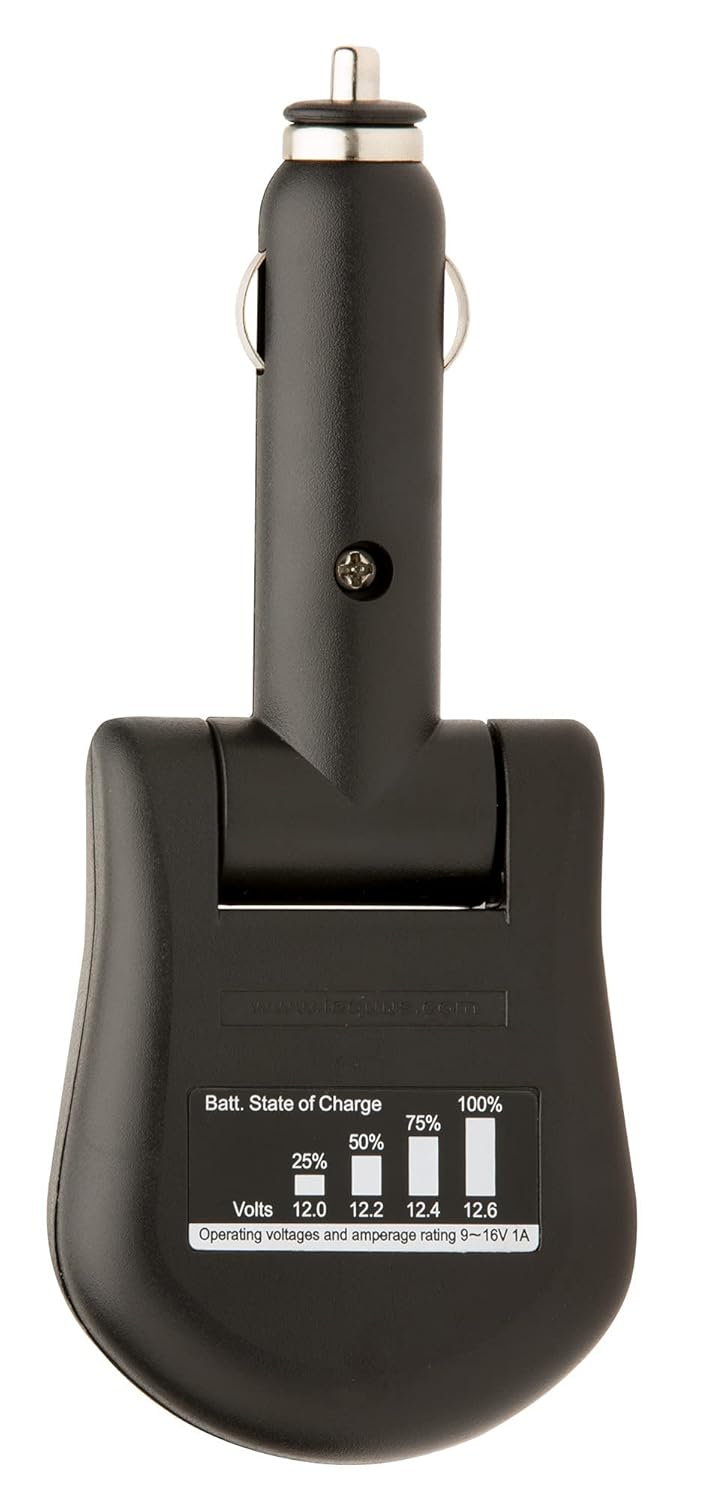
Figure 4.3: Battery State of Charge table on the device.
Battery State of Charge (Engine Off)
| Voltage (V) | Approx. State of Charge | LED Indicator |
|---|---|---|
| 12.6V+ | 100% (Fully Charged) | Green |
| 12.4V | 75% | Green |
| 12.2V | 50% | Yellow |
| 12.0V | 25% | Yellow |
| 11.8V- | Low Charge | Red |
Charging System Performance (Engine Running)
| Voltage (V) | Status | LED Indicator |
|---|---|---|
| 14.4V - 15.0V | Good Charging | Green |
| 13.3V - 14.3V | Acceptable Charging | Yellow |
| 12.6V - 13.2V | Weak Charging / No Charge | Red |

Figure 4.4: Voltage ranges for Battery and Charging Modes (from product packaging).
5. Maintenance
The Innova 3721 Battery and Charging System Monitor requires minimal maintenance to ensure its longevity and accurate performance.
- Cleaning: Periodically wipe the device with a soft, dry cloth to remove dust and grime. Do not use abrasive cleaners or solvents.
- Storage: When not in use, store the monitor in a cool, dry place away from direct sunlight and extreme temperatures.
- Connection: Ensure the 12V plug remains clean and free of corrosion for optimal electrical contact.
6. Troubleshooting
If you encounter issues with your Innova 3721 monitor, refer to the following troubleshooting guide:
| Problem | Possible Cause & Solution |
|---|---|
| No display or power when plugged in. |
|
| Inaccurate or fluctuating voltage readings. |
|
| LEDs do not match expected status. |
|
7. Specifications
| Specification | Detail |
|---|---|
| Brand | Innova |
| Item Model Number | 3721 |
| Product Dimensions (L x W x H) | 25.4 x 2.54 x 16.51 cm (10 x 1 x 6.5 inches) |
| Item Weight | 90.72 grams |
| Power Source | Battery Powered (via 12V vehicle outlet) |
| Style | 12 V |
| Color | Original Version |
| UPC | 077344875533, 043944196088, 604945305505, 042173037216, 043993994284, 074994532588 |
| International Article Number | 00042173037216 |
| Date First Available | September 21, 2022 |
8. Warranty and Support
Information regarding the specific warranty terms and customer support contact details for the Innova 3721 Battery and Charging System Monitor was not available in the provided product data. Please refer to the product packaging or the manufacturer's official website for the most current warranty information and support options.


