
Sony DSC-W100
Sony Cybershot DSC-W100 Digital Camera User Manual
Your guide to operating and maintaining your Sony Cybershot DSC-W100 8.1MP Digital Camera.
1. Introduction
The Sony Cybershot DSC-W100 is an 8.1-megapixel digital camera equipped with a 3x optical zoom Carl Zeiss Vario-Tessar lens. Designed for ease of use while offering advanced features, this camera allows for detailed image capture and creative control. Key technologies include the Super HAD (Hole Accumulated Diode) CCD for enhanced sensitivity and reduced noise, and the Real Imaging Processor for efficient image processing.
This manual provides essential information for setting up, operating, and maintaining your camera to ensure optimal performance and longevity.
2. What's in the Box
Please check that all the following items are included with your Sony Cybershot DSC-W100:
- Sony Cybershot DSC-W100 Digital Camera
- NP-BG1 Rechargeable Battery
- BC-CSG Battery Charger
- Multi-cable (USB/AV)
- Wrist Strap
- CD-ROM with drivers and software
- Instruction Manual (this document)
3. Setup
3.1. Installing the Battery
- Open the battery/Memory Stick compartment cover on the bottom of the camera.
- Insert the NP-BG1 rechargeable battery with the correct orientation, ensuring the orange lock lever clicks into place.
- Close the compartment cover securely.
3.2. Charging the Battery
Use the supplied BC-CSG battery charger to charge the NP-BG1 battery. Connect the charger to a power outlet and insert the battery. The charge indicator light will illuminate during charging and turn off when charging is complete. A full charge typically takes approximately 150 minutes.
3.3. Inserting a Memory Card
The DSC-W100 supports Memory Stick Duo and Memory Stick PRO Duo media. The camera also has 64 MB of built-in internal memory.
- Open the battery/Memory Stick compartment cover.
- Insert the Memory Stick Duo or Memory Stick PRO Duo into the slot with the label facing up, until it clicks into place.
- Close the compartment cover securely.
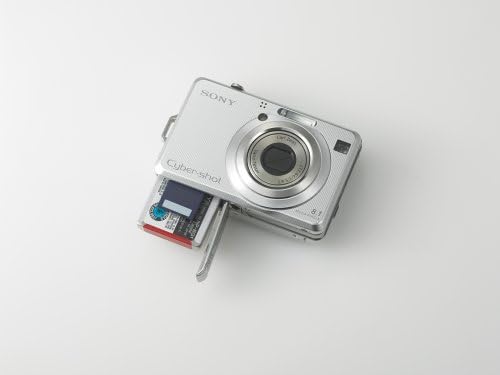
This image shows the underside of the Sony Cybershot DSC-W100 camera with the battery and Memory Stick Duo compartment door open, revealing the battery and memory card slot.
3.4. Initial Power On and Date/Time Setting
- Press the POWER button to turn on the camera.
- The first time you power on, you will be prompted to set the date and time. Use the control buttons to navigate and set the correct date, time, and time zone.
- Confirm your settings.
4. Operating the Camera
4.1. Basic Photography
To take a picture, simply point the camera at your subject and press the shutter button halfway to focus, then press it fully to capture the image. The 2.5-inch LCD screen provides a clear view of your composition.

This image displays the front of the Sony Cybershot DSC-W100, highlighting the Carl Zeiss Vario-Tessar lens, built-in flash, and Cybershot branding.
4.2. Shooting Modes
The mode dial on the back of the camera allows you to select various shooting modes:
- Auto Mode: For simple point-and-shoot operation, where the camera automatically adjusts settings.
- Program Auto (P) Mode: Allows for more control over settings like ISO and white balance, while the camera sets exposure.
- Manual (M) Mode: Provides full control over shutter speed and aperture for creative photography.
- Scene Selection Modes: Optimized settings for specific scenes like Portrait, Landscape, Night Scene, etc.
- High Sensitivity Mode (ISO 1000): Enables shooting in low-light conditions without flash, reducing blur from camera shake or subject movement.
4.3. Zoom Function
Use the zoom lever around the shutter button to adjust the focal length:
- Optical Zoom (3x): Provides high-quality magnification without image degradation.
- Digital Zoom (2x): Further magnifies the image digitally, which may result in some loss of quality.
- Smart Zoom (up to 14x): Intelligently crops the central portion of the image based on the selected picture size, minimizing quality loss compared to standard digital zoom.
4.4. Flash Settings
The built-in flash can be adjusted for various lighting conditions:
- Auto Flash: The camera automatically determines if flash is needed.
- Fill Flash (On): Flash fires for every shot.
- Flash Off: Flash does not fire.
- Slow Synch: Flash fires with a slow shutter speed, useful for illuminating both foreground and background in low light.
- Rear Curtain Synch: Flash fires just before the shutter closes, creating natural-looking light trails for moving subjects.
4.5. Reviewing Images and Videos
Press the PLAY button to enter playback mode. Use the control buttons to scroll through your photos and videos. You can zoom in on photos or play videos directly on the 2.5-inch LCD screen.
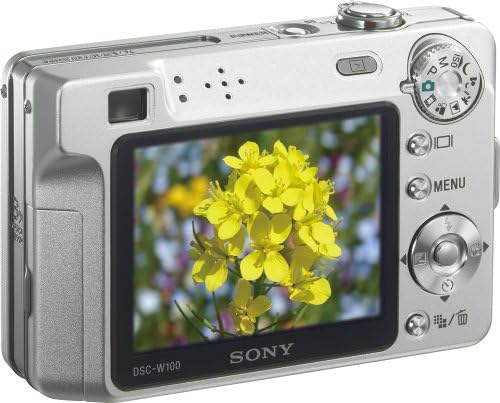
This image shows the back of the Sony Cybershot DSC-W100, featuring the 2.5-inch LCD screen displaying a vibrant yellow flower, along with control buttons and the mode dial.
4.6. Video Recording
The DSC-W100 can record video clips in MPEG Movie VX Fine Mode (VGA 640 x 480 pixels) at up to 30 frames per second. The recording length is limited only by the capacity of your Memory Stick Duo media.
- Turn the mode dial to the movie camera icon.
- Press the shutter button to start recording.
- Press the shutter button again to stop recording.
5. Maintenance
5.1. Cleaning the Camera
- Camera Body: Wipe with a soft, dry cloth. For stubborn dirt, use a cloth lightly dampened with water or a mild detergent, then wipe dry.
- Lens: Use a lens brush to remove dust, then gently wipe with a lens cleaning cloth. Avoid touching the lens surface with your fingers.
- LCD Screen: Gently wipe with a soft, dry cloth. Avoid pressing hard on the screen.
5.2. Battery Care
- Always use the genuine Sony NP-BG1 battery and BC-CSG charger.
- Avoid exposing the battery to extreme temperatures.
- If the camera will not be used for an extended period, remove the battery.
5.3. Storage
Store the camera in a cool, dry place away from direct sunlight and excessive humidity. If storing for a long time, remove the battery and memory card.
6. Troubleshooting
If you encounter issues with your camera, refer to the following common problems and solutions:
| Problem | Solution |
|---|---|
| Camera does not power on. | Ensure the battery is fully charged and correctly inserted. Try using a different charged battery if available. |
| Images are blurry. | Check focus settings. Ensure the lens is clean. Use a higher shutter speed or High Sensitivity Mode in low light. Hold the camera steady or use a tripod. |
| Flash does not fire. | Check flash mode settings (ensure it's not set to 'Flash Off'). Ensure the battery has sufficient charge. |
| Battery drains quickly. | Reduce LCD brightness. Limit excessive use of flash or video recording. Ensure the battery is fully charged before use. |
| Memory card error. | Ensure the Memory Stick Duo is inserted correctly. Try reformatting the card (this will erase all data). Use a different Memory Stick Duo if the problem persists. |
7. Specifications
| Feature | Detail |
|---|---|
| Photo Sensor Resolution | 8.1 Megapixels |
| Optical Zoom | 3x |
| Digital Zoom | 2x (Smart Zoom up to 14x) |
| Lens Type | Carl Zeiss Vario-Tessar |
| Screen Size | 2.5 Inches LCD |
| Sensor Type | Super HAD CCD |
| Maximum Shutter Speed | 1/2000 Seconds |
| Minimum Shutter Speed | 30 Seconds |
| Video Resolution | VGA (640x480) at 30 fps (MPEG VX Fine) |
| Internal Memory | 64 MB |
| Compatible Flash Memory | Memory Stick Duo / PRO Duo |
| Connectivity | USB |
| Battery Type | NP-BG1 Lithium Ion Rechargeable |
| Weight | 0.42 Pounds (approx. 190g) |
| Dimensions (WxHxD) | Approx. 90 x 56 x 23 mm (3.5 x 2.2 x 0.9 inches) |
8. Warranty and Support
8.1. Warranty Information
This product is covered by a Sony USA 1-Year Warranty. Please refer to the warranty card included in your product packaging for specific terms and conditions. Keep your proof of purchase for warranty claims.
8.2. Customer Support
For technical assistance, troubleshooting beyond this manual, or warranty service, please contact Sony customer support. You can find contact information on the official Sony website or in the documentation provided with your camera.
Before contacting support, please have your camera model number (DSC-W100) and serial number ready.
Related documentsDSC-W100


Ask a question about this manual
Ask about setup, troubleshooting, compatibility, parts, safety, or missing instructions. Manuals+ will review the question and use this page’s manual context to help answer it.