
BOSS DD-3
BOSS DD-3 Digital Delay Pedal Instruction Manual
Model: DD-3 | Brand: BOSS
1. Product Overview
The BOSS DD-3 Digital Delay Pedal is a compact effect unit designed to provide high-quality digital delay. It offers a range of delay times and modes, making it versatile for various musical applications. Its straightforward controls ensure ease of use, delivering professional-grade delay effects in a durable stompbox format.

2. Setup
2.1 Power Supply
The DD-3 can be powered by a 9V battery (included) or an optional PSA-series AC adapter (sold separately). Ensure the power source is stable and provides the correct voltage to prevent damage.
2.2 Connecting Your Pedal
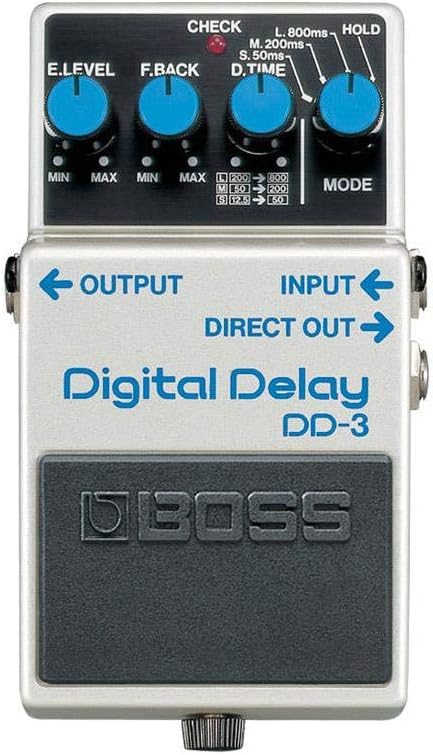
Connect your instrument to the INPUT jack. Connect the OUTPUT jack to your amplifier or the next pedal in your signal chain. For a wet/dry setup, use the DIRECT OUT jack to send the dry signal to a separate amplifier.

3. Operating the DD-3
The DD-3 features four main control knobs to shape your delay sound:
- E.LEVEL (Effect Level): Adjusts the volume of the delayed sound. Turn clockwise to increase the effect level.
- F.BACK (Feedback): Controls the number of repeats. Higher settings result in more repeats, creating longer, more ambient delays.
- D.TIME (Delay Time): Sets the interval between repeats. This knob offers a range from 12.5ms to 800ms, allowing for short slap-back echoes to long, atmospheric delays.
- MODE: Selects the delay range or special functions:
- S (Short): 12.5ms - 50ms
- M (Medium): 50ms - 200ms
- L (Long): 200ms - 800ms
- HOLD: Repeats the sound indefinitely for interesting textural effects.
4. Maintenance
To ensure the longevity and optimal performance of your BOSS DD-3 pedal, follow these maintenance guidelines:
- Cleaning: Use a soft, dry cloth to wipe down the pedal. Avoid abrasive cleaners or solvents.
- Battery Replacement: If using battery power, replace the AA battery when the CHECK indicator dims or the sound becomes weak. To replace, unscrew the thumbscrew on the footswitch, lift the pedal, and access the battery compartment.
- Storage: Store the pedal in a cool, dry place away from direct sunlight and extreme temperatures when not in use.
5. Troubleshooting
If you encounter issues with your DD-3, try the following:
- No Sound: Check all cable connections (input, output, power). Ensure the power supply is working correctly or replace the battery. Verify that your amplifier is on and functioning.
- Weak or Distorted Sound: This may indicate a low battery. Replace the battery or use an AC adapter. Check cable integrity for any damage.
- Unexpected Delay Behavior: Review the D.TIME and F.BACK knob settings. Ensure the MODE knob is set to your desired delay range (S, M, L) and not HOLD, unless intended.
- Pedal Not Turning On/Off: Ensure the footswitch is fully depressed. If using battery, check battery condition.
6. Specifications
| Feature | Specification |
|---|---|
| Model Number | DD-3 |
| Item Weight | 0.02 ounces (0.57 Grams) |
| Product Dimensions | 7.99 x 10 x 7.99 inches |
| Batteries | 1 AA battery required (included) |
| Battery Type | Alkaline |
| Power Source | Corded Electric |
| Voltage | 9 Volts |
| Color | white |
| Hardware Interface | 1/4-inch Audio |
| Signal Format | Digital |
| Size | Compact |
7. Warranty and Support
The BOSS DD-3 Digital Delay Pedal comes with a BOSS 5-year warranty, ensuring long-term reliability and support for your product. For technical assistance, service, or further inquiries, please refer to the official BOSS website or contact their customer support channels.
For additional resources and product information, visit the BOSS Store on Amazon.
Ask a question about this manual
Ask about setup, troubleshooting, compatibility, parts, safety, or missing instructions. Manuals+ will review the question and use this page’s manual context to help answer it.