
1. Introduction
This manual provides instructions for the proper use and care of your Kenko 3X Pro Telephoto Lens. This lens is designed to enhance the telephoto capabilities of cameras equipped with 28mm, 30mm, or 30.5mm mounting threads.
Please read this manual thoroughly before using the product to ensure optimal performance and longevity.
2. Product Overview
The Kenko 3X Pro Telephoto Lens is a high-resolution tele-conversion lens that extends the focal length of your camera's existing lens. It is compatible with various camera models through its interchangeable mounting system.
- 3.0x Hi-Resolution Tele-Conversion: Magnifies your camera's optical zoom by 3 times.
- Interchangeable Mounting: Designed for cameras with 28mm, 30mm, or 30.5mm filter thread sizes.
- Focal Length Conversion: Converts a maximum optical zoom equivalent of 105mm to a focal length equivalent of 315mm.
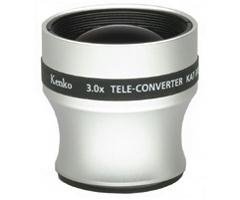
Figure 1: Kenko 3X Pro Telephoto Lens. This image displays the compact design of the telephoto lens, highlighting its optical elements and the universal mounting thread.
3. Setup and Installation
- Identify Camera Thread Size: Determine the filter thread size of your camera's existing lens. This lens is compatible with 28mm, 30mm, or 30.5mm threads.
- Remove Lens Cap: Carefully remove the front lens cap from your camera's lens and the rear cap from the Kenko telephoto lens.
- Attach Telephoto Lens: Align the threads of the Kenko 3X Pro Telephoto Lens with the filter threads on your camera's lens. Gently rotate the telephoto lens clockwise until it is securely fastened. Do not overtighten.
- Verify Attachment: Ensure the telephoto lens is firmly attached and does not wobble.
Note: If your camera's lens has a different thread size, an appropriate step-up or step-down ring (sold separately) may be required for attachment.
4. Operating Instructions
Once the Kenko 3X Pro Telephoto Lens is attached, your camera's optical zoom capabilities will be extended. The lens operates passively, meaning it does not require separate power or controls.
- Zoom Functionality: Continue to use your camera's built-in zoom controls. The telephoto lens will multiply the effective focal length by 3.0x. For example, a 105mm equivalent focal length will become 315mm.
- Focusing: Your camera's autofocus system should continue to function normally. For best results, ensure adequate lighting and contrast in your subject.
- Image Stabilization: If your camera or existing lens has optical image stabilization, it will continue to operate and is recommended for use with the telephoto lens, especially at longer focal lengths.
Tip: When using telephoto lenses, minor camera shake can be magnified. Consider using a tripod or increasing your shutter speed for sharper images.
5. Maintenance and Care
Proper maintenance ensures the longevity and performance of your telephoto lens.
- Cleaning the Lens: Use a soft, lint-free microfiber cloth specifically designed for optical lenses. For stubborn smudges, a small amount of lens cleaning solution can be applied to the cloth (not directly to the lens).
- Dust Removal: Use a blower brush to remove dust particles from the lens surface before wiping. Avoid using abrasive materials or harsh chemicals.
- Storage: When not in use, store the lens with its front and rear caps attached in a dry, cool place, away from direct sunlight and extreme temperatures.
- Water Resistance: This product is not water resistant. Avoid exposure to water, rain, or high humidity.
6. Troubleshooting
If you encounter issues with your Kenko 3X Pro Telephoto Lens, consider the following:
- Blurry Images:
- Ensure the lens is securely attached to your camera.
- Check if the camera's autofocus is functioning correctly.
- Verify that the lens surfaces are clean and free of smudges or dust.
- Consider using a tripod or increasing shutter speed to mitigate camera shake, especially at high zoom levels.
- Vignetting (Dark Corners):
- This can sometimes occur with auxiliary lenses, especially at wider angles or specific camera settings. Adjusting your camera's zoom slightly may reduce this effect.
- Difficulty Attaching Lens:
- Confirm your camera's lens filter thread size matches one of the compatible sizes (28mm, 30mm, 30.5mm).
- Ensure threads are clean and free of debris.
7. Specifications
| Feature | Detail |
|---|---|
| Model Name | KAT-300 PRO |
| Brand | Kenko |
| Lens Type | Telephoto (Conversion Lens) |
| Magnification | 3.0x |
| Compatible Mounting Threads | 28mm, 30mm, 30.5mm |
| Equivalent Focal Length Conversion | 105mm to 315mm (max optical zoom) |
| Focus Type | Utilizes camera's Auto Focus |
| Image Stabilization | Utilizes camera's Optical Image Stabilization |
| Water Resistance Level | Not Water Resistant |
| Item Weight | 12 ounces (approx. 340 grams) |
8. Warranty Information
Specific warranty terms and conditions for the Kenko 3X Pro Telephoto Lens may vary by region and retailer. Please refer to the warranty card included with your purchase or contact the authorized Kenko distributor or your point of purchase for detailed warranty information.
Retain your proof of purchase for any warranty claims.
9. Customer Support
For technical assistance, product inquiries, or service, please contact Kenko customer support or visit the official Kenko website.
Kenko Official Website: Visit the Kenko Store on Amazon
Please have your product model name (KAT-300 PRO) and purchase details ready when contacting support.