
1. Introduction
Thank you for purchasing the Pyle PPHP1599AI Portable Powered Speaker System. This manual provides important information regarding the setup, operation, and maintenance of your speaker system. Please read this manual thoroughly before using the product to ensure proper function and to maximize your listening experience. Keep this manual for future reference.
2. Important Safety Instructions
- Power Source: Connect the unit only to an AC power outlet of the specified voltage (110/220 AC).
- Ventilation: Do not block any ventilation openings. Ensure adequate airflow around the unit.
- Water and Moisture: Do not expose this appliance to rain or moisture. Do not place objects filled with liquids, such as vases, on the apparatus.
- Heat: Do not place near any heat sources such as radiators, heat registers, stoves, or other apparatus (including amplifiers) that produce heat.
- Cleaning: Unplug this apparatus before cleaning. Clean only with a dry cloth.
- Servicing: Do not attempt to service this product yourself. Refer all servicing to qualified service personnel.
- Placement: Ensure the speaker is placed on a stable, level surface or mounted securely on a 35mm speaker stand.
- Cables: Protect the power cord from being walked on or pinched, particularly at plugs, convenience receptacles, and the point where they exit from the apparatus.
3. Package Contents
Carefully unpack your Pyle PPHP1599AI speaker system and ensure all items are present and in good condition. If any items are missing or damaged, contact your dealer immediately.
Included Components:
- Pyle PPHP1599AI 15-inch 1600 Watt Portable Powered Speaker System with Built-in iPod Dock
- Power Cable
- User Manual (this document)
4. Product Overview
The Pyle PPHP1599AI is a 2-way, 2-speaker professional powered loudspeaker system featuring a 15-inch subwoofer and a 1.75-inch titanium compression driver. It includes a built-in digital amplifier, MP3 control with an LCD display, USB input, and an iPod docking station for versatile audio playback.
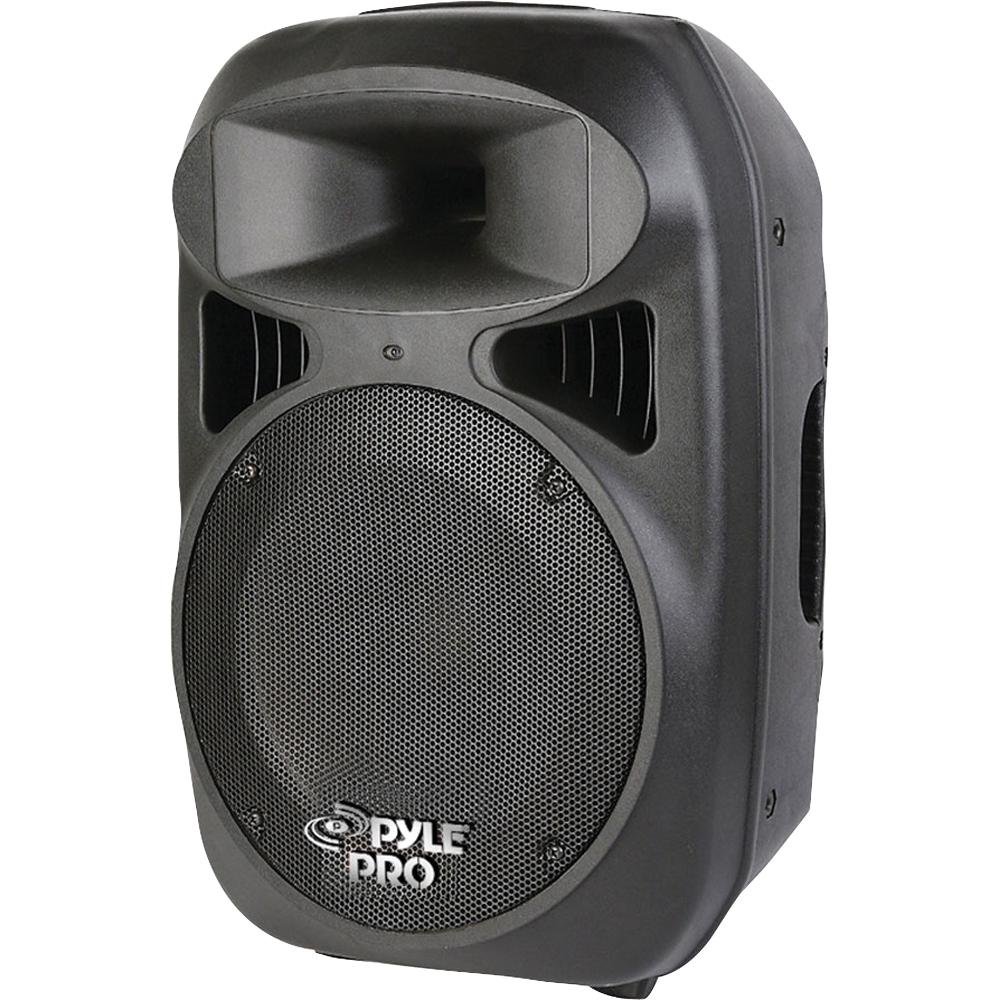
Image: Front view of the Pyle PPHP1599AI Portable Powered Speaker System, showcasing the 15-inch subwoofer, horn driver, control panel, and iPod dock.
Control Panel Features:
- Power Switch: Turns the unit on or off.
- MP3 Control with LCD Display: For navigating and controlling MP3/USB playback.
- Master Volume Control: Adjusts the overall output volume.
- Bass Control: Adjusts the low-frequency output.
- Treble Control: Adjusts the high-frequency output.
- XLR and 1/4" Mic Inputs: For connecting microphones.
- XLR Stereo RCA Line Input: For connecting external audio sources (e.g., mixers, CD players).
- XLR and 1/4" Line Outputs: For connecting to other powered speakers or audio equipment.
- USB Port: For playing MP3 files from a USB flash drive.
- iPod Docking Station: For connecting and playing audio from compatible iPod devices.
5. Setup
5.1 Initial Placement
- Place the speaker on a stable, flat surface or mount it on a compatible 35mm speaker stand. Ensure the stand is rated to support the speaker's weight (approximately 21 lbs).
- Position the speaker to optimize sound dispersion in your listening area.
5.2 Power Connection
- Ensure the Power Switch on the speaker is in the OFF position.
- Connect the provided power cable to the AC INlet on the speaker and then to a standard 110/220 AC power outlet.
5.3 Audio Input Connections
Connect your audio sources based on your requirements:
- Microphone: Connect a microphone to the XLR or 1/4" Mic Input.
- External Audio Device (e.g., Mixer, CD Player): Connect using RCA cables to the XLR Stereo RCA Line Input.
- USB Drive: Insert a USB flash drive containing MP3 files into the USB port.
- iPod: Carefully dock your compatible iPod device into the iPod Docking Station.
5.4 Audio Output Connections (Optional)
To connect to additional powered speakers or audio equipment:
- Use XLR or 1/4" cables to connect from the speaker's Line Outputs to the inputs of other devices.
6. Operating Instructions
6.1 Powering On/Off
- Before powering on, ensure all volume controls are set to their minimum level.
- Flip the Power Switch to the ON position. The LCD display will illuminate.
- To power off, set all volume controls to minimum and then flip the Power Switch to the OFF position.
6.2 Adjusting Volume and Tone
- Slowly increase the Master Volume control to your desired listening level.
- Use the Bass and Treble controls to adjust the low and high frequencies to your preference.
- If using a microphone, adjust its dedicated volume control.
6.3 MP3/USB Playback
- Insert a USB flash drive containing MP3 files into the USB port.
- Use the MP3 control buttons and LCD display to navigate through folders and tracks.
- Press the Play/Pause button to start or pause playback.
- Use the Skip buttons to move to the next or previous track.
6.4 iPod Dock Operation
- Carefully place your compatible iPod into the docking station. Ensure it is seated correctly.
- The speaker will automatically detect the iPod. Use the iPod's controls to select and play music.
- Adjust the Master Volume on the speaker and the volume on your iPod for optimal sound.
6.5 Microphone Usage
- Connect your microphone to either the XLR or 1/4" Mic Input.
- Adjust the microphone's volume control on the speaker's panel.
- Avoid pointing the microphone directly at the speaker to prevent feedback.
7. Maintenance
7.1 Cleaning
- Always unplug the speaker from the power outlet before cleaning.
- Use a soft, dry cloth to wipe the exterior surfaces of the speaker.
- Do not use liquid cleaners, aerosols, or solvents, as these may damage the finish or internal components.
- Keep the ventilation openings clear of dust and debris.
7.2 Storage
- If storing the speaker for an extended period, unplug it from the power source.
- Store the speaker in a cool, dry place, away from direct sunlight and extreme temperatures.
- Consider covering the speaker to protect it from dust.
8. Troubleshooting
If you encounter issues with your Pyle PPHP1599AI speaker system, refer to the following table for common problems and solutions.
| Problem | Possible Cause | Solution |
|---|---|---|
| No power | Power cable not connected; Power outlet not active; Power switch off | Ensure power cable is securely connected; Check power outlet with another device; Turn power switch ON. |
| No sound output | Volume controls too low; Incorrect input selected; Audio source issue; Cables not connected properly | Increase Master Volume and individual input volumes; Verify correct input source; Check audio source functionality; Ensure all audio cables are securely connected. |
| Distorted sound | Volume too high; Input signal too strong; Damaged speaker component | Reduce Master Volume or input volume; Lower the output level from the audio source; If distortion persists, contact service. |
| iPod disconnects/skips | Vibration from high volume; Improper seating in dock | Reduce volume; Ensure iPod is firmly seated in the dock. Consider using an auxiliary cable from the iPod's headphone jack to the speaker's RCA input for high-volume use. |
| Microphone feedback | Microphone too close to speaker; Microphone volume too high | Move microphone further away from the speaker; Reduce microphone volume. |
9. Specifications
| Feature | Detail |
|---|---|
| Power Output | 1600 Watts (Peak) |
| Speaker Type | 2-Way, Full-Range Powered Loudspeaker |
| Woofer Size | 15 inches |
| Driver | 1.75 inch Titanium Compression Driver |
| Impedance | 8 Ohm ±20% |
| Sensitivity | 101±3dB |
| Frequency Response | 40Hz-22 KHz (-3dB) |
| Crossover Frequency | 3.5 KHz |
| Inputs | XLR Mic, 1/4" Mic, XLR Stereo RCA Line, USB, iPod Dock |
| Outputs | XLR Line, 1/4" Line |
| Power Supply | 110/220 AC |
| Dimensions (W x D x H) | 18.2'' x 14.6'' x 28'' |
| Item Weight | 21 Pounds |
| Speaker Stand Mount | 35mm |
10. Warranty and Support
Pyle products are designed and manufactured to the highest quality standards. For detailed warranty information, please refer to the warranty card included with your product or visit the official Pyle website. In case of technical issues or if you require service, please contact Pyle customer support. Do not attempt to repair the unit yourself, as this may void your warranty.
For support and service inquiries, please visit: www.pyleusa.com


