
KODAK Z650
Kodak Easyshare Z650 Digital Camera User Manual
Model: Z650
1. Introduction
This manual provides detailed instructions for the operation and maintenance of your Kodak Easyshare Z650 6.1 MP Digital Camera. The Z650 features a professional-quality Schneider-Kreuznach Variogon 10x optical zoom lens and Kodak Color Science Image Processing Chip for high-quality images. Please read this manual thoroughly to ensure proper use and to maximize your camera's performance.
Key features include:
- 6.1-megapixel CCD for detailed prints up to 14 x 19 inches.
- 2.0-inch LCD display and electronic viewfinder.
- 10x Schneider-Kreuznach Variogon optical zoom lens.
- Continuous VGA video recording with MPEG-4 compression.
- Automatic and manual exposure settings, including 17 scene modes and 5 color modes.
- On-camera enhancement features such as cropping and digital red-eye reduction.
- Powered by AA-size batteries and stores images on SD memory cards (includes 32 MB internal memory).
2. What's in the Box
Upon unpacking your Kodak Easyshare Z650, please verify that all the following items are included:
- Kodak EasyShare Z650 Zoom Digital Camera
- Kodak Lithium Digital Camera Battery (CRV3 or equivalent)
- USB Cable
- AV Cable
- Lens Cap
- Lens Adapter
- Carrying Strap
- Kodak EasyShare Software (CD or download instructions)
- Getting Started Kit
- Custom Camera Insert for optional Kodak EasyShare camera and printer docks
3. Initial Setup
3.1. Installing Batteries
- Locate the battery compartment door on the bottom of the camera.
- Open the door by sliding the latch.
- Insert the Kodak Lithium digital camera battery (CRV3 or equivalent) according to the polarity indicators inside the compartment.
- Close the battery compartment door securely.
3.2. Inserting a Memory Card
The camera has 32 MB of internal memory. For extended shooting, an SD/MMC card is recommended.
- Locate the memory card slot, typically near the battery compartment.
- Open the memory card slot cover.
- Insert an SD or MMC card with the label facing the front of the camera until it clicks into place.
- Close the memory card slot cover.
3.3. Attaching the Carrying Strap
Thread the carrying strap through the strap lugs on the camera body as illustrated in the getting started guide to prevent accidental drops.
4. Camera Components
4.1. Front View
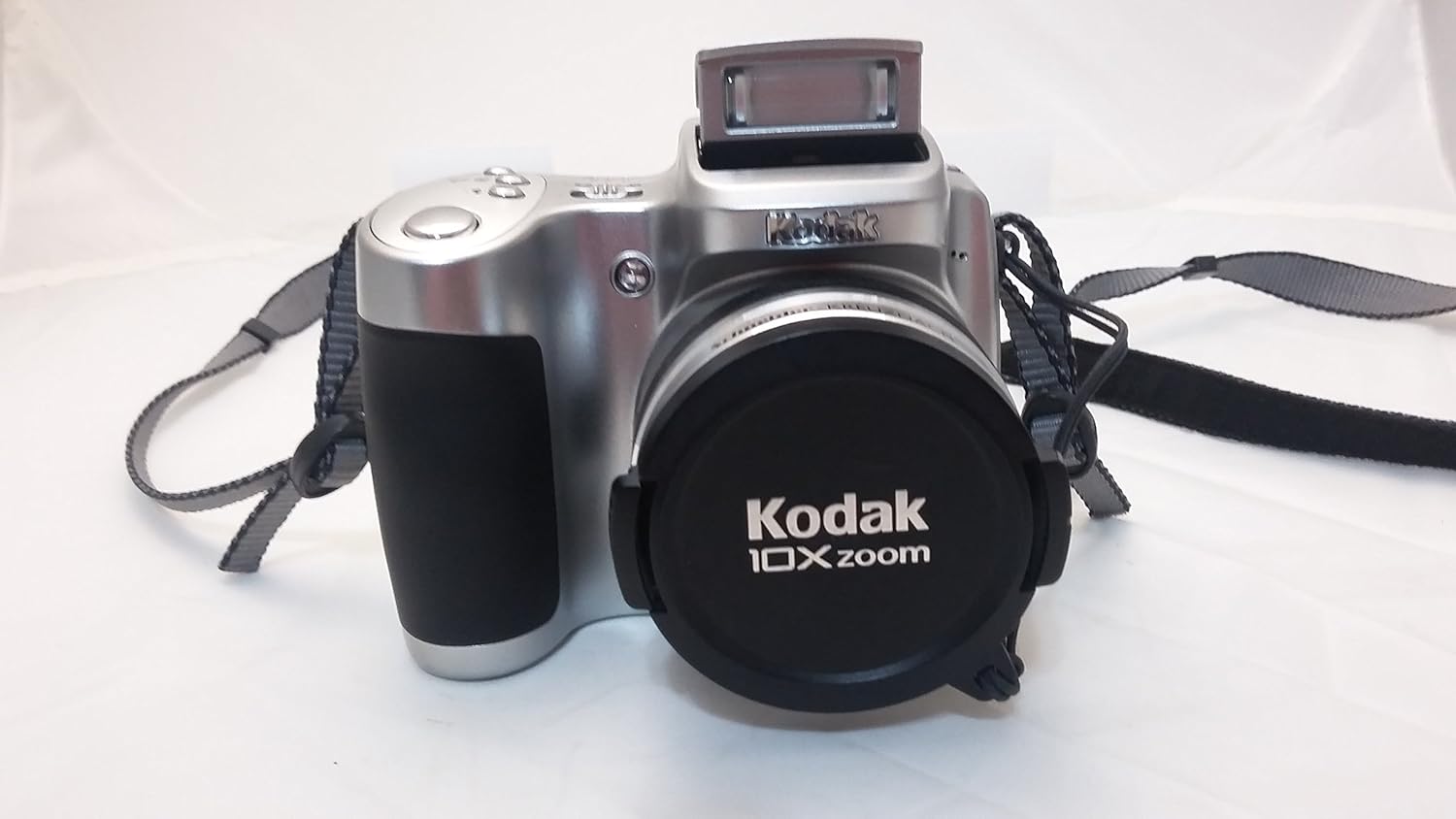
Image Description: This image displays the Kodak Easyshare Z650 digital camera from a front-angle perspective. The camera is silver with black accents on the grip and lens. A black lens cap with "Kodak 10x zoom" printed on it covers the lens. A gray carrying strap is visible on both sides of the camera. The pop-up flash unit is closed on top of the camera body.
4.2. Rear View
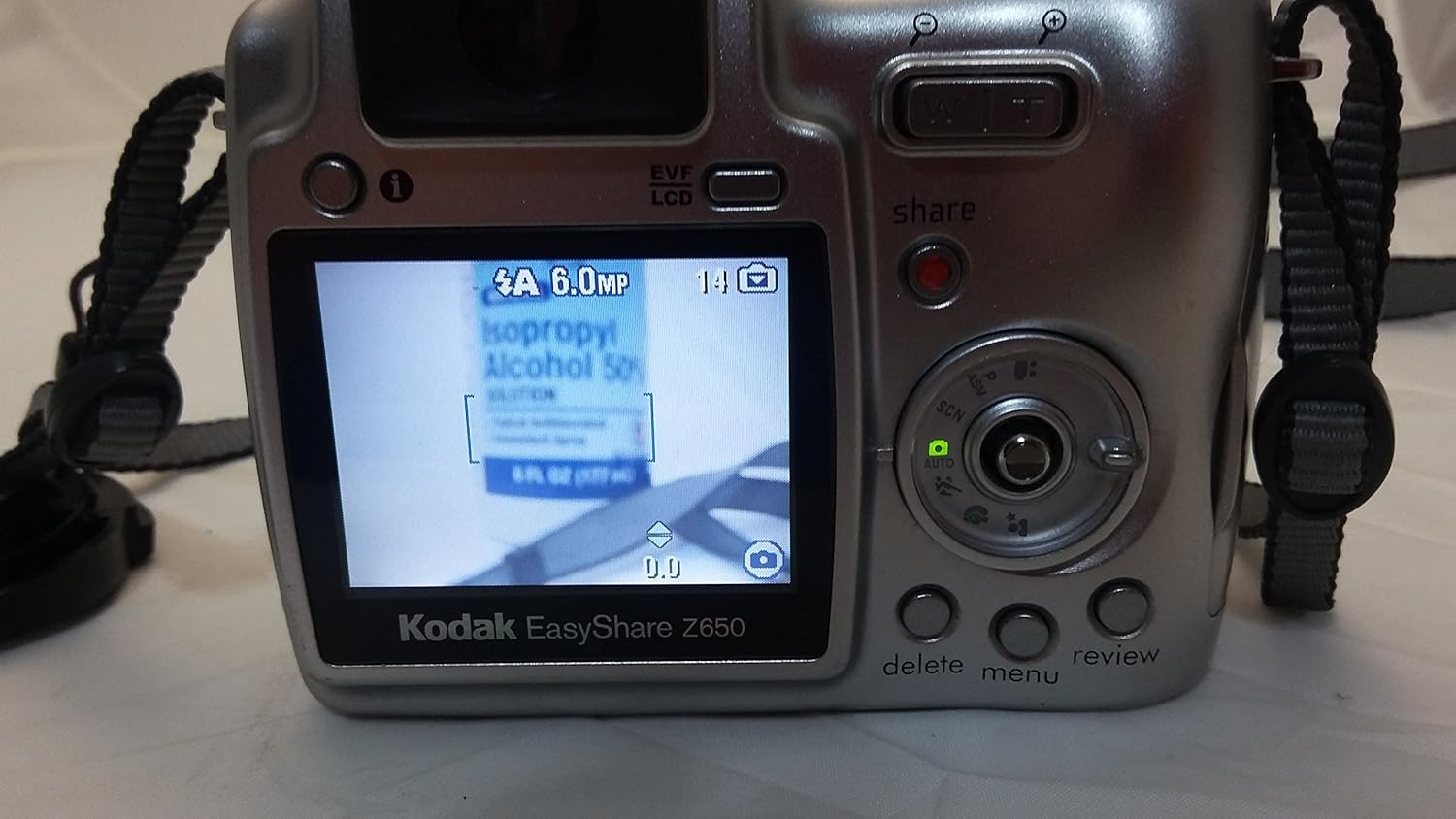
Image Description: This image shows the rear of the Kodak Easyshare Z650 digital camera. The 2.0-inch LCD screen is prominent, displaying an image of a bottle with text. To the right of the screen are the control dial, joystick, and various buttons including 'share', 'delete', 'menu', and 'review'. The electronic viewfinder (EVF) is located above the LCD screen. The camera body is silver with a black grip on the left side.
4.3. Bottom View

Image Description: This image provides a close-up view of the bottom of the Kodak Easyshare Z650 digital camera. A silver label is affixed to the bottom, displaying product information such as "Made in China," "Designed in Japan for Eastman Kodak Company," model number "KCKFL62900360," and various regulatory marks (CE, FC, MIC). A tripod mount socket is centrally located on the label. A USB port is visible at the bottom edge of the camera body.
5. Operating the Camera
5.1. Powering On/Off
Press the power button, usually located on the top of the camera, to turn the camera on or off. The lens will extend when powered on.
5.2. Basic Photography (Auto Mode)
- Turn the mode dial to the AUTO setting.
- Frame your shot using the LCD screen or electronic viewfinder.
- Press the shutter button halfway down to focus. The focus indicator will illuminate when focus is achieved.
- Press the shutter button completely down to capture the image.
5.3. Advanced Shooting Modes
The Z650 offers various modes for greater creative control:
- Program Mode (P): Camera sets optimal shutter speed and aperture combination.
- Aperture Priority Mode (A): You choose the aperture (f/2.8 to f/8 wide, f/3.7 to f/8 tele), and the camera sets the shutter speed.
- Shutter Priority Mode (S): You choose the shutter speed (1/8 to 1/1700 seconds auto, 8 to 1000 seconds manual), and the camera sets the aperture.
- Manual Mode (M): Full control over both aperture and shutter speed.
5.4. Scene Modes
Select a scene mode from the mode dial or menu to optimize settings for specific situations:
- Portrait Modes: Portrait, Self Portrait, Night Portrait, Backlight.
- Landscape Modes: Landscape, Night Landscape, Fireworks.
- Bright Scene Modes: Beach, Snow.
- Action Modes: Sport, Children.
- Close-up Modes: Macro, Flower.
- Party Mode: For indoor settings with lower light.
- Text/Documents Mode: Ensures sharp text when photographing documents.
- Manner/Museum Mode: Use when sound or flash are not desired.
5.5. Color Modes
Adjust the color rendition of your photos:
- High Color
- Low Color
- Natural Color
- Black and White
- Sepia
5.6. Video Recording
The Z650 supports continuous VGA video with MPEG-4 compression.
- Turn the mode dial to the video camera icon.
- Press the shutter button to start recording.
- Press the shutter button again to stop recording.
5.7. Reviewing and Sharing Photos
- Press the Review button to view captured images and videos.
- Use the zoom controls to magnify images up to 8x or fast scroll through pictures.
- The exclusive on-camera Share button allows you to tag pictures for easy printing or emailing later.
- Utilize the Favorites feature to mark special pictures.
5.8. Flash Modes
The built-in flash offers several modes:
- Auto Flash
- Red-eye Reduction
- Fill Flash
- Flash Off
5.9. Focusing
The Z650 features a high-speed, low-light autofocus system with an assist lamp. Autofocus modes include:
- Single AF
- Continuous AF
- Multizone
- Center-zone
6. Maintenance
6.1. Cleaning the Camera
- Lens: Use a soft, lint-free cloth specifically designed for camera lenses. Avoid touching the lens surface with your fingers.
- LCD Screen: Gently wipe with a soft, dry cloth. Do not use abrasive cleaners.
- Camera Body: Wipe with a soft, dry cloth. For stubborn dirt, slightly dampen the cloth with water.
6.2. Storage
- Store the camera in a cool, dry place away from direct sunlight and extreme temperatures.
- Remove batteries if the camera will not be used for an extended period to prevent leakage.
- Keep the lens cap on to protect the lens from dust and scratches.
7. Troubleshooting
| Problem | Possible Cause | Solution |
|---|---|---|
| Camera does not power on. | Dead or incorrectly inserted batteries. | Replace batteries with fresh ones or ensure correct polarity. |
| Lens does not extend or retract. | Battery low; obstruction; internal error. | Ensure batteries are fully charged. Check for any physical obstructions. If problem persists, contact support. |
| Images are blurry. | Camera shake; out of focus; dirty lens. | Hold camera steady or use a tripod. Ensure focus indicator is solid before shooting. Clean the lens. |
| Flash does not fire. | Flash mode set to 'Off'; battery low. | Check flash settings. Ensure batteries have sufficient charge. |
| Memory card error. | Card full; card corrupted; incorrect insertion. | Delete unnecessary files or use a new card. Reformat card (this will erase all data). Reinsert card correctly. |
| Pictures appear grainy (on LCD). | This is a known characteristic of the LCD preview; actual image quality is higher. | Review images on a computer for true quality assessment. |
8. Specifications
| Feature | Detail |
|---|---|
| Model Name | z650 |
| Effective Still Resolution | 6.1 MP |
| Photo Sensor Technology | CCD (1/2.5-inch) |
| Optical Zoom | 10x |
| Digital Zoom | 5x |
| Maximum Focal Length | 380 Millimeters |
| Minimum Focal Length | 38 Millimeters |
| Display Type | LCD |
| Screen Size | 2 Inches |
| Internal Memory | 32 MB |
| Memory Card Slot | SD/MMC card |
| Video Resolution | 480p (VGA) |
| Video Capture Format | MPEG-4 |
| Frame Rate | 30 FPS |
| ISO Equivalents | 80 to 160 (automatic), 80, 100, 200, 400, 800 (selectable) |
| Minimum Shutter Speed | 8 seconds |
| Maximum Shutter Speed | 1/1700 Seconds |
| Connectivity | USB |
| Power Source | AA size batteries (CRV3 or equivalent) |
| Item Weight | 11.36 ounces |
| Color | Gray |
9. Warranty and Support
9.1. Warranty Information
The Kodak Easyshare Z650 typically comes with a limited warranty. Please refer to the warranty card or documentation included with your purchase for specific terms, conditions, and duration of coverage. Warranty details may also be available on the official Kodak website.
9.2. Customer Support
For further assistance, technical support, or service inquiries, please visit the official Kodak support website or contact their customer service department. Contact information can usually be found in the getting started kit or on the manufacturer's website.