
Drive Medical 10215RD-1
Drive Medical 10215RD-1 Bariatric Foldable Rollator Walker with Seat Instruction Manual
Comprehensive guide for assembly, operation, and maintenance.
Introduction
The Drive Medical 10215RD-1 Bariatric Foldable Rollator Walker with Seat is designed to provide mobility assistance and support. This manual contains important information regarding the safe and proper use, assembly, and maintenance of your rollator.
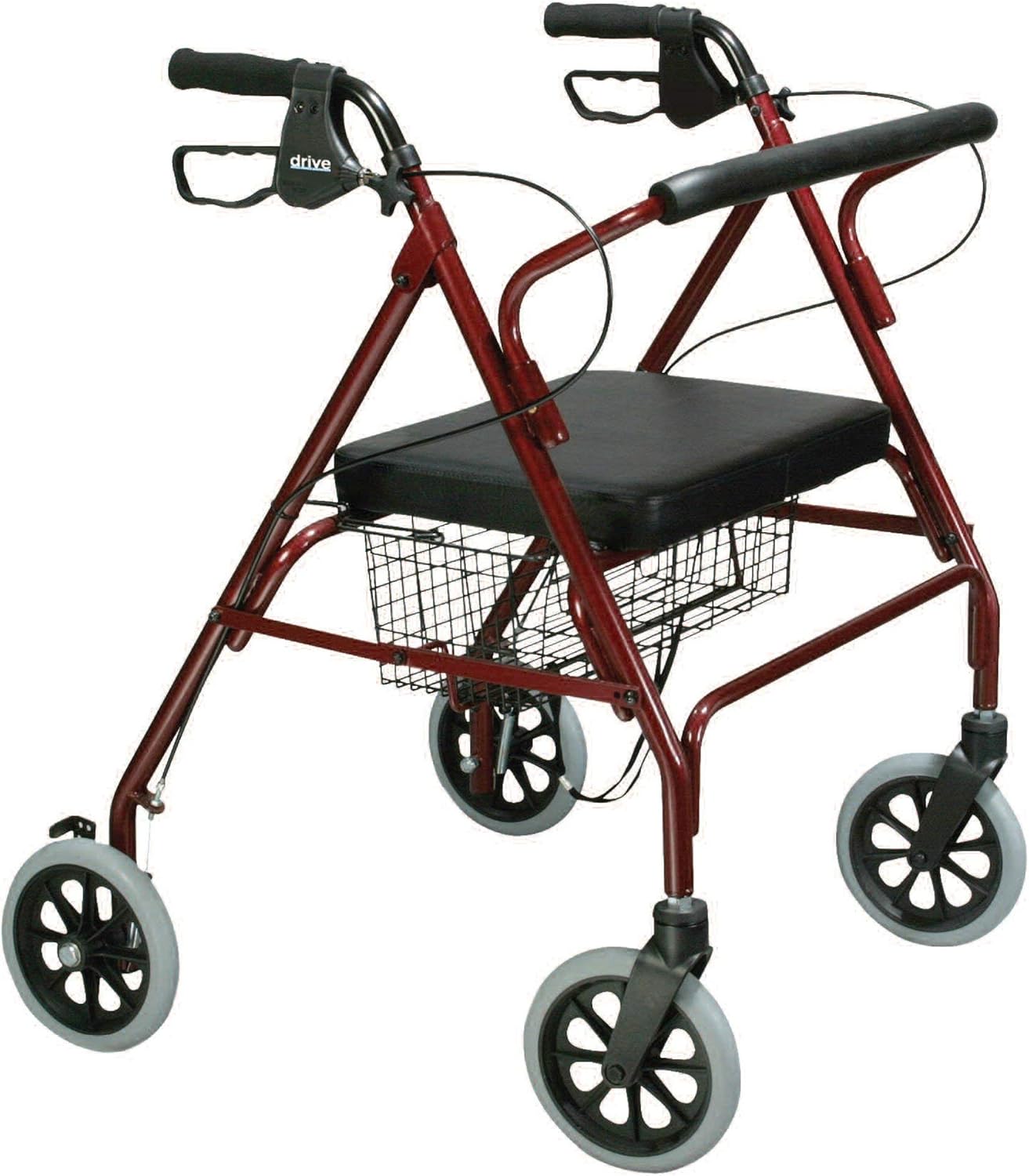
Image: The Drive Medical 10215RD-1 Bariatric Foldable Rollator Walker in red, shown fully assembled with its seat and storage basket.
Safety Information
Adherence to the following safety guidelines is crucial for preventing injury and ensuring the longevity of your rollator:
- Always engage the loop lock brakes when the rollator is stationary or when using the seat.
- Do not exceed the maximum weight capacity of 500 pounds (227 kg).
- Follow all assembly and disassembly instructions carefully to ensure proper function.
- Regularly inspect the rollator for any signs of wear, damage, or loose components.
- Keep the rollator clean and dry to maintain optimal performance and prevent corrosion.
- Consult a healthcare professional for guidance on proper usage if you have specific mobility needs.
Assembly Instructions
The Drive Medical 10215RD-1 rollator is designed for straightforward assembly. Follow these steps to prepare your rollator for use:
- Unfolding the Rollator: Carefully remove the rollator from its packaging. Stand it upright and gently pull the sides apart until the frame locks into its open position. Ensure all locking mechanisms are securely engaged.
- Attaching the Backrest: The padded backrest is typically pre-attached or easily slides into designated slots on the frame. Ensure it is securely fastened.
- Installing the Storage Basket: Position the wire storage basket under the seat. Secure it to the frame using the provided clips or hooks.
- Adjusting Handle Height: Locate the self-threading knobs on the handle posts. Loosen the knobs, adjust the handles to a comfortable height (typically wrist level when standing upright with arms relaxed), and then tighten the knobs securely.
- Brake Check: Before first use, test the brakes. Squeeze the loop hand brakes to slow down, and push them down to lock the wheels. Ensure both brakes function correctly.

Image: A close-up view of the ergonomic handle with the loop hand brake and the height adjustment knob.
Operating Instructions
Proper operation of your rollator ensures safety and ease of use:
- Walking: Stand behind the rollator, holding both handles. Push the rollator forward slightly, then step forward. Maintain a comfortable distance from the rollator, allowing it to provide support without leaning heavily on it.
- Braking: To slow down, gently squeeze the loop hand brakes. To lock the wheels for sitting or standing, push the loop hand brakes downwards until they click into the locked position. Always ensure brakes are locked before sitting.
- Using the Seat: Before sitting, ensure the rollator is on a flat, stable surface and both brakes are fully locked. Turn around and slowly lower yourself onto the padded seat. Use the backrest for support.
- Folding for Storage/Transport: To fold the rollator, lift the seat or pull the folding mechanism (if applicable) located under the seat. The side-to-side folding design allows for compact storage. Ensure the rollator is stable when folded.

Image: The rear view of the rollator, highlighting the removable padded backrest and the spacious wire storage basket beneath the seat.
Maintenance
Regular maintenance helps ensure the safety and extends the life of your rollator:
- Cleaning: Wipe down the frame, seat, and handles with a damp cloth and mild soap. Avoid abrasive cleaners. Dry thoroughly after cleaning.
- Wheel Inspection: Periodically check the wheels for wear, damage, or debris. Ensure they rotate freely.
- Brake Adjustment: If the brakes feel loose or do not engage properly, they may need adjustment. Consult a qualified technician or refer to specific brake adjustment instructions if provided separately.
- Fastener Check: Ensure all nuts, bolts, and screws are tight. Do not overtighten.
- Storage: Store the rollator in a dry place, away from extreme temperatures and direct sunlight, when not in use.
Troubleshooting
This section addresses common issues you might encounter with your rollator:
- Rollator does not fold easily: Check for any obstructions or if the folding mechanism is fully disengaged. Ensure the seat is lifted or the designated folding strap is pulled.
- Brakes are not engaging or are too loose: Inspect the brake cables for damage or kinks. The brakes may require adjustment. If you are unsure how to adjust them, seek assistance from a qualified technician.
- Wheels are not rolling smoothly: Check for debris (hair, lint, etc.) wrapped around the wheel axles. Clean the wheels and ensure they are free to rotate. Inspect for any damage to the wheels or bearings.
- Handles feel wobbly: Ensure the height adjustment knobs are fully tightened. If the wobble persists, inspect the handle posts for damage.
Specifications
| Feature | Detail |
|---|---|
| Model Number | 10215RD-1 |
| Brand | Drive Medical |
| Color | Red |
| Material | Steel |
| Product Dimensions (Assembled) | 26.75"D x 30.5"W x 35.25"H |
| Item Weight | 26 Pounds (11.8 kg) |
| Weight Capacity | Up to 500 pounds (227 kg) |
| Wheel Size | 8-inch caster wheels |
Warranty Information
The Drive Medical 10215RD-1 Bariatric Foldable Rollator Walker is backed by a limited lifetime warranty from Drive Medical. For specific details regarding warranty coverage, terms, and conditions, please refer to the warranty documentation included with your product or contact Drive Medical directly.
Customer Support
For further assistance, questions, or to report any issues with your Drive Medical rollator, please contact Drive Medical customer support. Contact information can typically be found on the product packaging or the official Drive Medical website.