
1. Introduction
This manual provides essential instructions for the safe and efficient operation of your Teac EX-M5 Mini Stereo System. The EX-M5 is a compact audio system featuring a vertical-loading CD/MP3 player and a digital AM/FM tuner. Please read this manual thoroughly before using the unit and retain it for future reference.
2. Safety Information
To ensure safe operation and prevent damage, observe the following precautions:
- Power Source: Connect the unit only to the specified power supply.
- Ventilation: Do not block ventilation openings. Ensure adequate space around the unit for proper airflow.
- Water and Moisture: Do not expose the unit to rain, moisture, or dripping/splashing liquids. Do not place objects filled with liquids on the unit.
- Heat: Keep the unit away from heat sources such as radiators, heat registers, stoves, or other apparatus (including amplifiers) that produce heat.
- Cleaning: Unplug the unit from the wall outlet before cleaning. Use a dry cloth only.
- Servicing: Do not attempt to service this product yourself. Refer all servicing to qualified service personnel.
3. Package Contents
Verify that all items listed below are included in your package:
- Teac EX-M5 CD Player/Radio Main Unit
- Two Detachable Stereo Speakers
- Wireless Remote Control (requires 2 AAA batteries, not included)
- Power Cord
- Speaker Cables
- Printed Operating Instructions (this manual)
4. Setup
4.1 Unpacking
Carefully remove all components from the packaging. Retain the packaging materials for future transport or storage.
4.2 Speaker Connection
- Identify the left and right speaker outputs on the rear of the main unit.
- Connect the provided speaker cables to the corresponding terminals on the main unit and the speakers. Ensure correct polarity (e.g., red to red, black to black) for optimal sound quality.
- Position the speakers for desired stereo separation.
4.3 Power Connection
- Insert the power cord into the AC IN jack on the rear of the main unit.
- Plug the other end of the power cord into a standard AC wall outlet.
4.4 Antenna Connection
For optimal AM/FM reception, connect the supplied antennas to their respective jacks on the rear of the unit. Extend the FM wire antenna fully and position the AM loop antenna for best signal reception.
4.5 Auxiliary Input Connection
To connect an external audio device (such as an iPod or MP3 player), use an audio cable (not supplied) to connect the device's audio output to the AUX IN jack on the EX-M5 main unit.
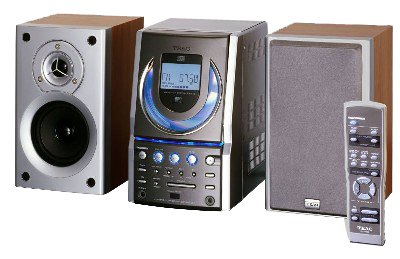
Image 1: The Teac EX-M5 Mini Stereo System, showing the main unit and two detachable speakers. This image illustrates the compact design of the system.
5. Operating Instructions
5.1 Power On/Off
Press the POWER button on the front panel or the remote control to turn the unit on or off.
5.2 CD/MP3 Playback
- Press the FUNCTION button to select CD mode.
- Press the OPEN/CLOSE button to open the vertical CD door.
- Carefully insert a CD (audio CD, CD-R, CD-RW, or MP3-CD) with the label side facing forward.
- Press the OPEN/CLOSE button again to close the CD door. The unit will begin reading the disc.
- Press the PLAY/PAUSE button to start or pause playback.
- Use the SKIP buttons (◀◀ / ▶▶) to navigate between tracks.
- Press the STOP button to stop playback.
5.3 AM/FM Tuner Operation
- Press the FUNCTION button to select FM or AM radio mode.
- Manual Tuning: Use the TUNE +/- buttons to manually adjust the frequency.
- Auto Scan: Press and hold the TUNE +/- buttons to automatically scan for the next available station.
- Setting Presets: To store a station, tune to the desired frequency, then press the MEMORY button. Use the PRESET +/- buttons to select a preset number (1-32), and press MEMORY again to confirm.
- Recalling Presets: Use the PRESET +/- buttons to cycle through stored stations.
5.4 Audio Adjustment
- Volume Control: Use the VOLUME +/- buttons on the unit or remote to adjust the sound level.
- Bass and Treble: The unit features dedicated bass and treble controls for fine-tuning the audio output.
- Equalizer Presets: Press the EQ button to cycle through 4 preset equalizer settings (e.g., Flat, Rock, Pop, Jazz) to optimize sound for different music genres.
5.5 Remote Control
The wireless remote control provides convenient access to all major functions. Install two AAA batteries (not included) into the remote control, observing correct polarity.
6. Maintenance
6.1 Cleaning the Unit
Wipe the exterior of the unit with a soft, dry cloth. Do not use abrasive cleaners, waxes, or solvents. For the CD lens, use a specialized CD lens cleaner disc if necessary.
6.2 General Care
Avoid placing heavy objects on the unit. Keep the unit away from direct sunlight and extreme temperatures. Ensure proper ventilation to prevent overheating.
7. Troubleshooting
If you experience issues with your EX-M5, refer to the following common problems and solutions:
| Problem | Possible Cause | Solution |
|---|---|---|
| No power | Power cord not connected; outlet not active | Ensure power cord is securely plugged in; test outlet with another device. |
| No sound | Volume too low; speakers not connected; incorrect function selected | Increase volume; check speaker connections; select correct source (CD, FM, AM, AUX). |
| CD not playing | Disc inserted incorrectly; disc dirty/scratched; wrong format | Reinsert disc correctly; clean disc; ensure disc is CD, CD-R, CD-RW, or MP3-CD format. |
| Poor radio reception | Antenna not positioned correctly; interference | Adjust antenna position; move unit away from other electronic devices. |
| Remote control not working | Batteries depleted or inserted incorrectly; obstruction | Replace batteries; check polarity; remove any obstructions between remote and unit. |
8. Specifications
- Model Number: EX-M5
- Manufacturer: TEAC America, Inc.
- Power Output: 5 watts per channel (10 watts total)
- Supported Disc Formats: CD, CD-R, CD-RW, MP3-CD
- Tuner: Digital AM/FM, Quartz PLL-synthesized, 32 presets
- Audio Inputs: Auxiliary input
- Audio Adjustment: Bass and Treble controls, 4 preset equalizer settings
- Speaker Type: Stereo, full-range, detachable
- Compatible Devices (Auxiliary): MP3 Player, Smartphone
- Main Unit Dimensions (W x H x D): 5.87 x 9.25 x 8.6 inches
- Approximate Package Dimensions: 57.15 x 27.94 x 26.67 cm
- Approximate Package Weight: 7.26 kg
- Global Trade Item Number (GTIN): 00086753090086
9. Warranty and Support
The Teac EX-M5 Mini Stereo System is remanufactured to like-new condition and comes with a 90-day warranty. For warranty claims or technical support, please refer to the contact information provided with your purchase documentation or visit the official Teac website for customer service details.


