
Logitech 967558-0403
Logitech Cordless Desktop MX 5000 Laser User Manual
Model: 967558-0403 | Brand: Logitech
Introduction
The Logitech Cordless Desktop MX 5000 Laser is an advanced wireless keyboard and mouse combination designed to enhance your computing experience. This system features an LCD keyboard display, advanced Bluetooth wireless connectivity, a rechargeable laser mouse, and intuitive touch-sensitive media controls. It is engineered to provide seamless interaction with your PC, offering convenience and efficiency.

Image: Logitech Cordless Desktop MX 5000 Laser product packaging, showcasing the keyboard and mouse.
Package Contents
Verify that all items listed below are included in your package:
- MX 5000 keyboard for Bluetooth
- MX 1000 Laser mouse for Bluetooth
- USB Bluetooth mini-receiver
- Rapid-charging base station with AC adapter
- 4 AA alkaline batteries (for keyboard)
- CD with software, comfort guidelines, and Help Center
- Quick Start Guide
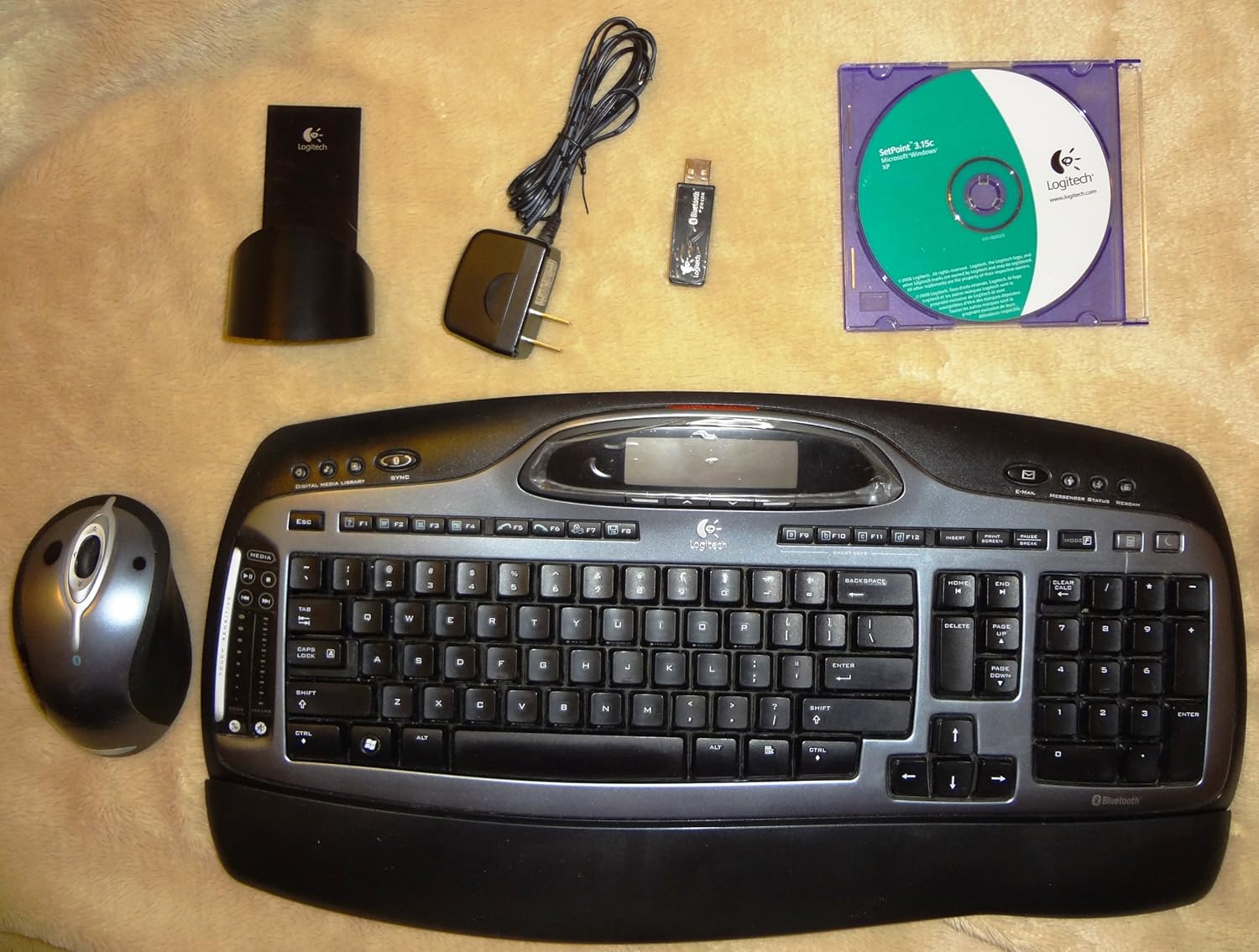
Image: All components of the Logitech Cordless Desktop MX 5000 Laser, including the keyboard, mouse, USB Bluetooth mini-receiver, rapid-charging base station, AC adapter, and software CD.
Setup
Follow these steps to set up your Logitech Cordless Desktop MX 5000 Laser:
- Install Batteries: Insert the 4 AA alkaline batteries into the keyboard. Ensure correct polarity.
- Connect Charging Base: Plug the AC adapter into the rapid-charging base station, then plug the adapter into a power outlet.
- Charge Mouse: Place the MX 1000 Laser mouse onto the rapid-charging base station. Allow the mouse to charge fully before first use.
- Connect USB Bluetooth Mini-Receiver: Plug the USB Bluetooth mini-receiver into an available USB port on your computer.
- Install Software: Insert the provided software CD into your computer's CD-ROM drive. Follow the on-screen instructions to install the Logitech SetPoint software and drivers. This software is essential for full functionality and customization.
- SecureConnect Technology: Your keyboard and mouse are pre-paired with the wireless mini-receiver using Logitech's SecureConnect technology. This establishes a secure link automatically, allowing for immediate use after software installation.
Operation
This section details the various features and functionalities of your Cordless Desktop MX 5000 Laser.
Keyboard Features
- LCD Keyboard Display: The integrated Dot Matrix LCD (102 x 42 pixels) provides instant feedback. It can display notifications for new instant messages or emails, application information, date and time, and Caps Lock status.
- Touch-Sensitive Media Controls: Utilize the touch-sensitive zone with 2 strips and 7 backlit controls for media management. Glide your finger to adjust volume or image size.
- Programmable Smart Keys: Customize specific keys to launch your favorite applications, websites, or folders for quick access.
- Windows Media Center Edition 2005 Compatibility: Seamlessly control your Windows Media Center PC from up to 60 feet away.
- Bluetooth Phone Synchronization: Perform one-touch synchronization of your PC calendar and address book with compatible mobile phones or PDAs.

Image: Close-up view of the Logitech MX 5000 keyboard, showing the LCD display, touch-sensitive media controls, and key layout.
Mouse Features
- MX Laser Engine: The MX 1000 Laser mouse features an 800-dpi resolution and 5.8-Megapixel image processing for precise tracking on various surfaces.
- Rechargeable Li-ion Batteries: The mouse is powered by Li-ion batteries and recharges via the rapid-charging base station, ensuring it is always ready for use.
- Tilt Wheel Plus Zoom: The scroll wheel offers side-to-side scrolling functionality and in/out zoom capabilities for enhanced navigation.
Bluetooth 2.0 Wireless Technology
- Enhanced Data Rate (EDR): Bluetooth 2.0 with EDR provides three times the speed of previous Bluetooth versions.
- Extended Range: Enjoy an extended wireless range of up to 60 feet, minimizing interference from other devices.
- Bluetooth Hub Functionality: The USB Bluetooth mini-receiver acts as a hub, allowing you to connect other Bluetooth devices such as headsets for Voice over IP, mobile phones for picture transfer, or headphones for music streaming.
Maintenance
Proper maintenance ensures the longevity and optimal performance of your Cordless Desktop MX 5000 Laser.
- Cleaning: Use a soft, dry cloth to clean the keyboard and mouse. For stubborn dirt, slightly dampen the cloth with water. Avoid using harsh chemicals or abrasive cleaners.
- Battery Management:
- The MX 1000 Laser mouse features a rapid-charging base station. Always return the mouse to its base when not in use to ensure it remains charged.
- Illuminated battery indicators on both the keyboard and mouse will alert you when it's time to recharge or replace batteries.
- For the keyboard, replace the 4 AA alkaline batteries when the low battery indicator illuminates.
- Storage: When not in use for extended periods, store the device in a cool, dry place away from direct sunlight and extreme temperatures.
Troubleshooting
If you encounter issues with your Logitech Cordless Desktop MX 5000 Laser, refer to the following common solutions:
- No Connection/Lag:
- Ensure the USB Bluetooth mini-receiver is securely plugged into a working USB port on your computer.
- Verify that the keyboard and mouse batteries are charged or replaced.
- Move the keyboard and mouse closer to the USB Bluetooth mini-receiver to rule out range issues. The maximum range is 60 feet, but obstacles can reduce this.
- Restart your computer.
- Re-establish the connection if prompted by the SetPoint software.
- Software Issues:
- Ensure the Logitech SetPoint software is correctly installed. Reinstall it from the provided CD or download the latest version from the Logitech support website if problems persist.
- Check for software updates for SetPoint.
- Mouse Not Tracking:
- Ensure the mouse is fully charged.
- Clean the laser sensor on the bottom of the mouse.
- Try using the mouse on a different surface.
- Keyboard LCD Not Displaying:
- Check keyboard battery levels.
- Ensure the SetPoint software is running correctly, as it manages the LCD display.
- System Requirements: Ensure your computer meets the minimum system requirements:
- PC with Pentium processor or compatible
- Windows XP (Home, Pro, Tablet or Media Center Edition)
- CD-ROM drive
- USB port
Specifications
Product Specifications
- Keyboard Display: Dot Matrix LCD at 102 x 42 pixels (supports Western characters only)
- Keyboard Controls: Touch Sensitive Zone with 2 strips and 7 backlit controls
- Mouse Engine: MX Laser Engine with 800-dpi resolution and 5.8-Megapixel image processing
- Mouse Power: Li-ion batteries with Fast Charging Station
- Wireless Technology: Bluetooth 2.0 EDR Technology
- Bluetooth Stack Support: Widcomm BTW 5.0 and Microsoft XPSP2 Bluetooth stacks
- Bluetooth Profiles: Audio Gateway, AV, Basic Imaging, Dial-up Network, File Transfer, Hard Cable Replacement, Headset, Human Interface Device, Local Area Network, Object Exchange, Serial Port, Synch
- Product Dimensions: 18 x 8 x 3 inches
- Item Weight: 4 pounds
- Batteries: 4 AA batteries required (for keyboard)
- Connectivity Technology: Bluetooth, USB
- Special Feature: Wrist Rest
- Compatible Devices: Personal Computer, Tablet
Warranty and Support
The Logitech Cordless Desktop MX 5000 Laser comes with a Three-Year Limited Warranty. For detailed warranty terms and conditions, please refer to the documentation included with your product or visit the official Logitech support website.
For technical support, troubleshooting assistance, or to download the latest software and drivers, please visit the Logitech support website or contact their customer service.
Related documents967558-0403


Ask a question about this manual
Ask about setup, troubleshooting, compatibility, parts, safety, or missing instructions. Manuals+ will review the question and use this page’s manual context to help answer it.