
1. Product Overview
The Zefal Doodad Plus Bicycle Pump Strap is designed to securely attach a bicycle pump to your bike frame. It features a robust Velcro closure and a universal pump bracket, ensuring your pump remains stable during rides. This accessory serves as an ideal replacement for lost or worn-out pump straps and brackets.
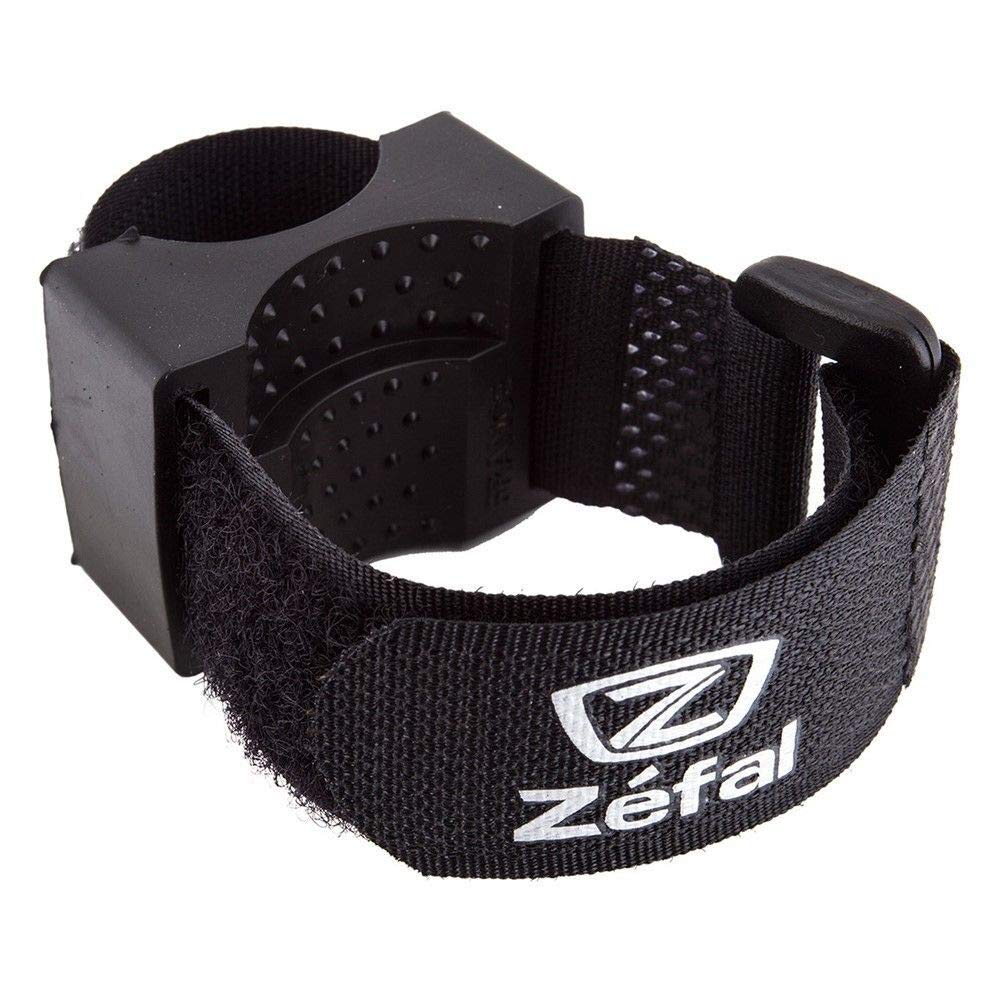
Image 1.1: The Zefal Doodad Plus Bicycle Pump Strap, featuring its Velcro strap and integrated pump bracket.
Key Features:
- Velcro Pump Strap: Provides strong and adjustable fastening.
- Universal Pump Bracket: Designed to accommodate most standard bicycle pumps.
- Durable Construction: Built to withstand the demands of cycling.
2. Setup and Installation
Follow these steps to properly install your Zefal Doodad Plus Bicycle Pump Strap:
- Prepare the Bracket: Ensure the universal pump bracket is clean and free of debris.
- Attach to Pump: Place your bicycle pump into the bracket. The bracket is designed to hold the pump securely.
- Position on Frame: Select a suitable location on your bicycle frame (e.g., top tube, down tube, or seat tube) where the pump will not interfere with pedaling or other components.
- Secure the Strap: Wrap the Velcro strap around the bicycle frame and through the buckle on the bracket. Pull the strap firmly to tighten it around both the pump and the frame.
- Fasten Velcro: Press the Velcro surfaces together to secure the strap. Ensure there is no slack and the pump is held firmly in place without excessive movement.
- Final Check: Gently tug on the pump to confirm it is securely attached and does not shift during normal riding conditions.

Image 2.1: Detail of the Velcro strap and buckle, illustrating the fastening mechanism.
3. Operating Instructions
Once installed, the Zefal Doodad Plus Bicycle Pump Strap operates passively by keeping your pump secured to your bicycle. No active operation is required during cycling.
- To remove the pump: Simply unfasten the Velcro strap, remove the pump from the bracket, and then refasten the strap to prevent it from dangling.
- To re-attach the pump: Place the pump back into the bracket and secure the Velcro strap as described in the Setup section.
4. Maintenance
Regular maintenance ensures the longevity and effectiveness of your pump strap:
- Cleaning: Wipe the strap and bracket with a damp cloth to remove dirt and grime. Avoid harsh chemicals that may degrade the material.
- Inspection: Periodically inspect the Velcro closure for wear and tear. Ensure the hooks and loops still provide a strong grip. Check the bracket for any cracks or damage.
- Storage: If removing the strap for extended periods, store it in a clean, dry place away from direct sunlight.
5. Troubleshooting
If you encounter issues with your Zefal Doodad Plus Bicycle Pump Strap, consider the following:
- Pump is not secure:
- Ensure the Velcro strap is pulled tight before fastening.
- Verify the pump is correctly seated within the universal bracket.
- Check if the Velcro is worn out and no longer provides adequate grip. If so, replacement is recommended.
- Strap interferes with bike components:
- Adjust the position of the pump and strap on the frame to avoid contact with cables, pedals, or other moving parts.
6. Specifications
| Attribute | Detail |
|---|---|
| Brand | ZEFAL |
| Model Number | 109001 |
| Material | Velcro |
| Item Weight | 10 Grams |
| Color | Black |
| Item Package Dimensions (L x W x H) | 7.44 x 5.55 x 0.87 inches |
| Item Dimensions (L x W x H) | 7.85 x 5.5 x 0.9 inches |
| Global Trade Identification Number (GTIN) | 643187000137 |
7. Warranty and Support
Specific warranty information for the Zefal Doodad Plus Bicycle Pump Strap is not provided in the product details. For warranty claims, technical support, or further inquiries, please contact ZEFAL directly through their official website or customer service channels.