
Igia ElectroSage 8
Igia ElectroSage 8 Massage Mat User Manual
Model: ElectroSage 8
Introduction
The Igia ElectroSage 8 Massage Mat is designed to provide muscle stimulation and relaxation. This system utilizes 8 pads to target various muscle groups across the body, offering a convenient way to experience muscle massage.
This manual provides essential information for the safe and effective use of your ElectroSage 8 system, including setup, operation, maintenance, and troubleshooting.

Figure 1: Igia ElectroSage 8 Product Packaging (Front View)
This image displays the front of the Igia ElectroSage 8 product box, highlighting the main unit, various pads, and connecting cables. It also features illustrative images of individuals using the product.
Important Safety Information and Precautions
Please read all safety information carefully before using the Igia ElectroSage 8 Massage Mat. Failure to follow these instructions may result in injury or damage to the device.
General Precautions:
- This product is not a medical device. Consult a healthcare professional before use if you have any medical conditions.
- Do not use this product if you have a pacemaker, heart disorder, or are pregnant.
- Do not use if you have medical conditions including Epilepsy, Multiple Sclerosis, skin disorders, or are in post-operative recovery.
- Pads should not be placed on sensitive parts of the body, or over scars, moles, or varicose veins.
- Keep out of reach of children.
- Do not use in wet environments or near water.
- Do not disassemble or modify the device.

Figure 2: Safety Information on Product Packaging
This image shows the bottom panel of the product box, detailing important safety warnings and usage restrictions for the Igia ElectroSage 8.
Package Contents
Verify that all items are present in your Igia ElectroSage 8 package:
- 1 x Igia ElectroSage 8 Control Unit (with 4 control dials/intensity indicators)
- 8 x Detachable Leads
- 8 x Replaceable Self-Adhesive Massaging Pads (various sizes for different body parts)
- 1 x Instruction Manual
- 1 x Compact Carrying Case

Figure 3: Complete Igia ElectroSage 8 Kit in Carrying Case
This image displays all components of the Igia ElectroSage 8 system neatly organized within its compact carrying case, including the control unit, various electrode pads, and connecting wires.

Figure 4: Product Components Diagram
This image illustrates the various components of the ElectroSage 8 system, including the control unit, large pads for the body, smaller pads for face and neck, and connectors.
Setup Instructions
Follow these steps to set up your Igia ElectroSage 8 Massage Mat:
- Insert Battery: The control unit requires a 9V battery (not included). Open the battery compartment on the back of the control unit and insert a fresh 9V battery, ensuring correct polarity.
- Attach Leads to Pads: Connect the detachable leads to the self-adhesive massaging pads. Ensure a secure connection.
- Connect Leads to Control Unit: Plug the other end of the detachable leads into the corresponding ports on the Igia ElectroSage 8 control unit. The unit has 4 output ports, each controlling two pads.
- Prepare Skin: Ensure the skin where you intend to place the pads is clean, dry, and free of oils or lotions for optimal adhesion and conductivity.
- Apply Pads: Carefully peel the protective film from the self-adhesive pads and apply them firmly to the desired muscle areas. Refer to the diagram on the product packaging for suggested placement (e.g., abs, buttocks, thighs, legs, back, face).

Figure 5: Electrode Pads and Cables
This image provides a detailed view of the self-adhesive electrode pads and their connecting cables, ready for attachment to the control unit.
Operating Instructions
Once the unit is set up and pads are applied, follow these steps to operate your ElectroSage 8:
- Power On: Turn the main power dial (usually labeled 'I/O' or 'On/Off') on the control unit to the 'On' position. A small indicator light may illuminate.
- Adjust Intensity (Strength): Use the 'Strength' dials to adjust the intensity of the massage for each pair of pads. Start with the lowest setting and gradually increase until you feel a comfortable pulsing sensation. Avoid setting the intensity too high, which may cause discomfort.
- Select Interval: Use the 'Interval' dial to control the timing or rhythm of the pulses. Experiment with different settings to find what is most comfortable for your muscle stimulation.
- Adjust Stress/Mode: The 'Stress' dial (or mode selector) allows you to choose different massage patterns or modes. Rotate this dial to cycle through available options and find the one that best suits your needs for muscle relief.
- Session Duration: Use the device for recommended durations as per the instruction manual (not specified in provided data, so keep general). If discomfort occurs, reduce intensity or stop use.
- Power Off: After your session, turn the main power dial to the 'Off' position.
- Remove Pads: Gently peel the pads from your skin. Replace the protective film on the adhesive side of the pads to preserve their stickiness for future use.
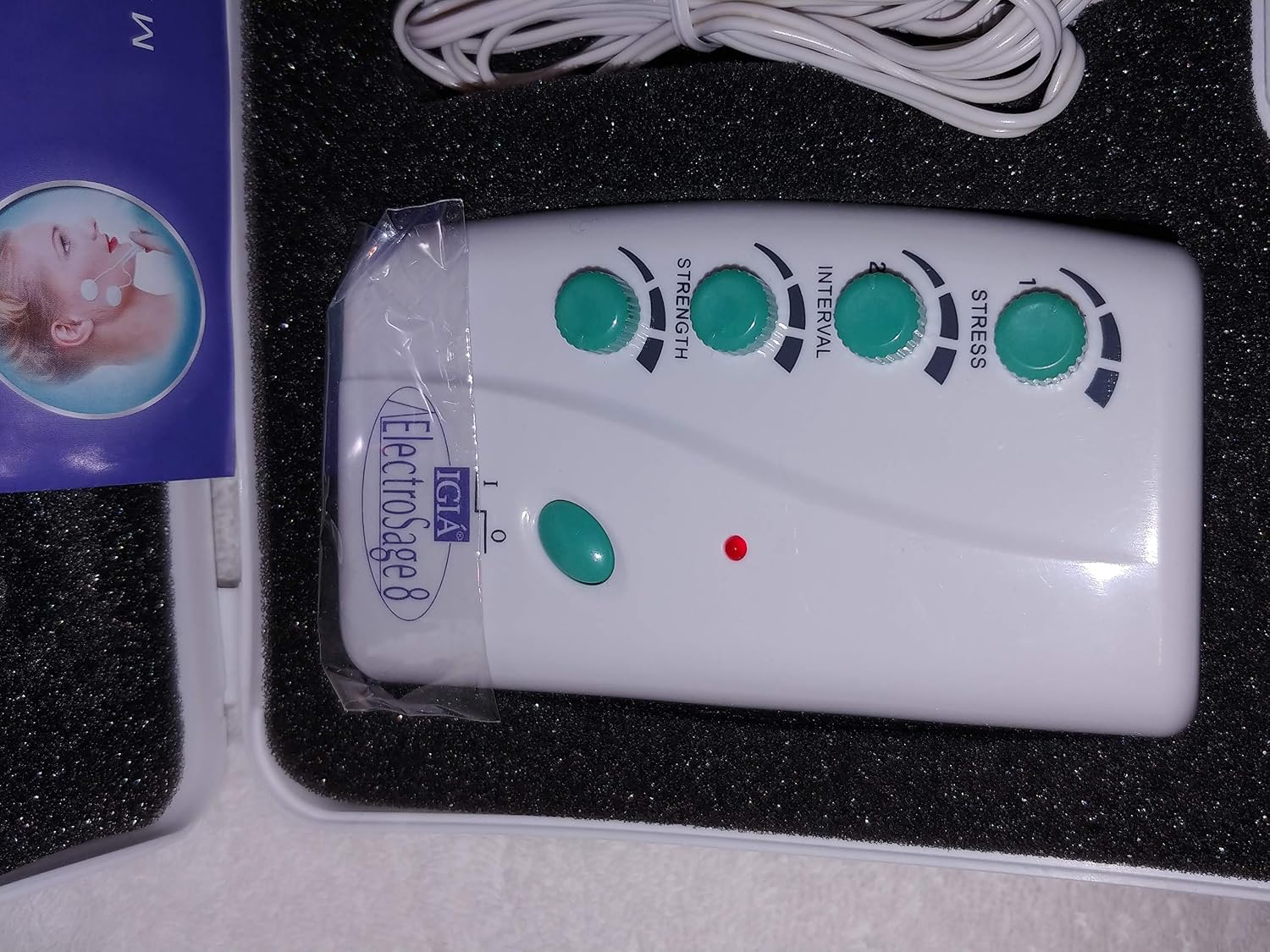
Figure 6: Control Unit Dials
This image provides a close-up view of the Igia ElectroSage 8 control unit, highlighting its power switch and the four adjustable dials for controlling strength, interval, and stress/mode settings.
Maintenance
Proper maintenance will extend the life of your Igia ElectroSage 8 Massage Mat:
- Cleaning the Control Unit: Wipe the control unit with a soft, dry cloth. Do not use abrasive cleaners or immerse in water.
- Cleaning the Pads: If the adhesive pads lose their stickiness, gently wipe the adhesive surface with a damp cloth (water only) and let them air dry. Do not use soap or harsh chemicals.
- Pad Replacement: The self-adhesive pads are replaceable. Replace them when they no longer adhere properly to the skin or if they show signs of wear and tear.
- Storage: Store the unit and all components in the compact carrying case in a cool, dry place, away from direct sunlight and extreme temperatures.
- Battery: Remove the battery if the device will not be used for an extended period to prevent battery leakage.
Troubleshooting
If you encounter issues with your Igia ElectroSage 8, refer to the following common problems and solutions:
| Problem | Possible Cause | Solution |
|---|---|---|
| Device does not turn on. | Battery is dead or incorrectly inserted. | Replace with a new 9V battery, ensuring correct polarity. |
| No sensation or weak sensation from pads. | Pads not adhering properly; leads not connected; intensity too low; pads worn out. | Ensure pads are firmly applied to clean skin. Check all lead connections. Increase intensity gradually. Replace old pads. |
| Pads do not stick to skin. | Skin is oily/dirty; pads are old/worn out. | Clean skin thoroughly before application. Gently clean pads with a damp cloth and air dry. Replace pads if adhesive is completely gone. |
| Discomfort or stinging sensation. | Intensity too high; pads not fully adhered; skin irritation. | Reduce intensity. Ensure pads are fully and evenly adhered. Discontinue use if skin irritation persists. |
Product Specifications
- Model Name: Igia ElectroSage 8
- Brand: Igia
- Power Source: 9V Battery (not included)
- Number of Pads: 8 (self-adhesive, replaceable)
- Number of Leads: 8 (detachable)
- Control Dials: Strength, Interval, Stress/Mode
- Product Dimensions: Approximately 28.45 x 20.32 x 6.6 cm (Package Dimensions)
- Item Weight: Approximately 612 g
- Intended Use: Muscle relief, general muscle stimulation
Warranty and Support
Specific warranty information for the Igia ElectroSage 8 is not provided in the available product data. Please refer to the original product packaging or contact the manufacturer directly for warranty details and customer support.
Manufacturer: Igia
Distributed by: IGIA Direct, Inc., New York, NY 10021
Website: www.igia.com
UPC: 0742953202666
Ask a question about this manual
Ask about setup, troubleshooting, compatibility, parts, safety, or missing instructions. Manuals+ will review the question and use this page’s manual context to help answer it.