
1. Introduction
The Dual XDM6820 is an in-dash receiver designed for vehicle audio systems, offering CD, MP3, and WMA playback capabilities, along with AM/FM radio tuning. This unit features a powerful internal amplifier, pre-amp outputs for external amplification, and an iPlug adapter for auxiliary input. This manual provides detailed instructions for installation, operation, and maintenance to ensure optimal performance and user satisfaction.
2. Safety Information
- Professional Installation Recommended: For proper functionality and to prevent damage, professional installation of this product is recommended.
- Power Source: Connect the unit only to a 12V DC negative ground electrical system.
- Wiring: Ensure all wiring is correctly connected according to the wiring diagram to avoid short circuits or malfunction.
- Ventilation: Do not block ventilation openings to prevent internal heat buildup.
- Moisture: Avoid exposing the unit to moisture or water to prevent electric shock or fire.
- Volume Level: Keep the volume at a level that allows you to hear outside traffic sounds.
3. Package Contents
Verify that all items are present in the package:
- XDM6820 Head Unit
- Wiring Harness and Antenna
- Mounting Plate
- iPlug Adapter
- Trim Ring
- Mounting Hardware
- Installation and User Guide (this document)
4. Setup and Installation
The XDM6820 features a 1.0 DIN chassis and is compatible with import ISO and DIN mounting standards. Due to the complexity of vehicle electrical systems, professional installation is highly recommended.
4.1 Wiring Connections
Refer to the included wiring harness diagram for specific connections. Key connections include:
- Power: Connect the yellow wire to constant 12V, red to accessory 12V, and black to ground.
- Speakers: Connect speaker wires to the corresponding vehicle speaker wires, ensuring correct polarity.
- Antenna: Connect the vehicle's antenna cable to the unit's antenna input.
- Pre-amp Outputs: A pair of RCA pre-amp outputs are provided for connecting to an external amplifier or amplified subwoofer.
- iPlug Adapter: Connect the iPlug adapter to the auxiliary RCA inputs on the rear of the unit. The iPlug can be mounted in a convenient location within the vehicle for easy access.
4.2 Mounting the Unit
Install the mounting sleeve into the dashboard opening. Secure the unit using the provided mounting hardware and trim ring. Ensure the unit is firmly seated and the detachable faceplate can be easily attached and removed.
5. Controls and Functions
The XDM6820 features a user-friendly interface with a large rotary control knob and an easy-to-read black and white LCD display.
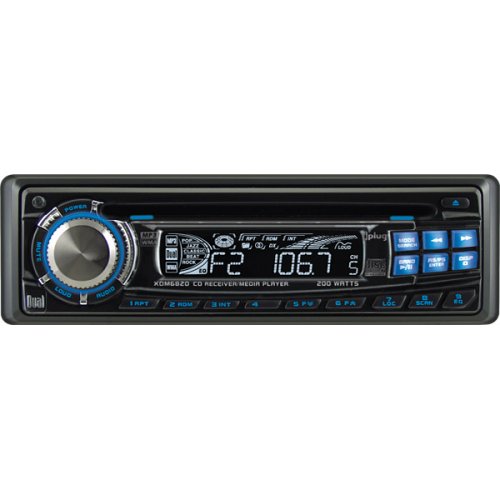
Figure 1: Front view of the Dual XDM6820 In-Dash CD/MP3/WMA Receiver. This image shows the main display, rotary volume knob, and various control buttons.
5.1 Front Panel Controls
- Rotary Control Knob: Used for volume adjustment, menu navigation, and selection.
- Power/Source Button: Turns the unit on/off and cycles through audio sources (CD, Radio, AUX).
- Display: Shows current mode, track information, radio frequency, and time.
- Detachable Faceplate: For security, the faceplate can be removed when leaving the vehicle.
- Keyless CD Eject Button: Allows disc ejection even when the vehicle ignition is off.
- Band/Menu Button: Selects radio bands (FM1, FM2, FM3, AM1, AM2) or enters the system menu.
- Seek/Track Buttons: Used for tuning radio stations or skipping tracks on a disc.
- Preset Buttons (1-6): Store and recall radio stations.
6. Basic Operation
6.1 Power On/Off
Press the Power/Source button to turn the unit on. Press and hold the Power/Source button to turn the unit off.
6.2 Volume Adjustment
Rotate the Rotary Control Knob clockwise to increase volume and counter-clockwise to decrease volume.
6.3 Source Selection
Press the Power/Source button repeatedly to cycle through available audio sources: CD, Radio (AM/FM), and AUX (iPlug).
7. CD/MP3/WMA Playback
The XDM6820 supports playback of standard audio CDs, as well as CD-R/RW discs containing MP3 and WMA files.
7.1 Loading/Ejecting a Disc
- Loading: Insert a disc gently into the disc slot with the label side up. The unit will automatically pull the disc in and begin playback.
- Ejecting: Press the Eject button. The disc will partially eject. Remove the disc.
7.2 Playback Controls
- Play/Pause: Press the Play/Pause button to pause playback. Press again to resume.
- Skip Track: Press the Seek/Track Up or Seek/Track Down buttons to skip to the next or previous track.
- Fast Forward/Reverse: Press and hold the Seek/Track Up or Seek/Track Down buttons for high-speed audible track search.
- Random/Repeat/Intro: Cycle through these modes using the corresponding buttons (if available) or menu options.
- Last Position Memory: The unit remembers the last played position on a disc.
7.3 MP3/WMA Features
- Alphanumeric Track Search: Navigate through folders and files on MP3/WMA discs.
- ID3 Tag Display: View track information (artist, title, album) for compatible MP3 files.
The CD player incorporates an anti-shock mechanism for consistent playback on rough roads, and a three-beam laser pickup with a one-bit digital/analog converter for clear audio.
8. Radio Operation
The XDM6820 features an AM/FM tuner with compatibility for both US and European frequency spacing.
8.1 Band Selection
Press the Band button to cycle through FM1, FM2, FM3, AM1, and AM2 bands.
8.2 Tuning
- Seek Tuning: Press the Seek/Track Up or Seek/Track Down buttons to automatically search for the next strong station.
- Manual Tuning: Press and hold the Seek/Track Up or Seek/Track Down buttons to enter manual tuning mode, then tap to adjust frequency step-by-step.
- Scan: Use the scan function (if available via menu) to briefly play each strong station.
8.3 Presets
The unit offers 30 station presets (18 FM, 12 AM).
- Storing Presets: Tune to the desired station, then press and hold one of the Preset Buttons (1-6) until you hear a beep.
- Recalling Presets: Briefly press one of the Preset Buttons (1-6) to recall a stored station.
- Auto Station Store (ASS): Use the ASS function (via menu) to automatically store the strongest stations in the current band.
- Preset Scan: Use the preset scan function (via menu) to briefly play each stored preset.
- One-Touch Memory: Quickly save a station to a specific preset.
9. iPlug Auxiliary Input
The included iPlug adapter provides a convenient line-in connection for external audio devices such as an iPod or other digital audio players. Connect your device to the iPlug's mini-jack input. Select the AUX source on the XDM6820 to play audio from the connected device.
10. Audio Settings
Adjust audio settings to customize the sound output to your preference.
- Equalizer (EQ) Presets: The unit offers five automatic equalizer settings: Pop, Jazz, Classic, Beat, and Rock. Access these through the audio menu.
- Manual Tone Control: Adjust Bass and Treble levels independently through the audio menu.
- Loudness: Engage the Loudness feature (via menu) to boost bass and treble frequencies at low volume levels.
- Fader: Adjust the front-to-rear speaker balance.
- Balance: Adjust the left-to-right speaker balance.
11. Maintenance
11.1 Cleaning the Unit
- Use a soft, dry cloth to clean the faceplate and display.
- Do not use abrasive cleaners, waxes, or solvents.
- For stubborn dirt, slightly dampen the cloth with water.
11.2 Disc Care
- Handle discs by their edges to avoid fingerprints.
- Keep discs in their cases when not in use.
- Clean discs with a soft, lint-free cloth, wiping from the center outwards.
12. Troubleshooting
Review the following common issues and solutions before contacting support.
| Problem | Possible Cause | Solution |
|---|---|---|
| No power | Blown fuse; Incorrect wiring; Vehicle ignition off | Check vehicle fuse and unit fuse; Verify wiring connections; Turn vehicle ignition on |
| No sound | Volume too low; Mute engaged; Incorrect speaker wiring; Fader/Balance settings | Increase volume; Disable mute; Check speaker connections; Adjust Fader/Balance |
| Disc error | Dirty or scratched disc; Incorrect disc format; Moisture condensation | Clean or replace disc; Ensure disc is CD-R/RW with MP3/WMA; Allow unit to acclimate to temperature |
| Poor radio reception | Antenna not connected; Weak signal area; Interference | Check antenna connection; Try tuning manually; Move to an area with better signal |
| Detachable faceplate not working | Improperly attached; Dirty contacts | Ensure faceplate is securely attached; Clean contacts with a cotton swab |
13. Specifications
| Feature | Specification |
|---|---|
| Model Number | XDM6820 |
| Brand | Dual Electronics |
| Product Dimensions | 10.8 x 8.5 x 4.75 inches |
| Item Weight | 4.9 pounds |
| Output Power | 200 Watts (Peak) |
| Number of Channels | 4 |
| Compatible Devices | Smartphone, Speaker (via iPlug) |
| Disc Compatibility | CD, CD-R/RW, MP3, WMA |
| Tuner Presets | 30 (18 FM, 12 AM) |
| Chassis Type | 1.0 DIN |
| Display Features | Black and White LCD, Detachable Face |
14. Warranty and Support
For warranty information and technical support, please refer to the warranty card included with your product or visit the official Dual Electronics website. Keep your purchase receipt as proof of purchase for any warranty claims.


