
1. Introduction
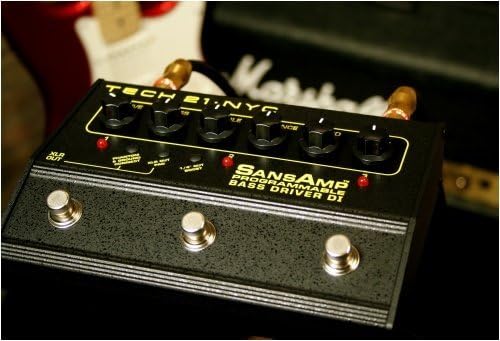
The Tech 21 PBDR SansAmp Programmable Bass Driver DI is a versatile 3-channel pre-amplifier, stomp box, and direct injection (DI) unit designed for bass guitar. It offers a 100% analog signal path combined with digital programmability, allowing users to dial in a wide range of tones from vintage tube sounds to modern slap and gnarly distortions. This manual provides essential information for setting up, operating, maintaining, and troubleshooting your device.
2. Setup
2.1. Power Connection
Connect the appropriate 9V DC power supply (not included) to the DC. input jack located on the rear panel of the unit. Ensure the power supply meets the specified voltage and current requirements to prevent damage.
2.2. Instrument and Amplifier Connections
The SansAmp PBDR is compatible with electric and bass guitars. Use standard 6.35mm (1/4-inch) instrument cables for connections.
- Connect your bass guitar to the IN input jack on the rear panel.
- Connect the OUT output jack on the rear panel to your amplifier's input.
- For direct recording or connecting to a mixing console, use an XLR cable from the XLR OUT jack (located on the side panel) to the desired input device.

3. Operating Instructions
3.1. Basic Operation
The SansAmp PBDR features a 100% analog signal path for authentic tone. It operates as a 3-channel programmable pre-amp, stomp box, and DI.
3.2. Tone Shaping Controls
Utilize the various control knobs on the top panel to sculpt your desired bass tone. These controls allow for a wide range of sound customization, from subtle enhancements to aggressive overdriven sounds.
3.3. Digital Programmability
The unit offers digital programmability for storing and recalling up to three distinct settings. To save a setting, simply adjust the knobs to your desired sound and then double-tap the corresponding footswitch location. This allows for quick switching between different tones during live performance or studio sessions.
4. Maintenance
4.1. Cleaning
To clean the metal enclosure, use a soft, dry cloth. Avoid abrasive cleaners or solvents, as these may damage the finish or internal components.
4.2. Storage
Store the unit in a cool, dry place away from direct sunlight and extreme temperatures. When not in use for extended periods, disconnect the power supply and any connected cables.
5. Troubleshooting
5.1. Accidental Preset Changes
Due to the double-tap save feature, it is possible to accidentally overwrite a preset if a footswitch is double-tapped while the knobs are in an unintended position. It is highly recommended to write down your preferred settings for each preset to easily dial them back in if they are accidentally changed.
5.2. Tone Characteristics
The SansAmp PBDR is designed for classic tube amp emulation and versatile tone shaping. While it can achieve some distorted sounds, it is not primarily a high-gain distortion pedal. For extremely aggressive or radically distorted tones, other dedicated distortion products may be more suitable. Some users note a slight mid-scoop in certain settings; adjust the EQ controls accordingly if this is not desired.
5.3. No Relevant Videos Available
At this time, there are no official product videos from the seller specifically demonstrating the Tech 21 PBDR SansAmp Programmable Bass Driver DI available for embedding in this manual.
6. Specifications
| Feature | Detail |
|---|---|
| Brand | tech21 |
| Model Number | SansAmp Programmable Bass Driver DI |
| Color | Black |
| Compatible Devices | Electric Guitar, Bass Guitar |
| Material | Metal |
| Item Weight | 1 Pounds |
| Number of Bands | 3 |
| Power Source | Corded Electric |
| Output Channel Quantity | 1 |
| Amplifier Type | Solid State |
| Connector Type | XLR, 6.35mm Jack |
| Enclosure Material | Metal |
| Manufacturer | Tech 21 USA, Inc. |
| UPC | 837088001571 |
7. Warranty
The Tech 21 PBDR SansAmp Programmable Bass Driver DI comes with a 1-year limited warranty covering parts and labor. Please retain your proof of purchase for warranty claims. For detailed warranty terms and conditions, refer to the official Tech 21 website or contact customer support.
8. Support
For further assistance, technical support, or to explore other products, please visit the official tech21 Store on Amazon or the manufacturer's website.