
1. Introduction
The Garrett Ace 250 is a versatile and user-friendly metal detector designed for various treasure hunting applications, including searching for old coins, jewelry, relics, and other valuables. It features a submersible search coil, making it suitable for shallow water searching. This manual provides essential information for the proper assembly, operation, maintenance, and troubleshooting of your Garrett Ace 250 metal detector.
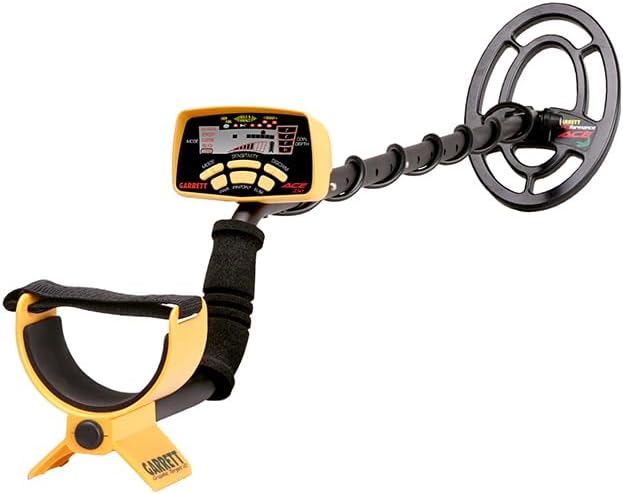
Figure 1.1: The Garrett Ace 250 Metal Detector with its main components assembled.
2. Setup and Assembly
Proper assembly is crucial for the optimal performance of your metal detector. Follow these steps carefully:
- Attach the Search Coil: Securely attach the submersible search coil to the lower stem using the provided bolt and rubber washers. Ensure the coil cable is wrapped snugly around the stem.
- Connect the Stems: Connect the lower stem to the middle stem, and then connect the middle stem to the upper stem, which houses the control housing and arm cuff. Ensure all connections are firm.
- Install Batteries: The Garrett Ace 250 requires four (4) AAA batteries. Open the battery compartment on the control housing and insert the batteries, observing the correct polarity. Close the compartment securely.
- Adjust Length: Adjust the length of the detector to a comfortable height by extending or retracting the stem sections. The detector features an adjustable length for user comfort.
- Adjust Arm Cuff: Position the arm cuff to comfortably support your forearm during use.

Figure 2.1: Detailed view of the Garrett Ace 250 control panel, showing buttons and display.
3. Operating Instructions
The Garrett Ace 250 is designed for intuitive operation. Familiarize yourself with the control panel and search modes.

Figure 3.1: The control panel highlighting the detailed target legend, target depth indicator, search modes, and pinpoint function.
3.1 Powering On and Basic Use
- Press the PWR button to turn the detector on. The LCD will illuminate, displaying the current settings.
- Adjust the SENSITIVITY using the '+' and '-' buttons. Start with a moderate sensitivity level and increase it as needed, ensuring stable operation without excessive false signals.
- The COIN DEPTH INDICATOR provides a continuous depth reading, helping to estimate how deep a target is buried.
3.2 Search Modes
The Ace 250 offers five distinct search modes, selectable via the MODE button:
- All Metal: Detects all types of metal without discrimination.
- Jewelry: Optimized for finding jewelry, discriminating against most iron.
- Custom: Allows you to create and save your own discrimination pattern.
- Relics: Designed to find older, less conductive metals, often found in historical sites.
- Coins: Specifically tuned to identify common coin types, discriminating against most trash items.
3.3 Discrimination and Pinpointing
- Accept/Reject Discrimination: Use the DISCRIM and ELIM buttons to customize discrimination patterns. This allows you to ignore unwanted targets (e.g., iron trash) and focus on desired items.
- Electronic Pinpointing: Press and hold the PINPOINT button to precisely locate targets. This feature helps to narrow down the exact location of a detected object, speeding up recovery.

Figure 3.2: The Garrett Ace 250 is suitable for searching in various environments, including beaches.

Figure 3.3: The submersible search coil allows for effective shallow water searching.

Figure 3.4: The Garrett Ace 250 is designed for ease of use, making it suitable for all ages.
Note: No official product videos with 'Seller' creator type were provided in the product data for embedding.
4. Maintenance
Proper maintenance extends the life and performance of your metal detector.
- Cleaning: After each use, wipe down the detector with a damp cloth. Avoid using harsh chemicals or abrasive cleaners. The search coil can be rinsed with fresh water if used in saltwater environments.
- Battery Care: Always remove batteries when the detector is not in use for extended periods to prevent corrosion.
- Storage: Store the detector in a dry, cool place away from direct sunlight and extreme temperatures.
- Cable Management: Ensure the search coil cable is not pinched or excessively bent, as this can damage internal wiring.
5. Troubleshooting
If you encounter issues with your Garrett Ace 250, refer to the following common problems and solutions:
| Problem | Possible Cause | Solution |
|---|---|---|
| No power or erratic operation | Low or dead batteries; incorrect battery installation; loose connections. | Replace batteries with fresh ones, ensuring correct polarity. Check all cable connections for tightness. |
| False signals or chattering | High sensitivity setting; electromagnetic interference; mineralized ground. | Reduce the sensitivity level. Move away from power lines or other electronic devices. In highly mineralized soil, lower sensitivity or use a different search mode. |
| Inaccurate pinpointing | Improper pinpointing technique. | Ensure you are sweeping the coil slowly and consistently over the target area while holding the PINPOINT button. Practice the technique in a clear area with a known target. |
| No audio or weak audio | Headphones not connected properly (if used); internal speaker issue. | Check headphone connection. If using headphones, try without them to test the internal speaker. Note that the unit does not have a volume knob, so external volume control on headphones is recommended for adjustment. |
| Shaft feels flimsy | Normal design for lightweight use. | While the shaft is designed to be lightweight, ensure all locking collars are tightened. For added stability, some users may choose to reinforce connections. |
6. Specifications
Detailed technical specifications for the Garrett Ace 250 Metal Detector:
- Brand: Garrett Metal Detectors
- Model Number: ACE 250
- Color: Black and Gold
- Material: Metal
- Power Source: Battery Powered (4 AAA batteries required, included)
- Item Weight: 1.2 Kilograms (2.64 pounds)
- Product Dimensions: 11.1"L x 5.1"W x 22.1"H
- Battery Life: Approximately 30 Hours
- Extended Length: 57 Centimeters
- Adjustable Length: Yes
- International Protection Rating: IP54 (Dust protected, splash resistant)
- Operating Frequency: 7.2 KHz
- Recommended Uses: Metal Detection
- UPC: 641243739625, 786156002715, 333830071200, 670541999783, 786156003699, 043972936151, 786156002777, 798256216879, 610098339243
- Global Trade Identification Number (GTIN): 00786156002715
7. Warranty and Support
The Garrett Ace 250 Metal Detector comes with a manufacturer's warranty. Please note that the warranty does not cover misuse of the product. For specific warranty terms, conditions, and duration, please refer to the documentation included with your purchase or contact Garrett Metal Detectors directly.
For technical support, service, or additional inquiries, please visit the official Garrett Metal Detectors website or contact their customer service department. You can find more information and products at the Garrett Metal Detectors Store.
8. Important Safety Information
Adhere to the following safety guidelines to ensure safe operation and longevity of your device:
- Avoid contact of the control housing with water. Only the search coil is submersible.
- Remove batteries when the detector is not in use to prevent corrosion and potential damage to the electronics.
- Do not attempt to modify or disassemble the detector beyond the instructions provided in this manual. Unauthorized modifications will void the warranty.
- Always obtain permission before metal detecting on private property.
- Be aware of your surroundings and potential hazards (e.g., buried utilities, sharp objects).


