
1. Introduction
The Case Logic QPB-1 Compact Digital Camera Case is designed to provide secure and protective storage for your compact digital camera. Its form-fitting design and durable materials help shield your device from scratches, impacts, and dust, ensuring your camera remains in optimal condition for use.
2. Key Features
- Form-fit protection: Designed to snugly fit most compact digital cameras, offering enhanced protection.
- Stow-away media holder: An internal pocket for storing extra memory cards or a spare battery.
- Screen-safe snap system: A soft internal lining and secure closure mechanism to protect the camera's screen.
- Durable construction: Made with materials intended for long-lasting use and protection.
- Wrist strap pass-through: A dedicated opening allows the camera's wrist strap to extend outside the case for added security during transport.
3. Setup and Installation
- Open the Case: Unzip the main compartment of the QPB-1 case completely.
- Insert Camera: Carefully place your compact digital camera into the main compartment. Ensure the camera fits snugly without excessive force. The internal lining is designed to protect the screen.
- Utilize Media Holder: If desired, place a spare memory card or battery into the internal stow-away media holder pocket.
- Secure Wrist Strap (Optional): If your camera has a wrist strap, thread it through the designated opening on the side of the case. This allows the strap to be used while the camera is secured inside the case.
- Close the Case: Zip the main compartment fully to secure your camera inside.
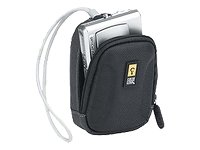
This image displays the exterior of the Case Logic QPB-1 Compact Digital Camera Case. The case features a black and gray design with a zipper closure, designed to protect a compact digital camera.
4. Operating Instructions
Using the QPB-1 case is straightforward. Simply open the zipper to access your camera and media, and close it securely when not in use or during transport. The case is designed for quick access while maintaining protection.
- To open, pull the zipper tab along the track until the compartment is fully accessible.
- To close, ensure no fabric is caught in the zipper teeth and pull the tab firmly until the compartment is sealed.
- The internal media holder is for small, flat items like memory cards or a slim spare battery. Avoid overfilling to prevent damage to the camera or case.
5. Maintenance
To ensure the longevity and appearance of your Case Logic QPB-1 camera case, follow these simple maintenance guidelines:
- Cleaning: Wipe the exterior of the case with a soft, damp cloth. For stubborn dirt, a mild soap solution can be used, followed by wiping with a clean, damp cloth. Allow to air dry completely.
- Do Not Machine Wash: Machine washing or drying is not recommended as it may damage the case's structure and materials.
- Storage: Store the case in a cool, dry place away from direct sunlight when not in use.
- Zipper Care: Keep the zipper free from dirt and debris to ensure smooth operation. If the zipper becomes stiff, a small amount of zipper lubricant can be applied.
6. Troubleshooting
- Camera Does Not Fit: Verify your camera's dimensions against the case's internal dimensions. This case is designed for compact digital cameras. If your camera is too large, it may not fit properly.
- Zipper Sticking: Check for any fabric or debris caught in the zipper teeth. Carefully remove any obstructions. If the zipper continues to stick, apply a small amount of zipper lubricant. Avoid forcing the zipper, as this can cause damage.
- Lack of Protection: Ensure the case is fully zipped and the camera is properly seated within the case. While the case offers protection against minor impacts and scratches, it is not designed for extreme conditions or severe drops.
7. Specifications
| Feature | Detail |
|---|---|
| Product Dimensions | 4.49 x 1.97 x 6.5 inches |
| Item Weight | 1.6 ounces |
| Item Model Number | QPB-1 |
| ASIN | B00093OLKS |
| Date First Available | April 1, 2005 |
| Manufacturer | Caselogic |
8. Warranty and Support
For information regarding warranty coverage or product support for your Case Logic QPB-1 Compact Digital Camera Case, please refer to the official Case Logic website or contact their customer service directly. Keep your purchase receipt as proof of purchase for any warranty claims.