
1. Introduction to the Magellan eXplorist 500
The Magellan eXplorist 500 is a robust, handheld GPS device designed for navigation in various outdoor environments, including hiking. It features a 16-color display, a high-speed USB data port, and expandable memory for detailed mapping. This manual provides essential information for its proper use and care.
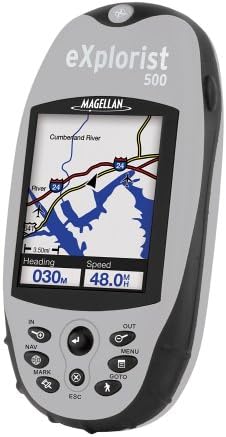
Figure 1: The Magellan eXplorist 500 GPS unit, showcasing its color display and control buttons. The screen displays a map with a river and roads, along with current heading and speed information.
2. Setup
2.1. Battery Installation and Charging
The eXplorist 500 uses a rechargeable lithium-ion battery pack. To install:
- Locate the battery compartment on the back of the device.
- Open the compartment cover.
- Insert the lithium-ion battery pack, ensuring correct orientation.
- Close the compartment cover securely to maintain water resistance.
To charge the battery, connect the device directly to a power source using the provided charger. The battery does not need to be removed for charging. A full charge provides up to 17 hours of operation.
2.2. Powering On and Off
- To Power On: Press and hold the power button (usually located on the top or side) until the screen illuminates.
- To Power Off: Press and hold the power button until a power-off prompt appears, then confirm.
2.3. Installing an SD Card (Optional)
The eXplorist 500 supports Secure Digital (SD) cards for expanded memory, allowing you to load additional maps and data. To install:
- Locate the SD card slot, typically under a protective cover.
- Insert the SD card gently until it clicks into place.
- Close the protective cover.
Maps can be loaded onto the SD card using Magellan's MapSend software (sold separately).
3. Operating the Device
3.1. Controls and Navigation
The device features an intuitive keypad and joystick for navigation:
- Joystick: Used to move the cursor on the map, scroll through menus, and select items.
- IN/OUT Buttons: Zoom in and out on the map display.
- NAV Button: Access navigation features.
- MARK Button: Mark your current location as a point of interest.
- MENU Button: Access the main menu for various settings and functions.
- GOTO Button: Initiate navigation to a saved point or destination.
- ESC Button: Return to the previous screen or cancel an action.
3.2. Display Information
The 16-color, high-contrast, backlit LCD display provides various data points:
- Map View: Shows your current position, surrounding terrain, roads, and waterways.
- Navigation Screens: Dedicated screens display real-time information such as:
- Speed
- Heading
- Distance to Destination
- Estimated Time of Arrival (ETA)
- Estimated Time Enroute (ETE)
- Elevation
- Time/Date
3.3. Language Settings
The device supports multiple languages. To change the language, navigate to the main menu, select "Settings," and then "Language." Available languages include English, French, German, Spanish, Italian, Swedish, Finnish, Portuguese, Dutch, and Norwegian.
4. Features and Navigation
4.1. Mapping Capabilities
The eXplorist 500 comes with 8 MB of built-in North American maps, including roads, parks, waterways, and airports. For more detailed mapping, you can:
- MapSend Software: Utilize optional Magellan MapSend software (sold separately) to load detailed street maps, topographical maps, or lake charts onto an SD card.
- Unlimited Expansion: There is no limit to the number of SD cards you can use, providing extensive map storage.
4.2. Data Management
The device allows you to save and manage various navigation data:
- Save up to 5 track log files.
- Store up to 20 routes.
- Save up to 500 points of interest in the internal memory. Additional points can be stored on SD cards.
- The PC-style file system simplifies data organization.
4.3. Specialized Functions
- Area Calculator: Determines the distance between saved points of interest, useful for planning routes or measuring areas.
- Fish/Hunt Function: Provides information on optimal fishing and hunting times for specific coordinates.
- Sun/Moon Information: Displays rising and setting times for the sun and moon.
- Geocache Manager: Download geocache coordinates from the internet directly to your device for treasure hunting activities.
4.4. Connectivity
The eXplorist 500 features a high-speed USB data port for connecting to a computer. This allows for data transfer, including loading maps and managing saved information.
5. Maintenance
5.1. Cleaning the Device
To clean the exterior of your eXplorist 500, use a soft, damp cloth. Avoid abrasive cleaners or solvents, as these can damage the casing or screen.
5.2. Battery Care
To maximize battery life and performance:
- Charge the battery regularly.
- Avoid extreme temperatures, which can affect battery capacity.
- The battery is designed to be charged while inside the device; removal is not necessary.
5.3. Water Resistance
The eXplorist 500 features a waterproof and impact-resistant housing. Ensure all port covers and the battery compartment are securely closed to maintain its water resistance during use in wet conditions.
6. Troubleshooting
If you encounter issues with your Magellan eXplorist 500, consider the following:
- Slow Performance (Scrolling/Zoom): In areas with high map detail (e.g., urban centers), map redraws and scrolling may be slower. This is normal due to the processing of extensive data.
- GPS Signal Reception: In-car reception can sometimes be weak, especially in urban areas or under heavy tree cover. Move to an open area for improved satellite acquisition.
- Map Routing Issues: Ensure your MapSend software is updated. Routing algorithms may prioritize direct paths; always review suggested routes.
- Battery Not Charging: Verify the charger is properly connected and the power source is active.
- Device Not Powering On: Ensure the battery is charged and correctly installed.
For further assistance, refer to the official Magellan support resources or website.
7. Specifications
| Feature | Detail |
|---|---|
| Product Dimensions | 2.1 x 4.6 x 1.3 inches (W x H x D) |
| Item Weight | 15.2 ounces |
| Display | 16-color, high-contrast, backlit LCD |
| Display Resolution | 160x120 pixels |
| Screen Size | 2.3 Inches |
| Internal Memory | 8 MB built-in maps + 8 MB additional usable memory |
| Expandable Memory | Secure Digital (SD) card slot (unlimited expansion) |
| Connectivity | USB |
| Battery Type | Rechargeable Lithium-Ion Pack |
| Battery Life | Up to 17 hours |
| Special Features | Bearing, Distance, ETA, ETE, Elevation, Heading, Speed, Time/Date, Area Calculator, Fish/Hunt Function, Sun/Moon Information, Geocache Manager |
| Water Resistance | Waterproof housing |
| Included Components | eXplorist 500 GPS unit, rechargeable lithium ion battery pack, warranty card, user's manual (physical), Dashboard Mount |
8. Warranty and Support
8.1. Warranty Information
The Magellan eXplorist 500 typically comes with a 1-year manufacturer's warranty. Please refer to the warranty card included with your product for specific terms and conditions.
8.2. Customer Support
For additional support, product registration, or to access updated software and drivers, please visit the official Magellan website. Contact information for customer service can also be found on the Magellan website or in your product's packaging.


