
Introduction
Scrapland is a 3rd-person 3D action/adventure game set in a robotic world constructed from scrap parts. This manual provides essential information for game setup, operation, and troubleshooting.
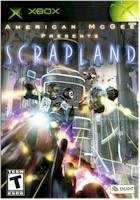
Image: The game cover for Scrapland on Xbox, featuring robotic characters and futuristic vehicles.
Key Features
- Explore a futuristic robot world in a 3rd-person action-adventure format.
- Transform into any of 15 character types, each possessing unique abilities.
- Experience a science-fiction narrative with humorous elements.
- Freely navigate a dynamic and interactive world, engaging in combat scenarios.
- Construct and pilot various ships with hundreds of possible configurations, participating in races.
Setup
- Insert Game Disc: Power on your Xbox console. Open the disc tray and carefully insert the Scrapland game disc with the label facing up. Close the disc tray.
- Start Game: The Xbox console should automatically detect the game disc and display the game title on the dashboard. Select "Play Game" or the Scrapland icon to begin.
- Initial Configuration: Upon first launch, the game may prompt you to adjust display settings, audio preferences, or create a save profile. Follow the on-screen instructions to complete these initial configurations.
Operating Instructions
Basic Controls (Xbox Controller)
- Left Analog Stick: Character Movement / Ship Steering
- Right Analog Stick: Camera Control / Aiming
- A Button: Jump / Confirm Selection
- B Button: Action / Cancel Selection
- X Button: Interact / Primary Attack
- Y Button: Transform / Secondary Action
- Left Trigger: Brake / Reverse (Vehicles) / Aim (On Foot)
- Right Trigger: Accelerate (Vehicles) / Fire Weapon (On Foot)
- D-Pad: Menu Navigation / Quick Select Items
- Start Button: Pause Menu / Game Options
- Back Button: Map / Inventory
Gameplay Mechanics
Character Transformation: A core mechanic of Scrapland involves the ability to transform into various robot types. Each transformation grants unique abilities necessary for progression, puzzle-solving, or combat. Experiment with different forms to overcome challenges.
Ship Piloting and Customization: The game features extensive ship combat and racing. Players can build and customize their own spacecraft using a wide array of parts, affecting speed, maneuverability, and weapon loadouts. Mastering ship controls is crucial for aerial engagements and timed races.
Exploration and Combat: The world of Scrapland is open for exploration. Engage in combat with enemy robots and vehicles using both on-foot abilities and customized ships. Objectives often involve navigating the environment, interacting with non-player characters, and completing missions.
Maintenance
To ensure optimal performance and longevity of your Scrapland game disc and Xbox console, observe the following maintenance guidelines:
- Disc Care: Handle the game disc by its edges. Store it in its original case when not in use to prevent scratches and dust accumulation. Clean the disc with a soft, lint-free cloth, wiping from the center outwards if necessary. Do not use abrasive cleaners.
- Console Ventilation: Ensure your Xbox console has adequate ventilation. Do not block air vents or place the console in an enclosed space. Overheating can lead to performance issues or system damage.
- Software Updates: Periodically check for and install any available system software updates for your Xbox console. These updates can improve stability and compatibility.
Troubleshooting
Common Issues and Solutions
- Game Not Loading / Disc Read Error:
- Ensure the disc is clean and free of scratches.
- Verify the disc is inserted correctly into the console's disc tray.
- Restart the Xbox console.
- Try another game disc to determine if the issue is with the console's disc drive.
- Game Freezing / Crashing:
- Ensure your Xbox console has sufficient ventilation to prevent overheating.
- Clear the console's cache (refer to your Xbox console's user manual for instructions).
- Ensure there is enough free storage space on your console's hard drive.
- Install any available system updates for your Xbox.
- No Audio / Video Problems:
- Check all audio and video cables are securely connected to both the console and your display/audio system.
- Verify your TV/monitor input source is correctly selected.
- Adjust in-game audio/video settings via the pause menu.
Specifications
| Feature | Detail |
|---|---|
| Product Title | Scrapland - Xbox |
| Brand | SPIG |
| Platform | Xbox |
| ASIN | B0007PLL06 |
| GTIN / UPC | 646662101251 |
| Item Model Number | XBEI 646662101251 |
| Release Date | March 2, 2005 |
| Rated | Teen |
| Language | English |
| Product Dimensions | 8 x 6 x 1 inches |
| Item Weight | 2.39 ounces |
Warranty and Support
This product is covered by the standard manufacturer's warranty. For specific warranty details, please refer to the packaging or contact the manufacturer directly. For technical support or assistance with gameplay, please visit the official SPIG website or consult your Xbox console's support resources.
Manufacturer: SPIG