
Introduction
This manual provides instructions for the safe and proper installation and use of the Lamson 2-Gang Old-Work Low-Voltage Box/Bracket (Model SC200R). This product is designed to provide a secure mounting point for low-voltage devices and faceplates in existing drywall or wallboard installations, allowing for organized cable management.
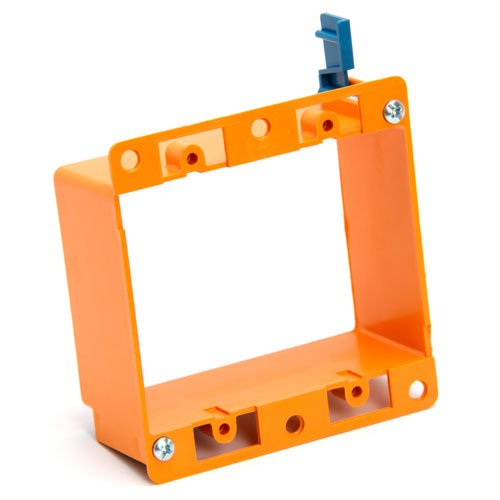
Image: Lamson 2-Gang Old-Work Low-Voltage Box/Bracket, showing its design for mounting in existing walls.
Safety Information
WARNING: Always disconnect power before working with electrical components. If you are unsure about any part of these instructions, consult a qualified electrician.
- Ensure all local electrical codes and regulations are followed during installation.
- This bracket is intended for low-voltage applications only. Do not use with high-voltage wiring.
- Wear appropriate personal protective equipment (PPE) such as safety glasses and gloves.
- Keep out of reach of children.
Package Contents
Verify that all components are present before beginning installation:
- 1 x Lamson 2-Gang Old-Work Low-Voltage Box/Bracket (Model SC200R)
- Mounting screws/clips (pre-attached or included)
Setup and Installation
Tools Required:
- Drywall saw or utility knife
- Screwdriver (Phillips head recommended)
- Pencil
- Tape measure
- Level (optional, for precise alignment)
Installation Steps:
- Choose Location: Select the desired location on the wall for your low-voltage device. Ensure there are no studs, pipes, or electrical wires behind the chosen area.
- Mark Cutout: Place the Lamson bracket against the wall at the desired location. The bracket features small holes in each corner; use these as guides to mark the outline of the cutout on the wall with a pencil. Alternatively, trace the inner edge of the bracket.
- Cut Opening: Carefully cut along the marked outline using a drywall saw or utility knife. Ensure the opening is clean and sized appropriately for the bracket.
- Route Cables: Before inserting the bracket, feed any necessary low-voltage cables (e.g., speaker wire, network cable, HDMI) through the newly cut opening in the wall.
- Insert Bracket: Insert the Lamson 2-Gang Old-Work Low-Voltage Box/Bracket into the wall opening. The front lip of the bracket should sit flush against the wall surface.
- Secure Bracket: Tighten the screws on the bracket. These screws engage the integrated spring-clip front connectors, which pivot and clamp securely against the inside of the drywall. The design allows for adjustment to accommodate various drywall thicknesses, ensuring a tight fit. Do not overtighten.
- Connect Devices: Once the bracket is secure, you can attach your low-voltage devices or faceplates to the bracket using the standard screw-down connectors provided on the back of the plate.
Operating Instructions
The Lamson 2-Gang Old-Work Low-Voltage Box/Bracket functions as a passive mounting solution. Once installed, its primary operation involves providing a stable and organized point for your low-voltage wiring and devices.
- Cable Management: Utilize the open design of the bracket to route low-voltage cables neatly.
- Device Mounting: Attach standard 2-gang low-voltage faceplates, keystone jacks, or other compatible devices directly to the bracket using the provided screw holes.
- Accessibility: The bracket allows for easy access to your low-voltage connections for future modifications or troubleshooting by simply removing the faceplate.
Maintenance
The Lamson 2-Gang Old-Work Low-Voltage Box/Bracket requires minimal maintenance.
- Cleaning: If necessary, gently wipe the visible surfaces of the bracket and any attached faceplates with a dry or slightly damp cloth. Avoid abrasive cleaners.
- Inspection: Periodically inspect the bracket for any signs of damage or loosening. Ensure the mounting screws remain tight and the bracket is securely flush with the wall.
- Cable Integrity: Check that all connected low-voltage cables are free from kinks, damage, or excessive tension.
Troubleshooting
Most issues related to this product are installation-dependent.
| Problem | Possible Cause | Solution |
|---|---|---|
| Bracket feels loose in the wall. | Mounting screws not tightened sufficiently, or cutout is too large. | Carefully tighten the mounting screws until the bracket is snug. If the cutout is too large, consider using a wall repair kit or a different mounting solution. |
| Faceplate does not sit flush. | Bracket not flush with the wall, or cables are obstructing. | Ensure the bracket is fully seated and flush with the wall. Rearrange cables inside the wall to prevent obstruction. |
| Difficulty tightening screws. | Screws are stripped or misaligned. | Ensure the screwdriver is properly seated. If screws are stripped, the bracket may need replacement. |
Specifications
| Brand: | Lamson |
| Model Number: | SC200R (Amazon 528-1-N) |
| Type: | 2-Gang Old-Work Low-Voltage Box/Bracket |
| Mounting Type: | Wall Mount (Old-Work) |
| Finish Type: | Metal (as per specifications, though some reviews mention plastic) |
| Special Feature: | Portable (Note: This feature may refer to the ease of installation or handling rather than typical portability for a fixed wall component.) |
| Number of Items: | 1 |
| UPC/GTIN: | 034481161875 |
| ASIN: | B0007N73CI |
Warranty Information
No specific warranty information is provided with this product. For details regarding warranty coverage, please refer to your purchase documentation or contact the retailer where the product was purchased.
Customer Support
For technical assistance, installation questions, or product inquiries, please contact your retailer or the manufacturer, Lamson Home Products. Please have your model number (SC200R) and purchase information ready when contacting support.