
Introduction
Thank you for purchasing the Pyle PT-1600 800W Power Amplifier. This manual provides detailed instructions for the proper setup, operation, maintenance, and troubleshooting of your new amplifier. Please read this manual thoroughly before using the product to ensure safe and optimal performance.
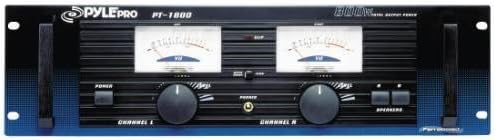
Figure 1: Front view of the Pyle PT-1600 800W Power Amplifier, showing dual illuminated voltage meters, volume controls for each channel, and power/speaker buttons.
Safety Instructions
Always follow these basic safety precautions when using the Pyle PT-1600 amplifier:
- Do not expose this unit to rain or moisture.
- Do not remove the cover. There are no user-serviceable parts inside. Refer all servicing to qualified personnel.
- Ensure proper ventilation. Do not block ventilation openings.
- Connect only to a grounded AC power outlet.
- Unplug the unit during lightning storms or when unused for long periods.
- Avoid placing the unit near heat sources such as radiators, heat registers, stoves, or other apparatus (including amplifiers) that produce heat.
Features
The Pyle PT-1600 amplifier is equipped with the following key features:
- Dual XLR and 1/4-inch combo jack and RCA inputs.
- Separate volume control for each channel.
- A/B speaker selector.
- Stereo or bridged power operation at 4 or 8 ohms with stereo/mono switch.
- Dual illuminated voltage meters.
- Meter range selection.
- Front panel headphone jack.
- Switched AC accessory outlet.
- Heavy-duty fan-cooled aluminum heat sinks.
- Dual voltage operation (110V/220V).
- Frequency Response: 10Hz-50kHz.
- Rack mountable design.
Setup
Unpacking and Inspection
Carefully remove the amplifier from its packaging. Inspect the unit for any signs of damage that may have occurred during shipping. If any damage is found, contact your dealer immediately.
Placement
Place the amplifier on a stable, flat surface or mount it in a standard 19-inch equipment rack. Ensure adequate ventilation around the unit. Do not place it in an enclosed cabinet without proper airflow.
Connections
Before making any connections, ensure the amplifier is turned off and unplugged from the power outlet.
- Input Connections: Connect your audio source (mixer, pre-amplifier, etc.) to the amplifier's input jacks. The PT-1600 features dual XLR, 1/4-inch combo jacks, and RCA inputs. Use the appropriate cable for your source.
- Speaker Connections: Connect your speakers to the amplifier's speaker output terminals. Ensure correct polarity (+ to + and - to -) for all speakers. The amplifier supports stereo or bridged operation. Refer to the "Operating" section for details on configuring stereo/mono mode.
- Power Connection: After all audio connections are made, connect the amplifier's power cord to a grounded AC power outlet. The unit supports dual voltage operation (110V/220V); ensure the voltage selector switch (if present, typically on the rear) is set correctly for your region.
Operating
Powering On/Off
Press the POWER button on the front panel to turn the amplifier on or off. It is recommended to turn on the amplifier after all other audio equipment and turn it off before other equipment to prevent pops or thumps.
Volume Control
The amplifier features separate volume controls for Channel L and Channel R. Adjust these knobs to set the desired output level for each channel. Start with the volume controls at their minimum setting before powering on.
Speaker Selector (A/B)
Use the A/B speaker selector switch to choose which set of speakers (if connected) you wish to use. This allows for flexible speaker configurations.
Stereo/Mono (Bridged) Operation
The PT-1600 can operate in stereo or bridged (mono) mode. In bridged mode, the amplifier combines the power of both channels into a single, more powerful mono output, typically for driving a single, high-power speaker or subwoofer. Consult the rear panel for the stereo/mono switch and specific speaker connection instructions for bridged mode (usually using specific terminals).
Illuminated Voltage Meters
The dual illuminated voltage meters provide a visual indication of the output level for each channel. Use the meter range selection switch to adjust the sensitivity of these meters for optimal readability based on your audio signal level.
Headphone Jack
A headphone jack is located on the front panel for private monitoring of the audio output. Connecting headphones will typically mute the speaker outputs.
Switched AC Accessory Outlet
The rear panel may feature a switched AC accessory outlet. This outlet provides power to other equipment that turns on/off with the amplifier, simplifying power management for your audio setup. Do not exceed the maximum power rating for this outlet.
Maintenance
Cleaning
Clean the exterior of the amplifier with a soft, dry cloth. Do not use liquid cleaners or aerosol sprays, as they may damage the finish or internal components. Ensure the unit is unplugged before cleaning.
Ventilation
Regularly check that the ventilation openings are clear of dust and debris to ensure proper airflow and prevent overheating. The heavy-duty fan-cooled aluminum heat sinks are designed for efficient cooling, but obstructions can impair their function.
Storage
If storing the amplifier for an extended period, unplug it from the power source and store it in a cool, dry place, away from direct sunlight and extreme temperatures.
Troubleshooting
If you experience issues with your Pyle PT-1600 amplifier, refer to the following common problems and solutions:
| Problem | Possible Cause | Solution |
|---|---|---|
| No power | Power cord not connected; Power outlet faulty; Amplifier fuse blown. | Ensure power cord is securely plugged in. Test the outlet with another device. If fuse is accessible and replaceable, replace with correct type (refer to specifications). If not, seek professional service. |
| No sound output | Input cables not connected; Speaker cables not connected or incorrect polarity; Volume controls set too low; Speaker selector incorrect; Source device not playing. | Check all input and speaker cable connections. Verify speaker polarity. Increase volume controls. Ensure A/B speaker selector is set correctly. Confirm audio source is active and playing. |
| Distorted sound | Input signal too high (clipping); Volume set too high; Speaker impedance mismatch; Damaged speaker. | Reduce input signal level from source. Lower amplifier volume. Ensure speaker impedance matches amplifier's capabilities (4 or 8 ohms). Test with different speakers if possible. |
| Overheating | Insufficient ventilation; Prolonged high-volume operation; Speaker impedance too low. | Ensure adequate space around the amplifier for airflow. Reduce volume or allow unit to cool down. Verify speaker impedance is within specified range. |
If the problem persists after trying these solutions, please contact Pyle customer support or a qualified service technician.
Specifications
The following are the technical specifications for the Pyle PT-1600 800W Power Amplifier:
- Model: PT-1600
- Output Wattage: 800 Watts
- Frequency Response: 10Hz-50kHz
- Product Dimensions (L x W x H): 58.42 x 20.32 x 43.18 cm (approx. 23 x 8 x 17 inches)
- Product Weight: 15.59 kg (approx. 34.37 lbs)
- Input Types: XLR, 1/4-inch Combo Jack, RCA
- Output Impedance: 4 or 8 Ohms (Stereo/Bridged)
- Voltage Operation: Dual Voltage (110V/220V)
- Rack Mount Dimensions: 18 7/8" (W) x 4 1/2" (H) x 12" (D)
Warranty and Support
For warranty information and technical support, please refer to the documentation included with your purchase or visit the official Pyle website. Keep your purchase receipt as proof of purchase for warranty claims.
Pyle Official Website: www.pyleusa.com


