
1. Introduction
This manual provides essential information for the proper installation, operation, and maintenance of your BestAir HW500 Humidifier Wick Filter. Designed to trap impurities and enhance humidifier performance, regular replacement of this filter is crucial for maintaining optimal indoor air quality and the efficiency of your humidifier.

Figure 1: BestAir HW500 Humidifier Wick Filter. This filter is designed to absorb water and release moisture into the air, while trapping mineral deposits and impurities.
2. Compatibility
The BestAir HW500 Humidifier Wick Filter is compatible with a wide range of humidifier models, including those from Honeywell, Kaz, Vicks, Relion, Sunbeam, Environizer, and Robitussin. Specifically, it fits the following models:
- Honeywell: HCM300T, 310T, 315T, 330T, 350, 350B, 530, 535-20, 540, 550-19, 550, 551, 560, 630, 631, 632, 632TG, 635, 640BW, 645, 646, 650, 710, ECM-250i, ecm-500, HCM-350 Series, HCM-540 Series, HCM-1000 Series, HCM-2000 Series (HAC504)
- Kaz: 3020
- Vicks: V3100, V3500, V3500N, V3600, V3700, V3800, V3850, V3850JUV, V3900
- Relion: RH1300, WA-8D (WF2)
- Sunbeam: 1118, 1119, 1120
- Environizer: 63-1508
- Robitussin: DH835
3. Product Features
The BestAir HW500 filter is engineered with advanced features to ensure efficient and clean humidification:
- Antimicrobial Wick Filter: Helps inhibit the growth of mold, mildew, and bacteria on the filter surface.
- Traps Impurities: Effectively captures mineral deposits and other impurities from the water, preventing them from being released into the air.
- Enhanced Strength: Constructed to be up to 150% stronger than standard filters, ensuring durability and consistent performance.
- Aluminum Reinforcement: Features aluminum reinforcement for added structural integrity, especially when wet.
4. Setup & Installation
Follow these steps to properly install your new BestAir HW500 Humidifier Wick Filter:
- Prepare the Humidifier: Unplug your humidifier from the power outlet. Remove the water tank and the top cover of the humidifier to access the filter compartment.
- Remove Old Filter: Carefully lift out the old, used wick filter from its tray. Dispose of the old filter according to local regulations.
- Clean Humidifier Base: It is recommended to clean the humidifier base and water tray thoroughly before installing a new filter. Use a mild detergent and rinse well.
- Prime the New Filter: Before placing the new filter into the humidifier, it is crucial to prime it. Submerge the new filter completely in cool, clean water for approximately 15-30 minutes. This allows the filter material to fully absorb water, ensuring optimal wicking action from the start.
- Install New Filter: Place the primed BestAir HW500 filter into the designated filter tray in your humidifier. Ensure it sits securely and is properly aligned.
- Reassemble Humidifier: Replace the humidifier's top cover and then the water tank. Ensure all components are correctly seated.
- Refill Water Tank: Fill the water tank with fresh, clean water. Distilled water is recommended to minimize mineral buildup.
- Power On: Plug the humidifier back into the power outlet and turn it on.
Video 1: Demonstration of WF2 Replacement Humidifier Filter installation. This video illustrates the process of replacing a humidifier filter, including removing the old filter and inserting a new one.
Video 2: Guide for replacing HAC504 compatible filters. This video provides a visual walkthrough of the filter replacement process for humidifiers using HAC504 type filters.
5. Operating Guidelines
To maximize the life and effectiveness of your BestAir HW500 filter:
- Flip the Filter: Regularly flip the filter (e.g., daily or every few days) to ensure even saturation and extend its lifespan. This helps prevent one side from drying out or accumulating more mineral deposits than the other.
- Use Distilled Water: Whenever possible, use distilled water in your humidifier. Hard water contains minerals that can clog the filter and reduce its efficiency, leading to premature yellowing and decreased moisture output.
- Monitor Moisture Output: Pay attention to the humidifier's moisture output. If you notice a significant decrease in humidity or the water tank is not emptying as quickly as usual, it may indicate that the filter is becoming saturated and needs attention or replacement.
Video 3: Tips for maintaining WF2 humidifier filters. This video offers advice on how to extend the life and efficiency of your humidifier filters through proper usage.
6. Maintenance
Regular maintenance ensures your humidifier operates effectively and provides clean moisture:
- Filter Replacement: Replace your BestAir HW500 filter approximately every 1 to 2 months, or more frequently if you have hard water or use the humidifier continuously. Signs that a filter needs replacement include discoloration (yellowing or browning), hardening, or a noticeable decrease in humidifier output.
- Humidifier Cleaning: Clean the humidifier's water tank and base weekly to prevent mineral buildup and bacterial growth. Refer to your humidifier's specific instruction manual for detailed cleaning procedures.
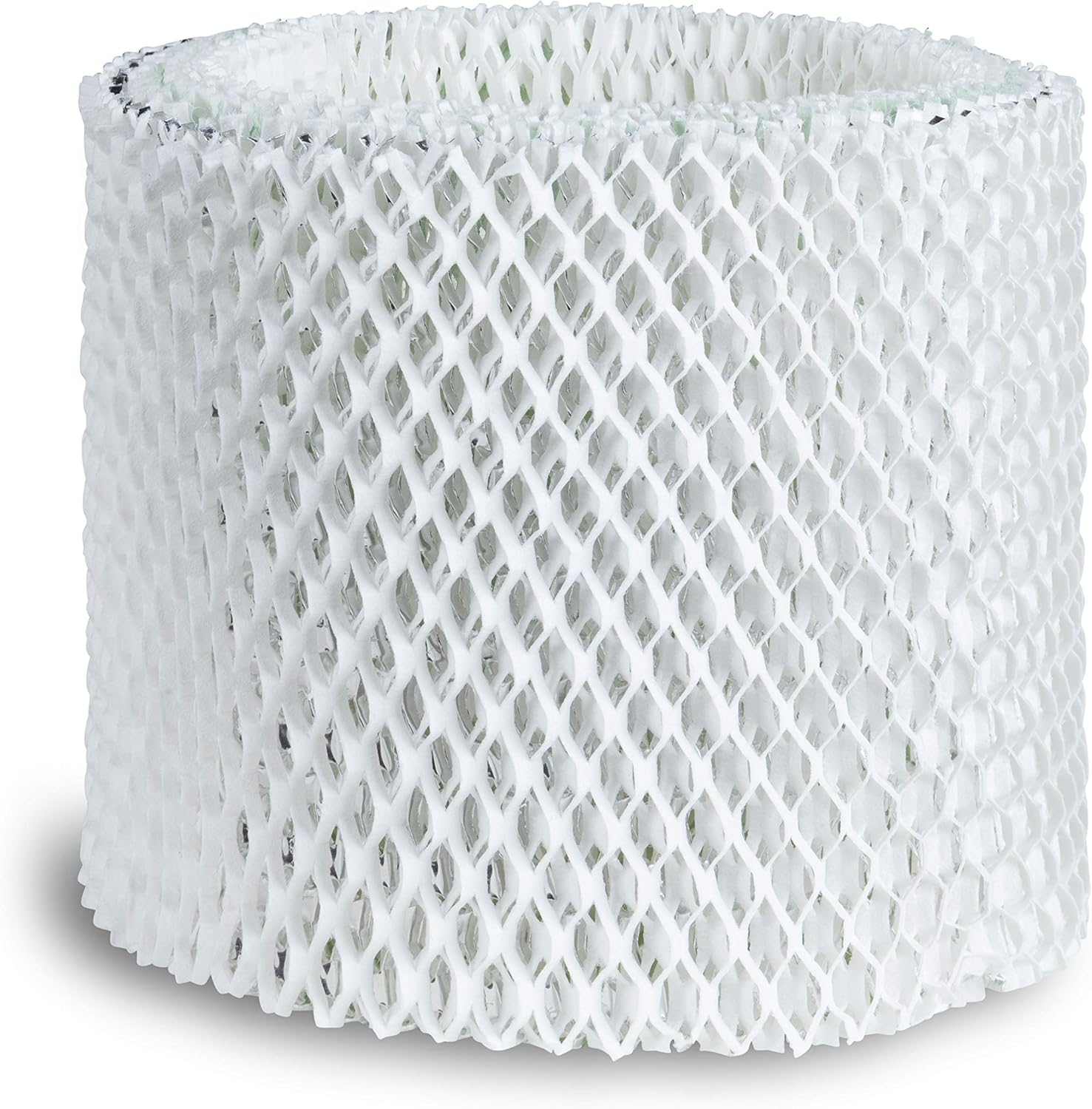
Figure 2: Close-up view of the BestAir HW500 filter material, showing its honeycomb structure designed for efficient wicking. The aluminum reinforcement is visible along the edges.
7. Troubleshooting
If your humidifier is not performing as expected after filter replacement, consider the following:
- Low Moisture Output: Ensure the new filter was properly primed by soaking it in water before installation. Check if the humidifier's fan is operating correctly. If using hard water, mineral buildup on the filter can quickly reduce efficiency; consider more frequent filter changes or using distilled water.
- Unpleasant Odor: A new filter should not produce odors. If an odor is present, ensure the humidifier base and tank are thoroughly cleaned. If the odor persists, the filter may need to be replaced sooner.
- Filter Discoloration: Yellowing or browning of the filter is normal due to mineral absorption. However, rapid or excessive discoloration may indicate very hard water, requiring more frequent filter changes.
8. Specifications
| Attribute | Detail |
|---|---|
| Brand Name | BestAir |
| Part Number | HW500 |
| Item Weight | 2.4 ounces |
| Item Dimensions (LxWxH) | 6.38 x 2.75 x 8.63 inches |
| Material | Aluminum (reinforcement) |
| Color | White |
| Size | 1 - Pack |
9. Warranty & Support
For information regarding product warranty or technical support, please refer to the official BestAir website or contact their customer service directly. Keep your purchase receipt for warranty claims.
You can also visit the BestAir Store on Amazon for more products and information.