
1. Introduction
The Virutex Double Sided Edge Trimmer AU93 is a hand tool designed for efficiently trimming excess edging material from both sides of a panel simultaneously. It is suitable for various edging materials and is engineered for ease of use and long-lasting performance. This manual provides essential information for the safe and effective operation, maintenance, and care of your trimmer.
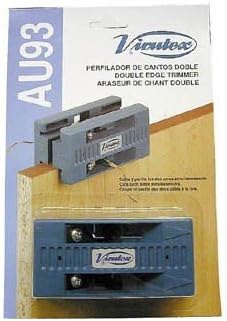
Image 1: The Virutex Double Sided Edge Trimmer AU93, shown in its original packaging. The tool is blue and gray, designed to trim edges from both sides of a panel simultaneously.
2. Safety Instructions
Always observe the following safety precautions when using the Virutex Double Sided Edge Trimmer AU93:
- Read the Manual: Familiarize yourself with all instructions before operation.
- Wear Eye Protection: Always wear safety glasses to protect against flying debris.
- Keep Blades Sharp: Dull blades can cause the tool to slip or require excessive force, increasing the risk of injury.
- Handle with Care: Blades are sharp. Exercise extreme caution when handling, installing, or replacing blades.
- Secure Workpiece: Ensure the material being trimmed is stable and securely held to prevent movement during operation.
- Store Safely: Keep the trimmer and spare blades out of reach of children and in a dry, secure location.
- Inspect Before Use: Check the tool for any damage or loose parts before each use. Do not use if damaged.
3. Package Contents
Upon unpacking, verify that all items are present and undamaged:
- 1 x Virutex Double Sided Edge Trimmer AU93
- Set of replaceable blades (pre-installed or separate)
If any items are missing or damaged, contact your retailer or the manufacturer immediately.
4. Setup
The Virutex Double Sided Edge Trimmer AU93 typically comes ready for use with blades pre-installed. No complex assembly is required.
- Inspect Blades: Before first use, ensure the blades are securely fastened and sharp. If they appear dull or damaged, refer to the Maintenance section for replacement instructions.
- Adjust for Edge Thickness: The trimmer is designed to accommodate edges from 5/8" to 7/8" wide. Ensure your edging material falls within this range for optimal performance. No manual adjustment is typically needed for this range.
5. Operating Instructions
Follow these steps for effective and safe operation of your double-sided edge trimmer:
- Prepare Workpiece: Place the panel with the applied edging on a stable, flat surface. Ensure the edging material extends beyond the panel's edges.
- Position the Trimmer: Place the trimmer over the edge of the panel, ensuring that the blades are positioned to trim the excess material on both the top and bottom surfaces simultaneously. The trimmer's design allows it to sit flush against the panel's face.
- Apply Pressure: Apply gentle, even downward pressure on the trimmer to keep it firmly against the panel.
- Trim the Edge: With steady, controlled motion, slide the trimmer along the length of the edge. The blades will cut the excess material from both sides. Avoid jerky movements.
- Check Results: After trimming, inspect the edge for a clean, flush finish. Repeat if necessary, or use a single-sided trimmer for fine-tuning corners if desired.
The trimmer is designed to cut two sides simultaneously, providing a clean finish for wood veneer and vinyl edging. For harder materials like mica, additional finishing may be required.
6. Maintenance
Proper maintenance ensures the longevity and performance of your Virutex Double Sided Edge Trimmer AU93.
- Cleaning: After each use, wipe down the trimmer with a dry cloth to remove dust and adhesive residue. For stubborn residue, a small amount of mineral spirits on a cloth can be used, ensuring to wipe dry immediately.
- Blade Replacement: The trimmer features long-life replaceable blades. When blades become dull or damaged, they should be replaced. To replace, carefully loosen the screws holding the blades in place, remove the old blades, insert new ones, and tighten the screws securely. Ensure blades are correctly oriented. Always use genuine replacement blades.
- Storage: Store the trimmer in a clean, dry place away from direct sunlight and extreme temperatures.
7. Troubleshooting
If you encounter issues with your trimmer, consider the following:
- Uneven Cut:
- Check if blades are dull or damaged. Replace if necessary.
- Ensure even pressure is applied during trimming.
- Verify the workpiece is stable and not shifting.
- Difficulty Trimming:
- Blades may be dull. Replace them.
- The edging material might be too hard for the trimmer's design (e.g., some types of mica).
- Ensure the edging width is within the 5/8" to 7/8" range.
- Trimmer Sticking/Dragging:
- Clean any adhesive residue from the trimmer's guides and blades.
- Ensure blades are sharp and properly installed.
If problems persist, contact customer support.
8. Specifications
| Feature | Detail |
|---|---|
| Model | AU93 |
| Brand | Virutex (Distributed by Vance) |
| Trimming Capacity | Cuts edges from 5/8" to 7/8" wide |
| Blade Type | Long life replaceable blades |
| Function | Cuts two sides simultaneously |
9. Warranty and Support
Warranty information for the Virutex Double Sided Edge Trimmer AU93 is typically provided by the manufacturer, Virutex, or the distributor, Vance, at the time of purchase. Please refer to the documentation included with your product or contact your retailer for specific warranty terms and conditions.
For technical support, replacement parts, or further assistance, please contact the retailer from whom you purchased the product or refer to the contact information provided by Vance or Virutex.