Introduction
This manual provides comprehensive instructions for the setup, operation, and maintenance of your Denon AVR-3805 AV Receiver. Designed for high-fidelity audio and video performance, the AVR-3805 offers advanced features for an immersive home theater experience.
Key Features:
- Fully discrete 7-channel power amplifier with 160 Watts (6 Ohms, DIN) per channel.
- DENON Link 3rd and AL24 Processing Plus for all channels.
- Component video conversion, multi-room functions, and serial interface.
- Innovative EL-Touch-Panel remote control with variable key display.
- Includes precision measurement microphone for acoustic calibration.
Setup Guide
Follow these steps to set up your Denon AVR-3805 AV Receiver.
1. Unpacking and Placement
Carefully remove the receiver from its packaging. Place the receiver on a stable, level surface with adequate ventilation. Ensure there is sufficient space around the unit for heat dissipation.

Figure 1: Front view of the Denon AVR-3805 AV Receiver.
2. Connecting Speakers
Connect your speakers to the appropriate speaker terminals on the rear panel of the receiver. Ensure correct polarity (+ to + and - to -) for all speakers. The AVR-3805 supports 7.1 channel configurations.
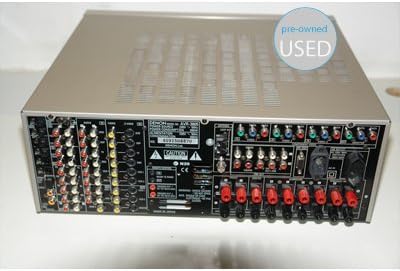
Figure 2: Rear panel connections of the Denon AVR-3805 AV Receiver.
3. Connecting Audio/Video Sources
Connect your audio and video components (e.g., Blu-ray player, TV, game console) to the corresponding input jacks on the receiver. Use high-quality cables for optimal performance. The receiver features component video conversion and various digital and analog audio inputs.
4. Power Connection
Once all connections are secure, plug the power cord into a wall outlet. Do not connect the power cord until all other connections are made.
5. Initial Setup and Calibration
Turn on the receiver. Use the included precision measurement microphone and the on-screen display (OSD) menu to perform the automatic speaker setup and room acoustic calibration. This optimizes sound performance for your specific listening environment.
Operating Instructions
Learn how to operate your Denon AVR-3805 for daily use.
1. Power On/Off
Press the POWER button on the front panel or the remote control to turn the unit on or off.
2. Input Selection
Use the INPUT SELECTOR knob on the front panel or the corresponding input buttons on the remote control (e.g., DVD, CD, TV) to switch between connected audio/video sources.
3. Volume Control
Adjust the master volume using the large VOLUME knob on the front panel or the VOLUME +/- buttons on the remote control.
4. Sound Modes
The AVR-3805 offers various surround sound modes. Use the MODE buttons on the remote control to select your preferred audio processing mode (e.g., Dolby Digital, DTS, Stereo).
5. Remote Control
The innovative EL-Touch-Panel remote control allows for comprehensive control of the receiver and other compatible Denon components. Refer to the remote control section in the full manual for detailed button functions and programming.
Maintenance and Care
Proper maintenance ensures the longevity and optimal performance of your receiver.
- Cleaning: Wipe the exterior surfaces with a soft, dry cloth. Do not use abrasive cleaners, waxes, or solvents.
- Ventilation: Ensure that the ventilation openings on the top and sides of the receiver are not blocked. Adequate airflow prevents overheating.
- Power Cord: Periodically check the power cord for any damage. If damaged, replace it immediately with an authorized Denon part.
- Storage: If storing the unit for an extended period, disconnect it from the power outlet and store it in a cool, dry place.
Troubleshooting
This section addresses common issues you might encounter with your Denon AVR-3805.
| Problem | Possible Cause | Solution |
|---|---|---|
| No power | Power cord disconnected; power outage; protection circuit activated. | Check power cord connection; check household circuit breaker; disconnect all speakers and power cycle the unit. |
| No sound | Incorrect input selected; volume too low; speakers disconnected; mute activated. | Select correct input; increase volume; check speaker connections; deactivate mute function. |
| Remote control not working | Batteries depleted; obstruction between remote and receiver; incorrect remote mode. | Replace batteries; remove obstructions; ensure remote is in the correct operating mode for the receiver. |
| Poor sound quality | Incorrect speaker wiring; improper calibration; source quality. | Verify speaker polarity; re-run automatic calibration; check source audio settings. |
For more complex issues, please refer to the detailed troubleshooting section in the complete user manual or contact Denon customer support.
Specifications
Key technical specifications for the Denon AVR-3805 AV Receiver:
- Brand: Denon
- Model Number: Denon AVR-3805
- Channels: 7.1 Surround Sound
- Output Power: 160 Watts per channel (6 Ohms, DIN) / 1120 Watts total
- Controller Type: Remote Control
- Connectivity: 3.5 mm Jack, various audio/video inputs (detailed in full manual)
- Dimensions (approx.): 53.6 x 52.4 x 27.4 cm (Packaging)
- Weight (approx.): 21.36 Kilograms (Packaging)
- First Available: August 28, 2006
Note: Detailed specifications for all inputs, outputs, and processing capabilities are available in the comprehensive user manual.
Warranty and Support
For information regarding product warranty, service, and technical support, please refer to the warranty card included with your product or visit the official Denon website. Contact details for customer service are typically provided in the full user manual or on the manufacturer's support pages.
Denon Official Website: www.denon.com