
Introduction
The Kaito KA007 is a versatile portable emergency radio designed for reliable communication and illumination in various situations. It features multiple power sources, including solar, dynamo (hand crank), internal rechargeable battery, and external batteries, ensuring functionality even during power outages. This manual provides detailed instructions for setting up, operating, and maintaining your KA007 radio.
Key features include:
- Wide frequency coverage: AM, FM, Shortwave (SW1-4), Weather Band (WX), and TV Bands (TV1-2).
- Four power options: Solar panel, hand-crank dynamo, built-in rechargeable NiMH battery pack, and external batteries.
- Integrated LED flashlight for illumination.
- Reading lamp for convenient low-light use.
- Compact and portable design.
Product Overview

Figure 1: Front View. This image displays the front of the Kaito KA007 radio, highlighting the main speaker grille, the frequency display, tuning knob, and band selection switches. The Kaito KA007 logo is visible at the bottom left.

Figure 2: Side View. This image shows the left side of the Kaito KA007 radio, featuring the headphone jack, the switch for the flashlight/reading lamp, and the DC 4.5-6V input port for external power.

Figure 3: Top-Front View with Antenna. This image provides a top-front perspective of the radio with its telescopic antenna fully extended, illustrating its readiness for improved reception.
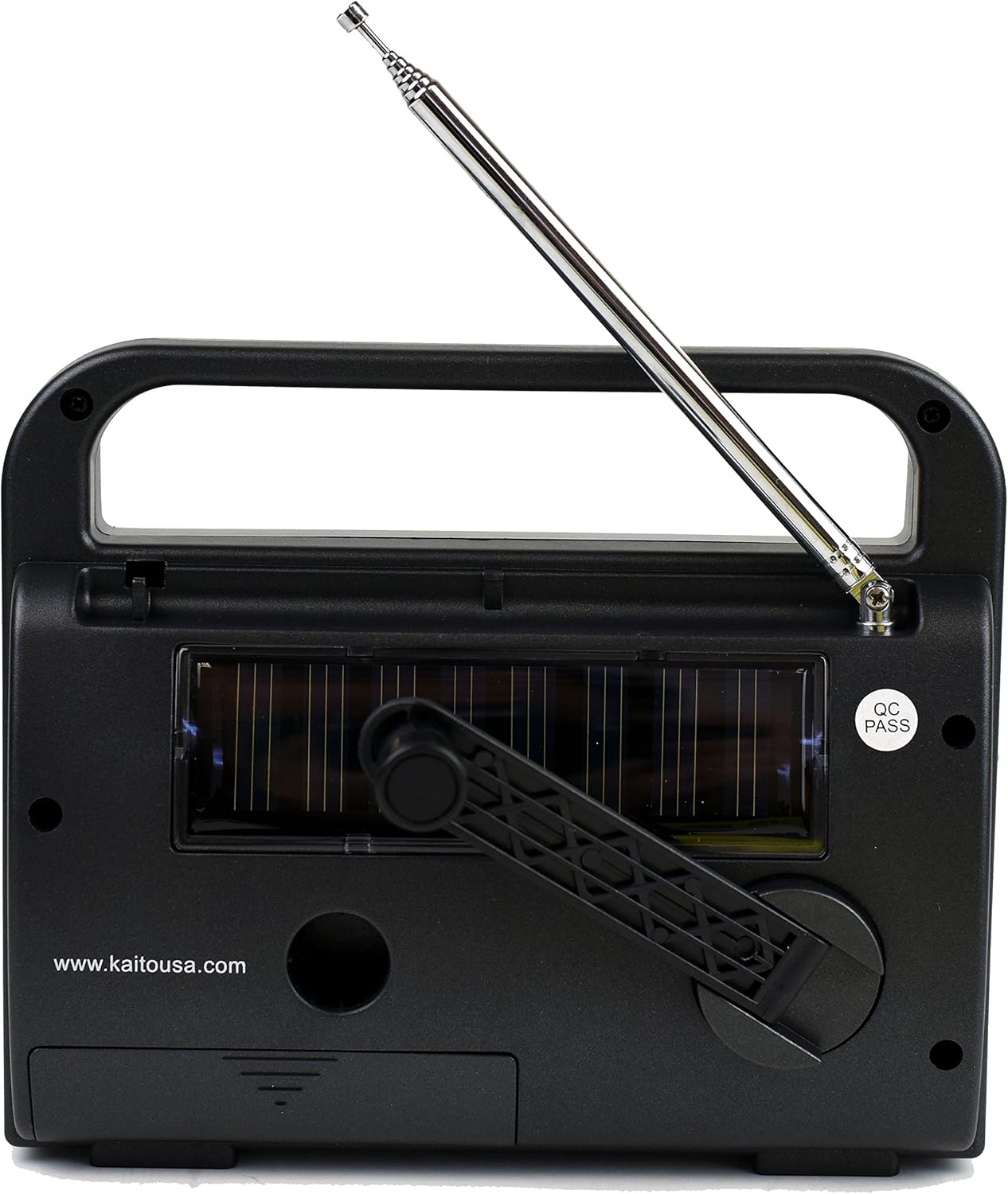
Figure 4: Rear View. This image shows the back of the Kaito KA007 radio, prominently featuring the integrated solar panel and the foldable hand-crank dynamo for charging.
Setup
1. Powering the Radio
The Kaito KA007 offers multiple power options:
- Internal NiMH Battery Pack: The radio comes with a built-in rechargeable NiMH battery pack. This pack can be charged via the AC/DC adapter, solar panel, or hand-crank dynamo.
- External Batteries: For extended use or when the internal battery is depleted, you can insert standard batteries (type not specified in product data, typically AA or AAA for similar devices, refer to battery compartment markings).
- AC/DC Adapter: Connect the included AC/DC adapter to the DC 4.5-6V input port on the side of the radio and plug it into a wall outlet. This will power the radio and charge the internal NiMH battery pack.
- Solar Power: Place the radio with the solar panel (located on the back) facing direct sunlight. The solar panel will slowly charge the internal NiMH battery pack. This method is best for maintaining charge or trickle charging.
- Dynamo (Hand Crank): Unfold the hand crank on the back of the radio and rotate it clockwise or counter-clockwise for approximately 1-3 minutes to provide power for immediate use or to charge the internal NiMH battery pack.
2. Antenna Setup
For optimal reception, especially for FM, Shortwave, and Weather bands, fully extend the telescopic antenna. For AM reception, the radio uses an internal ferrite bar antenna, so antenna extension is not typically required.
Operating Instructions
1. Power On/Off and Volume Control
Locate the combined ON/OFF and Volume knob, typically on the right side of the radio. Rotate it clockwise to turn the radio on and increase the volume. Rotate counter-clockwise to decrease volume and turn the radio off.
2. Band Selection
Use the band selector switches, usually located on the front panel below the frequency display, to choose your desired band:
- AM: For Amplitude Modulation broadcasts (525-1710 KHz).
- FM: For Frequency Modulation broadcasts (88-108 MHz).
- SW1-4: For Shortwave bands (SW1: 4.90-9.00 MHz, SW2: 9.00-13.50 MHz, SW3: 13.50-17.50 MHz, SW4: 17.50-22.00 MHz).
- WX: For Weather Band broadcasts (162.40-162.55 MHz).
- TV1-2: For TV audio broadcasts (TV1: Channel 2-6, TV2: Channel 7-13). Note: TV audio broadcasts are largely discontinued in many regions due to digital TV transition.
- VHF: For VHF band (145-175 MHz), which may include weather, taxi, and police frequencies.
3. Tuning
Once a band is selected, use the TUNING knob (typically on the right side, above the volume knob) to scan for stations. Rotate slowly for fine-tuning. The frequency display will indicate the current frequency.
4. Flashlight and Reading Lamp
A switch on the side of the radio controls the integrated lighting features. Toggle the switch to activate the LED flashlight or the reading lamp as needed.
5. Headphone Use
For private listening, plug standard 3.5mm headphones into the headphone jack located on the side of the radio.
Maintenance
- Cleaning: Wipe the radio with a soft, damp cloth. Do not use abrasive cleaners or solvents.
- Battery Care:
- If using external batteries, remove them if the radio will not be used for an extended period to prevent leakage.
- Regularly charge the internal NiMH battery pack, especially if stored for long durations, to maintain its lifespan. Avoid over-discharging.
- Storage: Store the radio in a cool, dry place away from direct sunlight and extreme temperatures. Ensure the antenna is retracted when not in use.
- Dynamo Crank: Operate the hand crank smoothly. Avoid excessive force, which could damage the mechanism.
Troubleshooting
| Problem | Possible Cause | Solution |
|---|---|---|
| Radio does not turn on. | Internal battery depleted, external batteries dead or incorrectly inserted, power switch off. | Charge internal battery via AC adapter, solar, or dynamo. Replace external batteries. Ensure power/volume knob is turned on. |
| Poor reception or static. | Antenna not extended, weak signal, interference from electronics, incorrect band selected. | Fully extend telescopic antenna. Try repositioning the radio. Tune slowly and carefully. Ensure correct band is selected for desired broadcast. |
| Solar charging light not on. | Insufficient sunlight, solar panel obstructed, internal wiring issue. | Ensure direct, strong sunlight on the solar panel. Check for any physical damage to the panel or connecting wires. |
| Difficulty fine-tuning stations. | Small tuning dial, sensitive tuning mechanism. | Rotate the tuning knob very slowly and gently. Use the telescopic antenna for better signal clarity. |
| FM bleed-over on TV bands. | Strong local FM signals interfering with TV band reception. | This can be a characteristic of the radio's design. Try adjusting antenna position or moving to an area with less FM interference. Note that TV audio broadcasts are largely obsolete. |
Specifications
- Model: KA007
- Brand: Kaito
- Tuner Technology: AM, FM
- Power Source: Battery Powered (Internal NiMH, External), Solar, Dynamo, AC Adapter (DC 4.5-6V)
- Radio Bands Supported:
- AM: 525 - 1710 KHz
- FM: 88 - 108 MHz
- Weather Band (WX): 162.40 - 162.55 MHz
- TV1: Channel 2-6
- TV2: Channel 7-13
- VHF: 145 - 175 MHz (Weather, Taxi, Police)
- Shortwave 1 (SW1): 4.90 - 9.00 MHz
- Shortwave 2 (SW2): 9.00 - 13.50 MHz
- Shortwave 3 (SW3): 13.50 - 17.50 MHz
- Shortwave 4 (SW4): 17.50 - 22.00 MHz
- Item Weight: 12 ounces (approximately 340 grams)
- Voltage: 110 Volts (for AC adapter input)
- Audio Output Mode: Mono / Stereo (via headphone jack)
- Special Feature: Portable
Warranty Information
The Kaito KA007 radio comes with a manufacturer's limited warranty for 1 year from the date of purchase. Additionally, a 90-day money-back guarantee may apply. Please retain your proof of purchase for warranty claims. For specific terms and conditions, refer to the warranty card included with your product or contact Kaito customer support.
Customer Support
For technical assistance, troubleshooting beyond this manual, or warranty inquiries, please visit the official Kaito website or contact their customer service department. Contact information can typically be found on the manufacturer's website or product packaging.
You can also visit the Kaito Store on Amazon for more product information.


