
1. Introduction
This manual provides essential instructions for the safe and effective use of your Nikon Coolpix 8800 8MP Digital Camera. The Coolpix 8800 features an 8.0 effective megapixel CCD, a 10x optical Zoom-Nikkor ED lens, and Nikon's Vibration Reduction (VR) technology, designed to capture high-quality images and videos.

Image 1.1: The Nikon Coolpix 8800 Digital Camera, showcasing its compact design and prominent lens.
2. Initial Setup
Before using your camera, ensure proper setup of the battery and necessary connections.
2.1. Battery Installation and Charging
The camera uses a rechargeable lithium-ion battery (EN-EL7). Insert the battery into the battery compartment as indicated by the diagram inside the compartment. Use the provided battery charger (MH-56) to fully charge the battery before first use.
2.2. Memory Card Insertion
The camera requires a compatible memory card (not always included) to store images and videos. Open the memory card slot cover and insert the card in the correct orientation until it clicks into place. Refer to the camera's internal diagrams for proper insertion.
2.3. Connecting to External Devices
- USB Cable: Connect the camera to a computer using the supplied USB cable for image transfer.
- Audio-Video Cable: Connect the camera to a television using the supplied audio-video cable to view images and videos on a larger screen.
- Wireless Remote Controller (ML-L3): The camera includes a wireless remote controller for convenient remote shutter release.
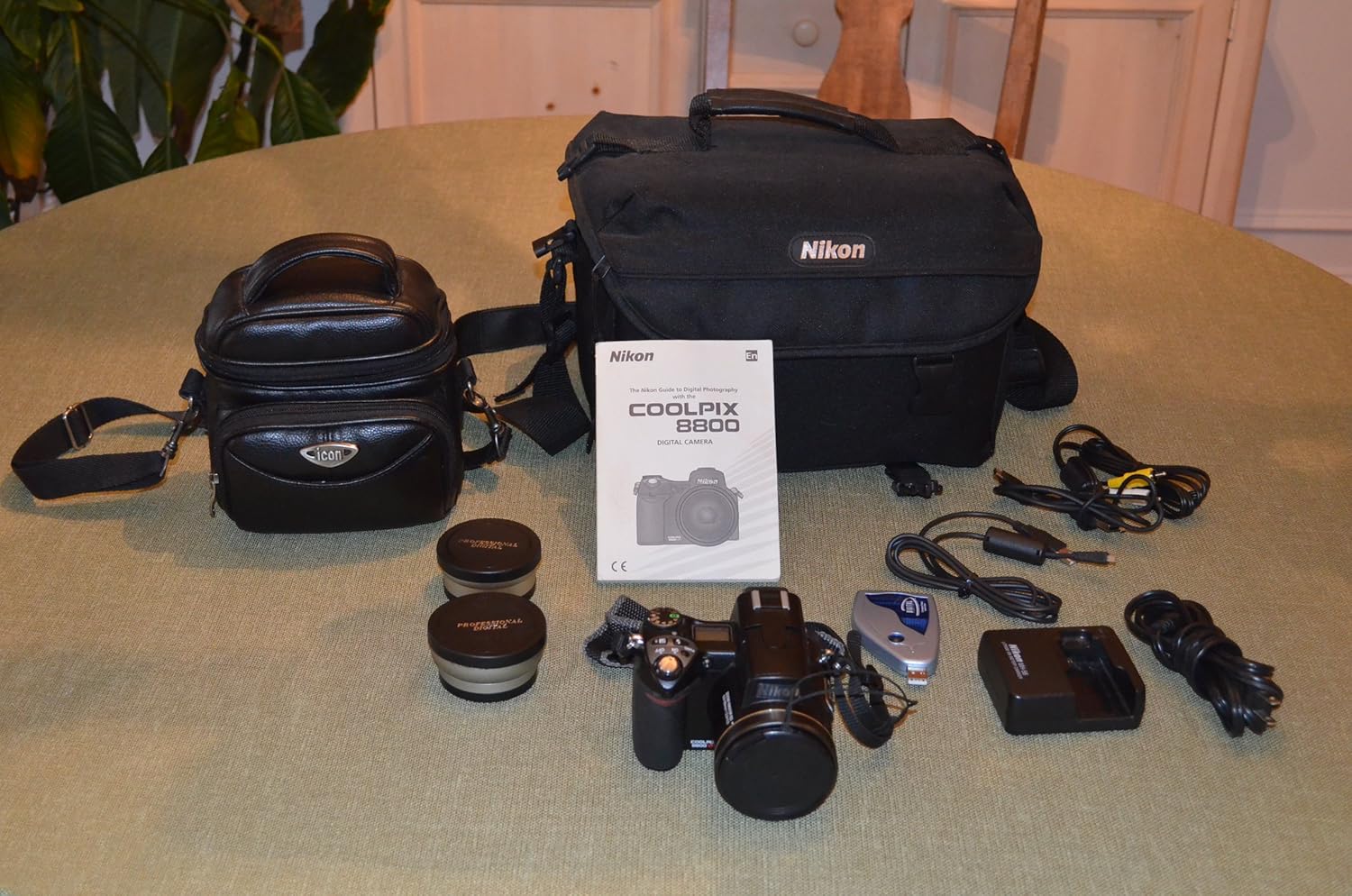
Image 2.1: The Nikon Coolpix 8800 camera alongside its standard accessories, including cables, charger, and remote.
3. Operating the Camera
Understand the various functions and settings to optimize your photography experience.
3.1. Power On/Off
Press the power button to turn the camera on or off. The lens will extend upon powering on.
3.2. Shooting Modes
The Coolpix 8800 offers a range of shooting modes for different scenarios:
- Automatic Mode: For general point-and-shoot photography.
- Aperture Priority Mode: Allows manual control over aperture while the camera sets shutter speed.
- Shutter Priority Mode: Allows manual control over shutter speed while the camera sets aperture.
- Manual Mode: Provides full control over both aperture and shutter speed.
- Scene Modes: Select from 15 pre-set scene modes (e.g., Portrait, Landscape, Night Scene) to automatically adjust settings for specific conditions.
3.3. Zoom Function
Utilize the 10x optical Zoom-Nikkor ED lens (equivalent to 35-350mm in 35mm format) for wide-angle to telephoto shots. The zoom control is typically located near the shutter button.
3.4. Vibration Reduction (VR) System
Nikon's VR technology helps reduce blur caused by camera shake, especially in low light or when using the telephoto zoom. The VR system offers two main modes:
- Normal Mode: Compensates for general camera movement.
- Active Mode: Recommended for shooting from moving vehicles or unstable platforms.
VR is effective for still images and movie recording, allowing for sharper handheld shots at slower shutter speeds.
3.5. Focusing
The camera uses Contrast-detect TTL-AF. You can select from:
- Auto 5-area Multi AF: Camera automatically selects focus points.
- Manual 9-area Multi AF: Allows manual selection of focus points.
- AF Assist Illuminator: Aids in achieving sharp focus in low-light conditions.
3.6. Metering Options
Choose the appropriate light metering system for your shooting conditions:
- 256-segment Matrix Metering: Ideal for general shooting, providing balanced exposure.
- Center-weighted Metering: Emphasizes the central area of the frame.
- Spot Metering: Measures light from a very small area, useful for precise exposure control.
- AF Spot Metering: Links spot metering to the active autofocus point.
3.7. Flash Functions
The built-in flash offers multiple modes:
- Auto: Flash fires automatically when needed.
- Red-eye Reduction: Emits a pre-flash to minimize red-eye effect.
- Anytime Flash: Flash fires regardless of ambient light.
- Flash Cancel: Disables the flash.
- Slow Sync: Combines flash with slow shutter speeds for balanced exposure of subject and background in low light.
- Rear-curtain Sync: Flash fires just before the second curtain closes, creating natural-looking light trails behind moving subjects.
A hot shoe is available for connecting an optional external Nikon speedlight.
3.8. D-Lighting
This in-camera feature improves images shot with strong backlighting or in shadow. Access D-Lighting in playback mode to apply corrections and save the enhanced image without affecting properly exposed areas.
3.9. Movie Mode
Record live action with sound. Clips are saved as QuickTime movies and can be easily shared.
3.10. Macro Mode
For close-up photography, the macro mode allows shooting subjects as close as approximately 1.2 inches (3 centimeters) from the lens.
4. Maintenance and Care
Proper maintenance ensures the longevity and optimal performance of your camera.
- Cleaning the Lens: Use a soft, lint-free cloth or a lens brush to gently remove dust. For smudges, use a specialized lens cleaning solution applied to a cloth, not directly to the lens.
- Cleaning the Camera Body: Wipe the camera body with a soft, dry cloth. Avoid using harsh chemicals or solvents.
- Storage: Store the camera in a cool, dry place away from direct sunlight and extreme temperatures. Remove the battery if the camera will not be used for an extended period.
- Battery Care: Recharge the battery regularly. Avoid fully discharging the battery frequently.
5. Troubleshooting
This section addresses common issues you might encounter.
- Camera Does Not Power On: Ensure the battery is fully charged and correctly inserted.
- Blurred Images: Check if Vibration Reduction (VR) is enabled, especially in low light or with telephoto zoom. Ensure proper focus. Use a tripod if necessary.
- Images Too Dark/Bright: Adjust exposure compensation or select a different metering mode. Ensure flash settings are appropriate for the scene.
- Red-Eye in Flash Photos: Use the red-eye reduction flash mode.
- Cannot Transfer Images to Computer: Verify the USB cable connection. Ensure the camera is in the correct transfer mode (refer to on-screen prompts).
For more complex issues, consult the full product manual or contact Nikon support.
6. Specifications
- Effective Megapixels: 8.0 MP
- Lens: 10x Ultra Telephoto Optical Zoom-Nikkor ED (35-350mm equivalent)
- Vibration Reduction: Yes
- Product Dimensions: 4.57 x 4.76 x 3.35 inches
- Item Weight: 1.5 pounds
- Battery: 1 Lithium Ion battery (EN-EL7)
- Minimum Shutter Speed: 8 seconds
- Date First Available: September 16, 2004
7. What's in the Box
The Nikon Coolpix 8800 package typically includes:
- Nikon Coolpix 8800 Camera
- Lens Cap
- Strap
- USB Cable
- Audio-Video Cable
- Rechargeable Lithium-Ion Battery (EN-EL7)
- Battery Charger (MH-56)
- Wireless Remote Controller (ML-L3)
- PictureProject CD-ROM (Software)
- Instruction Manual (this document)
8. Warranty and Support
For information regarding product warranty, please refer to the warranty card included with your purchase or visit the official Nikon website. For technical support, service, or additional inquiries, please contact Nikon customer service through their official channels.


