
Introduction
This manual provides detailed instructions for the safe and effective use of the PICO 1920D 12-10 AWG (Yellow) Flared Vinyl Insulated 3-Way Electrical Connector. Please read this manual thoroughly before installation and retain it for future reference.
Product Overview
The PICO 1920D is a flared vinyl insulated connector designed to securely join three electrical wires. Its yellow insulation indicates compatibility with 12-10 AWG (American Wire Gauge) wires, providing a reliable and insulated connection point.
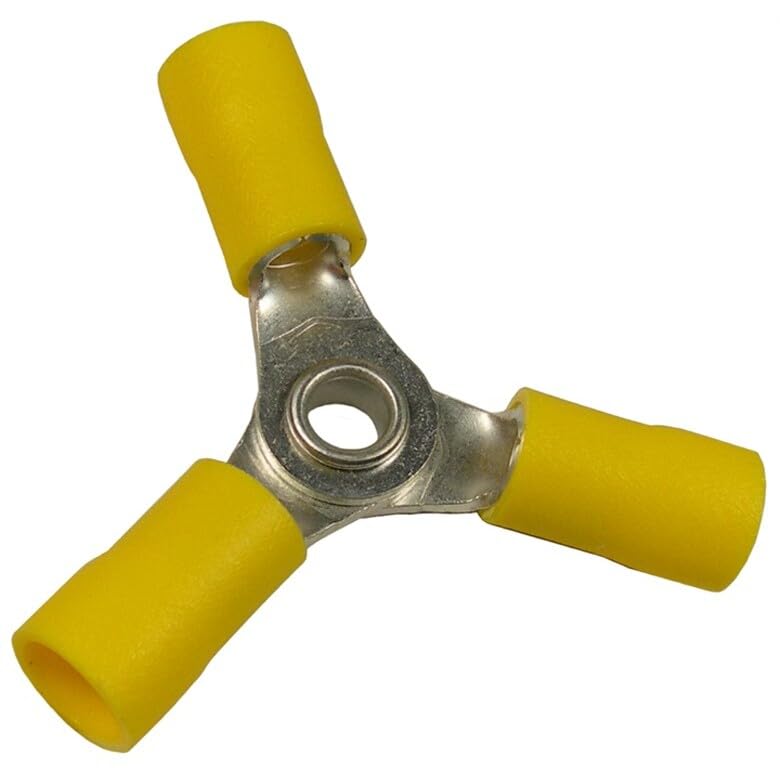
Image: A single PICO 1920D 3-way electrical connector. It features a central metal hub with three radiating arms, each covered with yellow vinyl insulation. The central hub has a circular opening, and each arm is designed to accept a wire.
Key Features:
- Vinyl Flare Insulation: Provides protection and strain relief for wire connections.
- 3-Way Connection: Designed to connect three wires simultaneously.
- Wire Gauge Compatibility: Suitable for 12-10 AWG electrical wires.
- Color-Coded: Yellow insulation for easy identification of 12-10 AWG compatibility.
Specifications
| Model Number | 1920D |
| Wire Gauge | 12-10 AWG |
| Insulation Material | Polyvinyl Chloride (Vinyl) |
| Color | Yellow |
| Connection Type | 3-Way |
| Brand | PICO |
Safety Information
Always prioritize safety when working with electrical components. Failure to follow these safety guidelines may result in electric shock, fire, or personal injury.
- Disconnect Power: Always ensure that the power supply to the circuit is completely disconnected before beginning any electrical work. Verify with a voltage tester.
- Use Correct Tools: Use appropriate wire strippers and crimping tools designed for the specified wire gauge.
- Proper Wire Gauge: Ensure the wires being connected are within the 12-10 AWG range for this connector. Using incorrect wire gauges can lead to poor connections or overheating.
- Inspect Components: Before installation, inspect the connector for any signs of damage or defects. Do not use damaged connectors.
- Secure Connections: Ensure all wire connections are firm and secure to prevent arcing or loose circuits.
- Professional Assistance: If you are unsure about any electrical procedure, consult a qualified electrician.
Setup and Installation
Follow these steps to properly install the PICO 1920D 3-way electrical connector:
- Prepare Wires: With the power disconnected, carefully strip approximately 3/8 to 1/2 inch (10-12 mm) of insulation from the ends of the three wires you intend to connect. Ensure the copper strands are clean and untwisted.
- Insert Wires: Insert one stripped wire end fully into each of the three insulated openings of the PICO 1920D connector. Ensure that the bare wire extends into the metal barrel of the connector and no insulation is crimped.
- Crimp Connection: Using a suitable crimping tool, firmly crimp the metal barrel of each connection point. Ensure the crimp is secure and the wire cannot be easily pulled out. A proper crimp will deform the metal barrel around the wire.
- Verify Connection: Gently tug on each wire to confirm it is securely held within the connector. Visually inspect the crimped areas for proper formation.
- Insulate (if necessary): While the connector is insulated, for added protection in certain environments, you may consider applying electrical tape or heat shrink tubing over the entire connection area after crimping.
- Restore Power: Once all connections are secure and verified, restore power to the circuit.
Operating Instructions
The PICO 1920D connector is a passive component. Once properly installed, its function is to maintain a secure and insulated electrical connection between three wires. No further operational steps are required beyond ensuring a correct initial installation.
- The connector facilitates the flow of electrical current between the three connected wires.
- The vinyl insulation provides protection against accidental contact and environmental factors.
- Ensure the connected circuit operates within its intended voltage and current limits.
Maintenance
PICO 1920D connectors are designed for long-term, maintenance-free operation once properly installed. However, periodic inspection of electrical connections is good practice.
- Visual Inspection: Periodically inspect the connector and surrounding wiring for any signs of damage, discoloration, or loose connections.
- Environmental Factors: Ensure the connector is not exposed to conditions beyond its intended use (e.g., excessive moisture, extreme temperatures, corrosive chemicals) unless specifically rated for such environments.
- Cleaning: If cleaning is necessary, ensure power is disconnected and use a dry, lint-free cloth. Do not use liquid cleaners directly on electrical connections.
Troubleshooting
If you experience issues with your electrical circuit after installing the connector, consider the following troubleshooting steps:
- No Power/Intermittent Power:
- Verify power is restored to the circuit.
- Check for loose connections at the connector. Re-crimp if necessary (after disconnecting power).
- Ensure wires are fully inserted into the connector.
- Inspect for damaged wires or insulation outside the connector.
- Overheating/Discoloration:
- Immediately disconnect power.
- This indicates a poor connection or incorrect wire gauge. Ensure wires are 12-10 AWG and crimps are secure.
- Replace the connector if it shows signs of heat damage.
- Wire Pull-Out:
- Disconnect power.
- The wire was not crimped securely enough. Re-strip and re-crimp the wire, ensuring a firm connection.
If troubleshooting does not resolve the issue, consult a qualified electrician.
Warranty and Support
For information regarding warranty coverage or technical support for PICO products, please refer to the official PICO website or contact their customer service directly. Keep your purchase receipt as proof of purchase.
Manufacturer: Pacific Industrial Components