
Swann SW-C-C500R
Swann C500R Professional CCD Security Camera User Manual
Model: SW-C-C500R
1. Introduction
This manual provides comprehensive instructions for the installation, operation, and maintenance of your Swann C500R Professional CCD Security Camera. This camera is designed to deliver clear images for various surveillance applications, from domestic to commercial environments. It features a C/CS inter-changeable lens system, allowing for flexibility with optional lenses.
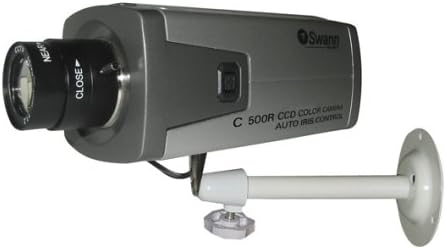
Figure 1: The Swann C500R Professional CCD Security Camera. This image shows the camera unit, which is grey, with a black lens at the front. It is attached to a white mounting arm that can be fixed to a wall or ceiling.
2. Safety Information
Please read and understand all safety precautions before installing or operating this product. Failure to do so may result in injury or damage to the device.
- Ensure the power supply used is compatible with the camera's voltage requirements (12 Volts).
- Do not expose the camera to extreme temperatures, humidity, or direct water contact unless specified for outdoor use (this model is rated for Indoor use).
- Avoid placing the camera in direct sunlight or near heat sources.
- Handle the lens with care to prevent scratches or damage.
- Disconnect power before performing any maintenance or cleaning.
3. Package Contents
Verify that all items are present in your package:
- Swann C500R Professional CCD Security Camera
- Mounting Bracket
- Power Adapter (may be sold separately or included depending on region/kit)
- Instruction Manual (this document)
- Mounting Hardware (screws, wall plugs)
4. Setup
4.1 Mounting the Camera
- Choose a suitable indoor location for installation, considering the desired viewing area and proximity to a power outlet.
- Secure the mounting bracket to a wall or ceiling using the provided screws and wall plugs. Ensure the surface can support the camera's weight (approximately 3 pounds).
- Attach the camera to the mounting bracket. Adjust the angle and direction of the camera for optimal coverage.
4.2 Connecting the Camera
- Connect the camera's video output to your AV TV, VCR, DVR, or monitor using a compatible video cable (e.g., BNC or RCA, depending on your system).
- Connect the power adapter to the camera's power input.
- Plug the power adapter into a wall outlet. The camera should power on automatically.
5. Operating
5.1 Basic Operation
Once powered on and connected to a display device, the camera will immediately begin transmitting video. Select the correct input channel on your TV, VCR, DVR, or monitor to view the camera's feed.
5.2 Adjusting the Lens
The Swann C500R features a vari-focal (ZOOM) 3.5-8mm lens with manual iris control. This allows for adjustment of the field of view and light intake.
- Focus Adjustment: Rotate the focus ring on the lens (marked 'NEAR' and 'FAR' or similar) until the image on your display is clear and sharp.
- Zoom Adjustment: Rotate the zoom ring on the lens to adjust the focal length, widening or narrowing the field of view.
- Iris Adjustment: The manual iris allows you to control the amount of light entering the lens. Adjust this to prevent overexposure or underexposure, especially in varying light conditions. An auto-iris capable lens can be used for automatic light adjustment (requires optional lens).
6. Maintenance
Regular maintenance ensures optimal performance and longevity of your camera.
- Cleaning the Lens: Gently wipe the lens with a soft, lint-free cloth. For stubborn smudges, use a lens cleaning solution designed for optical surfaces.
- Cleaning the Camera Body: Use a soft, dry cloth to wipe down the camera body. Do not use harsh chemicals or abrasive cleaners.
- Cable Inspection: Periodically check all cables for signs of wear, fraying, or damage. Replace damaged cables immediately.
7. Troubleshooting
If you encounter issues with your Swann C500R camera, refer to the table below for common problems and solutions.
| Problem | Possible Cause | Solution |
|---|---|---|
| No image on screen | No power; Incorrect input selected on display; Loose video cable | Check power connection; Select correct AV input; Secure video cable connections |
| Image is blurry | Lens out of focus; Dirty lens | Adjust the focus ring on the lens; Clean the lens gently |
| Image is too dark/bright | Incorrect iris adjustment | Adjust the manual iris on the lens |
| No signal detected | Faulty cable; Camera malfunction | Try a different video cable; Contact support if problem persists |
8. Specifications
| Feature | Detail |
|---|---|
| Brand | Swann |
| Model Number | SW-C-C500R |
| Photo Sensor Technology | CCD |
| Lens Type | Vari-focal (ZOOM) 3.5-8mm with Manual Iris |
| Voltage | 12 Volts |
| Connectivity Protocol | Wi-Fi (Note: This refers to general connectivity, actual video output is typically wired AV) |
| Indoor/Outdoor Usage | Indoor |
| Color | Silver |
| Item Dimensions (L x W x H) | 2.44 x 5.11 x 2.08 inches |
| Item Weight | 3 Pounds |
| Mounting Type | Wall Mount |
| Recommended Uses | Security, Surveillance |
9. Warranty and Support
Swann products are designed for reliability and performance. For specific warranty details, please refer to the warranty card included with your product or visit the official Swann website. For technical support, troubleshooting assistance beyond this manual, or to inquire about replacement parts, please contact Swann customer service through their official channels.
Keep your purchase receipt as proof of purchase for warranty claims.