
Introduction
The Pyle PYD-1958 is a robust 4-channel professional mixer designed for various audio mixing applications, including DJ performances and studio use. This unit integrates advanced features such as a digital sampler, multiple input options, and a comprehensive 10-band graphic equalizer to provide precise control over your audio. This manual provides essential information for the proper setup, operation, and maintenance of your PYD-1958 mixer.
- 12-second digital sampler: Offers single playback or loop functionality for creative audio manipulation.
- Versatile Inputs: Includes 2 turntable inputs, 8 line-level inputs (for devices like CD players, cassette decks, or minidiscs), and 2 microphone inputs.
- Amp Output: Features both 1/4" and RCA output jacks for flexible connectivity to amplifiers or powered speakers.
- Dual Mic Inputs with Talkover: Allows for two microphones with a talkover function to automatically lower music volume during announcements.
- Assignable A/B Crossfader: Enables smooth transitions between selected channels.
- 10-Band Graphic Equalizer: Provides detailed frequency control for both right and left channels.
Setup Instructions
Follow these steps to correctly set up your Pyle PYD-1958 mixer.
1. Unpacking and Inspection
Carefully remove the mixer from its packaging. Inspect the unit for any signs of damage that may have occurred during transit. Ensure all included accessories are present.
2. Power Connection
Connect the provided power cable to the mixer's power input and then to a standard AC power outlet. Ensure the power switch on the mixer is in the 'OFF' position before connecting to power.
3. Audio Input Connections
Connect your audio sources to the appropriate input jacks on the rear panel of the mixer:
- Turntables: Connect to the PHONO inputs.
- Line-Level Devices: Connect CD players, cassette decks, minidisc players, or other line-level audio sources to the LINE inputs.
- Microphones: Connect microphones to the XLR or 1/4" MIC inputs.
4. Audio Output Connections
Connect the mixer's output to your amplifier or powered speakers:
- Use the RCA output jacks for standard audio connections.
- Use the 1/4" output jacks for professional audio connections.
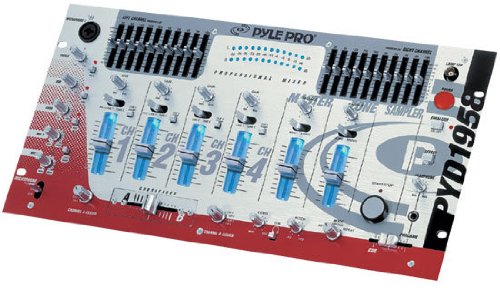
Figure 1: Front view of the Pyle PYD-1958 mixer, showing controls and inputs.
Operating Instructions
This section details the basic operation of your PYD-1958 mixer.
1. Powering On/Off
After all connections are made, switch the power button to the 'ON' position. The unit will illuminate, indicating it is ready for use. To power off, switch the button back to 'OFF'.
2. Input Selection and Volume Control
- Use the input selector switches for each channel to choose between PHONO, LINE, or MIC sources.
- Adjust the GAIN controls for each channel to set the input level, ensuring no clipping (distortion).
- Use the channel faders to control the volume of individual channels.
- Adjust the MASTER volume control to set the overall output level of the mixer.
3. Using the 10-Band Graphic Equalizer
The PYD-1958 features a 10-band graphic equalizer for both the left and right channels. Use the sliders to boost or cut specific frequency ranges to tailor the sound to your preference or room acoustics.
4. Crossfader Operation
The assignable A/B crossfader allows for smooth transitions between two selected channels. Assign channels to either side of the crossfader using the respective switches above each channel fader. Move the crossfader left or right to blend between the assigned channels.
5. Microphone Usage and Talkover
Connect your microphones to the dedicated MIC inputs. Adjust the MIC GAIN control for appropriate volume. Activate the TALKOVER function to automatically reduce the music volume when speaking into the microphone, ensuring your voice is clear and prominent.
6. Digital Sampler
The 12-second digital sampler allows you to record and play back short audio segments. Refer to the specific controls on the unit for recording, single playback, and loop functions. This feature is ideal for adding sound effects or short vocal clips to your mix.
7. Monitoring
Connect headphones to the dedicated headphone jack. Use the CUE/PFL (Pre-Fader Listen) buttons on each channel and the headphone volume control to monitor individual channels or the master output without affecting the main sound.
Maintenance
Proper maintenance ensures the longevity and optimal performance of your mixer.
- Cleaning: Regularly wipe the mixer's surface with a soft, dry, lint-free cloth. Avoid using liquid cleaners, solvents, or abrasive materials, as these can damage the finish and internal components.
- Ventilation: Ensure that the ventilation openings on the mixer are not blocked. Adequate airflow is crucial to prevent overheating, which can lead to performance issues or damage.
- Storage: When not in use, store the mixer in a dry, dust-free environment. If transporting, use appropriate protective casing.
- Cable Management: Keep cables organized and free from kinks or excessive bending to prevent damage to the cables and connectors.
Troubleshooting
If you encounter issues with your PYD-1958 mixer, refer to the following common problems and solutions:
- No Power:
Solution: Check that the power cable is securely connected to both the mixer and a working power outlet. Ensure the power switch is in the 'ON' position. - No Sound Output:
Solution: Verify all audio input and output cables are correctly connected. Check the MASTER volume control and individual channel faders are raised. Ensure your amplifier or powered speakers are turned on and functioning. - Distorted Sound:
Solution: Reduce the GAIN controls for individual channels and the MASTER volume. Ensure input levels are not too high, causing clipping (indicated by peak LEDs). Check cable integrity for any damage. Adjust the 10-band equalizer settings to ensure no extreme boosts are causing distortion. - Microphone Not Working:
Solution: Confirm the microphone is properly connected to the MIC input. Adjust the MIC GAIN control. Ensure the input selector for the microphone channel is correctly set. If the talkover function is active, test if it's interfering. - Sampler Not Recording/Playing:
Solution: Ensure the sampler's input source is correctly selected and the recording level is adequate. Refer to the specific sampler controls for correct operation sequence.
Specifications
| Brand | Pyle |
| Model Number | PYD-1958 |
| Number of Channels | 4 |
| Item Weight | 22.96 Pounds |
| Audio Input (Microphone) | XLR |
| UPC | 068888725835 |
Warranty Information
This Pyle PYD-1958 Professional Mixer is covered by a standard manufacturer's warranty. For detailed information regarding warranty terms, conditions, and duration, please refer to the warranty card included with your product packaging. You may also visit the official Pyle website for the most current warranty policy.
Customer Support
For technical assistance, service inquiries, or additional product information, please contact Pyle customer support. You can find contact details and support resources by visiting the official Pyle website. For general information, you may also visit the Pyle Store on Amazon.
