
1. Introduction
Welcome to the Electronic Naval Battle Game by Scientific Explorer Eztec. This electronic marine strategy game offers an engaging experience for one or two players, featuring two levels of play, realistic battle sounds, and flashing lights. Prepare for strategic naval combat against a computer opponent or a friend.
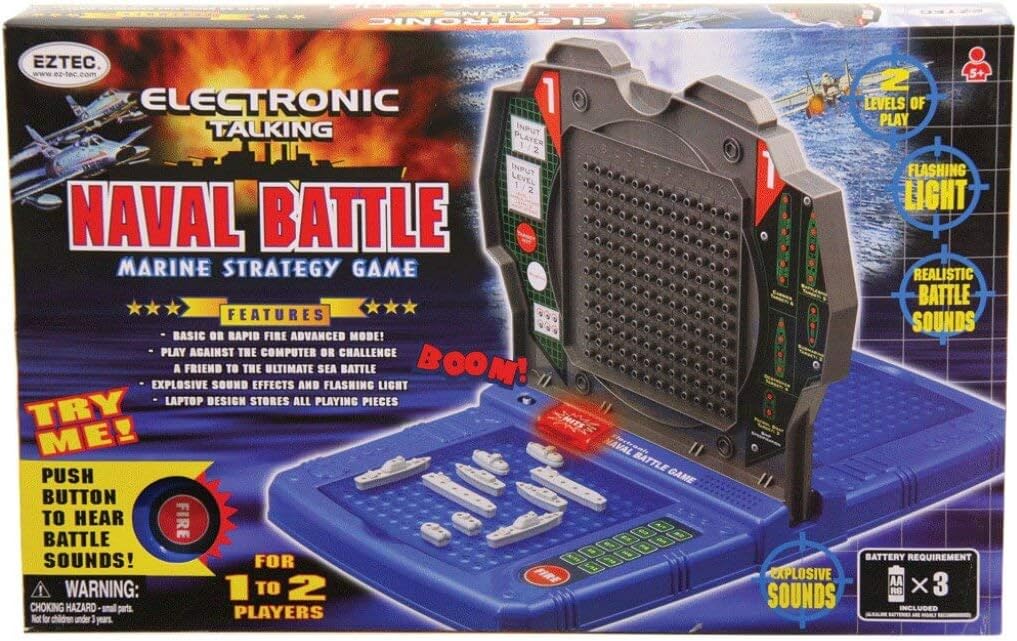
Image 1: The Eztec Electronic Naval Battle Game in its retail packaging. The image displays the game unit, various ship pieces, and highlights features such as "Electronic Talking," "Naval Battle Marine Strategy Game," "2 Levels of Play," "Flashing Light," "Realistic Battle Sounds," and "Explosive Sounds." It also shows the "Try Me" button and battery requirements.
2. Safety Information
WARNING: CHOKING HAZARD - Small parts. Not for children under 3 years.
- Keep all small game pieces away from young children to prevent choking.
- Do not mix old and new batteries. Do not mix alkaline, standard (carbon-zinc), or rechargeable (nickel-cadmium) batteries.
- Remove batteries if the game is not used for an extended period.
3. Package Contents
Ensure all items are present before beginning play:
- 1x Electronic Naval Battle Game Unit (laptop design)
- Various ship pieces (e.g., aircraft carrier, battleship, destroyer, submarine, patrol boat)
- Red "hit" pegs
- White "miss" pegs
- 3x AA batteries (included)
- Instruction Manual (this document)
4. Setup
4.1 Battery Installation
- Locate the battery compartment on the underside of the game unit.
- Using a Phillips head screwdriver, open the battery compartment cover.
- Insert 3 AA batteries, ensuring correct polarity (+/-) as indicated inside the compartment.
- Replace the battery compartment cover and secure it with the screw.
Note: The game comes with 3 AA batteries included. Replace them when sounds become distorted or lights dim.
4.2 Game Unit and Ship Placement
- Open the game unit. It features a laptop design that stores all playing pieces.
- Each player will have a designated grid for placing their ships and a separate grid for tracking opponent's shots.
- Before starting a game, each player secretly places their fleet of ships on their lower grid (your ocean). Ships can be placed horizontally or vertically, but not diagonally. Ensure ships do not overlap.
- Record the coordinates of your placed ships. The game unit has a keypad for entering these coordinates.
5. Operating Instructions
5.1 Powering On and Game Start
- Press the "ON" button to power on the game unit. You will hear a startup sound.
- The game will prompt you to select the number of players (1 or 2) and the game mode (Basic or Rapid Fire Advanced). Use the input buttons to make your selections.
5.2 Game Modes
- Basic Mode: Standard gameplay where players take turns firing.
- Rapid Fire Advanced Mode: Offers a faster-paced game experience.
5.3 Playing Against the Computer or a Friend
- 1-Player Mode: You will play against the electronic computer opponent.
- 2-Player Mode: You will challenge another player.
5.4 Gameplay
- On your turn, select a coordinate on your opponent's grid (the upper grid) where you wish to fire.
- Enter the chosen coordinates using the keypad on your side of the game unit.
- Press the "FIRE" button.
- The game unit will announce the result:
- "HIT!": If you hit an opponent's ship. Place a red "hit" peg on your upper grid at the corresponding coordinate.
- "MISS!": If you miss an opponent's ship. Place a white "miss" peg on your upper grid at the corresponding coordinate.
- The game may also announce the type of ship hit.
- When all sections of an opponent's ship have been hit, the game will announce that the ship is "SUNK!".
- The game features realistic battle sounds and flashing lights to enhance the experience.
- Continue taking turns until one player has successfully sunk all of their opponent's ships.
- The game will announce the winner with a congratulatory message and victory music.
5.5 Powering Off
Press the "OFF" button to turn off the game unit. The unit may also automatically power off after a period of inactivity to conserve battery life.
6. Maintenance
- Clean the game unit with a soft, dry cloth. Do not use abrasive cleaners or solvents.
- Avoid exposing the game to extreme temperatures or direct sunlight.
- Store all game pieces inside the laptop-style unit when not in use to prevent loss.
- Remove batteries if the game is to be stored for an extended period to prevent leakage.
7. Troubleshooting
| Problem | Possible Cause | Solution |
|---|---|---|
| Game does not power on. | Batteries are dead or incorrectly installed. | Check battery polarity. Replace with fresh AA batteries. |
| Sounds are distorted or lights are dim. | Low battery power. | Replace all 3 AA batteries. |
| Game unit is unresponsive. | Temporary electronic glitch. | Turn the unit off, remove batteries for a few seconds, then reinsert and power on. |
| "Try Me" button does not work. | This feature is for in-store demonstration. It may be disabled or require fresh batteries. | Ensure fresh batteries are installed. If the main game functions, this is not a critical issue. |
8. Specifications
- Model Number: 88095
- Material: Plastic
- Product Dimensions: 17.3 x 11.1 x 2.9 inches (43.9 x 28.2 x 7.4 cm)
- Item Weight: 2.2 pounds (1 kg)
- Batteries: 3 AA batteries (included)
- Players: 1 to 2
- Features: Electronic talking, two play levels (Basic, Rapid Fire Advanced), realistic battle sounds, flashing lights, laptop design for storage.
9. Warranty and Support
Specific warranty information for the Scientific Explorer Eztec Electronic Naval Battle Game Model 88095 is not provided in this manual. For warranty details, product support, or replacement parts, please refer to the manufacturer's official website or contact their customer service department directly. Contact information can typically be found on the product packaging or the manufacturer's website.
Manufacturer: Scientific Toys